Adding a User to a Kansas City Business Phone System
Adding a User to a Kansas City Business Phone System
Adding a new employee to your business phone system sounds simple. Add the user, add the phone and get back to work.
Behind the scenes, there can be a little more to it.
When North Oak Animal Hospital in Kansas City needed to add another doctor and phone to its existing cloud business phone system, the change also involved updating an existing user, programming the new phone, adjusting the automated attendant and making sure calls and voicemail went to the right places.
Towner Communications handled those details so the practice didn’t have to turn a routine staffing change into an internal phone-system project.
The new phone was programmed and shipped to North Oak Animal Hospital, and Towner followed up after delivery to verify that it registered properly and that the requested call routing was correct. Once connected, the customer confirmed that everything was working.
Their review captured exactly what we want an everyday business phone system change to feel like:
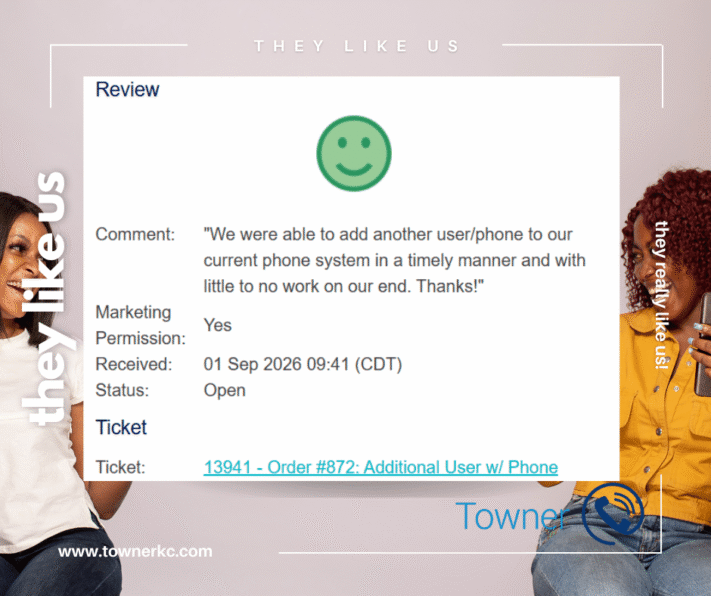
“We were able to add another user/phone to our current phone system in a timely manner and with little to no work on our end. Thanks!”
Little to no work on our end.
There was quite a bit happening behind the scenes. The customer just didn’t have to be the one doing it.
Quick Answer
How do you add a new user and phone to an existing business phone system?
Adding a user to an existing cloud business phone system can involve more than creating a new extension. The new employee may need a user account, license, voicemail, call-routing rules and a programmed IP phone. Automated attendant options may also need to be updated so callers can reach the right person.
For North Oak Animal Hospital, Towner handled those changes as part of the existing system. That included adding the new user, programming the phone, updating another user, modifying the automated attendant and voicemail routing, and following up after the phone was delivered.
The phone was programmed before it reached the customer. After delivery, Towner continued checking for the device to register and followed up with North Oak rather than assuming the job was finished. Once the phone was connected, the customer confirmed that everything was working properly.
The result: North Oak added another user and phone to its existing system quickly, with what the customer described as “little to no work on our end.”
Key Takeaways From This Customer Review
Customer Need: Add a User and Phone to the Existing Business Phone System
North Oak Animal Hospital needed to add a new doctor and phone to its existing cloud business phone system. The practice also had another staffing change that required an existing user to be updated, so the request involved more than simply adding another device.
The goal was straightforward: update the phone system to match the practice’s current team without creating unnecessary technical work for North Oak’s staff.
Business Phone System Changes Beyond Adding a Phone
Adding the new user affected several connected parts of North Oak Animal Hospital’s phone system. Towner needed to create the new user, update an existing user, program the new IP phone, modify the automated attendant and confirm how calls and voicemail should be routed for the doctors.
These types of moves, adds and changes are common as businesses hire employees, change roles or reorganize how incoming calls should be handled. The phone itself is only one part of making sure the new user works correctly within the existing communications system.
How Towner Added and Programmed the New Business Phone
Towner handled the cloud phone system configuration and programmed the new IP phone before sending it to North Oak Animal Hospital.
Once the phone was ready, Towner shipped the device but kept the service request open. The job wasn’t considered finished simply because the hardware had left Towner’s hands. The service team planned to follow up after delivery and verify that the new phone successfully registered and worked as intended.
The objective wasn’t just to ship another phone. It was to deliver another working user on the customer’s existing business phone system.
Towner Followed Up Until the New Phone Was Working
After the phone shipped, Towner continued checking for the new device to register on the system.
When it hadn’t appeared yet, Towner proactively contacted North Oak Animal Hospital rather than waiting for the customer to report a problem. There wasn’t a phone-system failure—the practice was simply waiting for a cable before connecting the new phone.
Once it was connected, North Oak confirmed:
“We have hooked up new phone and everything is working great, Thanks!”
Towner then confirmed the remaining call-routing details before closing the request.
That distinction matters. The customer didn’t have to discover a problem and call Towner. Towner was already checking to make sure the change had been completed successfully.
The Result: A New User and Phone With Minimal Customer Effort
North Oak Animal Hospital was able to add the new user and phone while Towner handled the technical work behind the change.
The customer’s review summarized the experience:
“We were able to add another user/phone to our current phone system in a timely manner and with little to no work on our end. Thanks!”
That is ultimately the result that matters.
The user was added. The phone was programmed and delivered. The related phone-system changes were made. Towner followed through until everything was working.
North Oak’s staff didn’t have to become phone-system administrators to get it done.
Why Ongoing Business Phone System Support Matters
Businesses don’t stop changing after a phone system is installed. Employees are hired, people change roles, extensions move, voicemail destinations change and call-routing requirements evolve.
Having local business phone support in Kansas City means those everyday changes don’t have to become another technology project for your staff.
North Oak Animal Hospital’s request was classified as a move, add or change (MAC) rather than a repair or service failure. Nothing was broken. The business had changed, and its phone system needed to change with it.
A scalable business phone system should make that possible.
The support behind it should make it easy.
The Story Behind the Review: Adding a New User Without Making It the Customer’s Project
What North Oak Animal Hospital described as adding “another user/phone” was straightforward from the customer’s perspective.
Behind the scenes, several pieces of the existing business phone system had to change together.
North Oak needed to add Dr. K. as a new user while also updating an existing user from Dr. L. to Dr. P. Because those users were connected to the practice’s incoming call flow, Towner also needed to update the automated attendant and determine where calls and voicemail should be directed.
Adding the New User While Updating an Existing Phone System
Towner began by working through both the new-user request and the changes the client needed for its existing users.
That meant making sure the system reflected the practice’s current staff, not simply adding another name and extension.
For the new user, Towner needed to establish how Dr. K. would fit into the existing phone system. At the same time, the automated attendant needed to be updated so the option previously associated with Dr. L. reflected Dr. P. instead.
These details are easy for a customer to overlook when requesting another phone, but they affect what happens when someone actually calls the business.
Updating the Automated Attendant and Call Routing
Adding a user also raised an important call-routing question:
What should happen when a caller selects the new doctor?
Should the call ring the doctor’s phone directly?
Should it go to voicemail?
Where should that voicemail be delivered?
Rather than assuming how North Oak wanted those calls handled, Towner worked with the practice to confirm the desired call flow and configure the system accordingly.
That’s an important distinction when making changes to an existing business phone system. A new extension can technically exist while still not functioning the way the business needs it to.
The goal wasn’t merely to make the new user appear in the system.
The goal was to make sure callers could reach the right person in the right way.
Programming the New IP Phone Before Delivery
The hardware was another part of the request.
The client wasn’t simply sent a new IP phone with instructions to figure out the rest.
Towner programmed the phone as part of the order and prepared it for the new user before shipment. The underlying order included an additional user and IP phone.
Once the device was ready, Towner shipped the phone and deliberately kept the service request open so the team could follow up after delivery.
That’s an important part of what the customer’s phrase “little to no work on our end” actually represents.
The configuration and programming happened behind the scenes so that North Oak’s staff didn’t have to manage those technical steps themselves.
Verifying the New Business Phone Was Connected and Working
Towner’s involvement didn’t end when the phone shipped.
The service team checked the system to see whether the new device had registered. When it hadn’t appeared yet, Towner followed up with North Oak to make sure there wasn’t a problem.
There wasn’t.
The customer was waiting for a cable before connecting the phone. Once that was available, North Oak plugged in the new device and reported:
“We have hooked up new phone and everything is working great, Thanks!”
That may be one of the most important details in the ticket.
North Oak didn’t have to discover that someone needed to follow up. Towner was already checking.
Confirming Call Routing Before the Service Request Was Closed
Even after the client confirmed that the new phone was working, there was still one more piece to verify.
Towner confirmed how the automated attendant should handle calls intended for Dr. K. so the final configuration matched the practice’s expectations. Only after the phone was online and the remaining routing details were confirmed was the request completed.
For the customer, the request was simple:
We need another user and phone.
Towner handled the user configuration, existing-user changes, automated attendant, voicemail and call-routing decisions, phone programming, shipping and follow-up required to turn that request into a working addition to the practice’s existing phone system.
That’s why the customer’s review is such a good description of the outcome:
Timely. Working. And little to no work on their end.
What This Customer Review Shows About Business Phone System Support
Adding a user to a business phone system isn’t always complicated, but it can involve more than adding another phone.
User accounts, extensions, voicemail, automated attendants, call routing and phone programming may all need to work together. The exact requirements depend on the phone system and how the business needs calls to be handled.
That’s where ongoing support matters.
A business shouldn’t have to become its own telecommunications department every time an employee is added, a phone needs to be programmed or a call flow changes.
The customer experience on this page is a simple example of what that support can look like:
The business changed. Towner made the phone system change with it.
Business Phone System Support in Kansas City
Towner Communications helps Kansas City businesses manage the everyday changes that happen after a business phone system is installed.
That can include adding or removing users, programming phones, changing extensions, updating voicemail, modifying automated attendants and adjusting call routing as an organization grows or changes.
For businesses using cloud communications for Kansas City businesses, the ability to add users and devices is only part of scalability. Having experienced support to configure those changes correctly can be just as important.
A business phone system should make communication easier.
Keeping it current shouldn’t make things harder.
Frequently Asked Questions About Adding Users to a Business Phone System
Need to Add a User or Make Changes to Your Business Phone System?
Your business changes. Your phone system needs to keep up.
Whether you’re adding an employee, programming another phone, updating an extension or changing how incoming calls are routed, Towner Communications can help make the change without turning it into another project for your staff.
For businesses in Kansas City, that means experienced telecommunications support for the phone system you rely on every day.
Need to make a change to your business phone system?