Business Phone Not Receiving Calls? Here’s What We Found
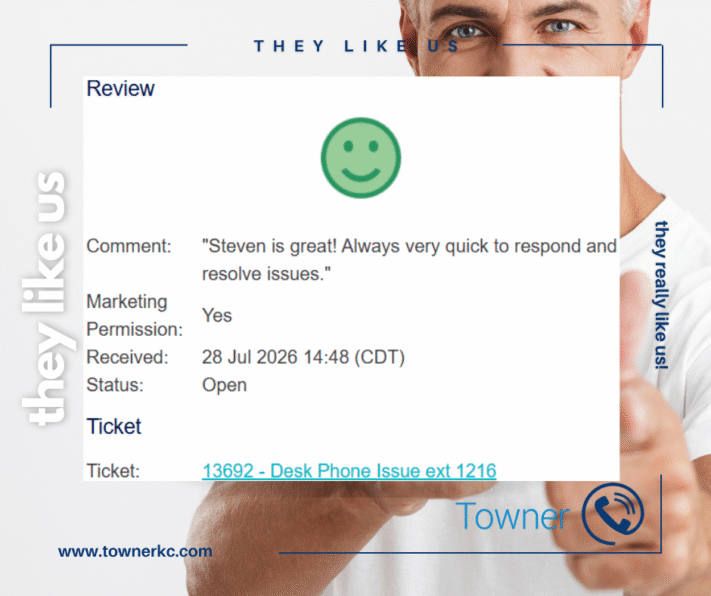
What The Customer Said
“Steven is great! Always very quick to respond and resolve issues.”
Fast response is important. Finding the right solution is even more important. This customer’s experience reflects the value of experienced telecommunications support that identifies the root cause and restores reliable business communications quickly.
How Towner Resolved “Our phones aren’t ringing”
When a business phone stops receiving incoming calls, every unanswered ring has the potential to become a missed opportunity. Customers can’t reach the right employee, calls go straight to voicemail, and communication across the organization quickly breaks down.
Recently, a customer contacted Towner with a straightforward problem: their business phone wasn’t receiving incoming calls. While the issue sounded simple, the cause wasn’t immediately obvious.
Fortunately, it was exactly the kind of troubleshooting our engineers handle every day.
At A Glance
| Customer Challenge | A business phone extension stopped receiving incoming calls. |
|---|---|
| Root Cause | An active call forwarding setting was preventing calls from reaching the extension. |
| Solution | Steven Scott identified the call forwarding issue, restored normal call routing, verified the repair, and confirmed the phone was working properly. |
| Business Impact | Incoming calls were restored quickly, helping the customer avoid missed business opportunities and unnecessary downtime. |
Quick Answer
Quick Answer
If your business phone isn’t receiving incoming calls, the problem isn’t always the phone itself. Common causes include call forwarding, Do Not Disturb, extension programming, call routing changes, or network configuration issues. In this customer’s case, Towner identified an active call forwarding setting that was preventing incoming calls from reaching the extension. Steven removed the call forwarding rule, restored incoming calls to the extension, and confirmed the phone was working properly.
How Towner Resolved a Business Phone That Wasn’t Receiving Calls
When Steven Scott began troubleshooting, he first verified the phone’s programming and tested the extension. Steven verified the phone’s programming, but incoming calls still bypassed the extension.
Rather than stopping after the initial programming changes, Steven continued testing until he identified the actual problem.
A call forwarding setting was still active, causing incoming calls to bypass the extension entirely. After Steven removed the call forwarding rule, incoming calls reached the extension again, and the customer confirmed everything was working properly. Before closing the service request, Steven confirmed with the customer that everything was working properly.
That attention to the root cause, not just the symptom, is what restores reliable business communications.
Why Fast Telecommunications Support Matters
Business phone issues don’t always involve broken hardware. Sometimes the problem is a single configuration setting that’s easy to overlook but has a significant impact on daily operations.
When incoming calls aren’t reaching the right employee, businesses can experience:
- Missed customer opportunities
- Delayed response times
- Reduced employee productivity
- Unnecessary downtime while searching for the cause
Experienced telecommunications support is about more than responding quickly. The key is identifying the root cause quickly so employees can get back to work and customers can reach the right people without unnecessary delays.
Expert Insight
Why Call Forwarding Can Prevent Your Business Phone From Receiving Calls
Call forwarding is a valuable feature that allows employees to redirect calls when they’re working remotely, away from the office, or temporarily unavailable.
Call forwarding is a valuable feature when employees work remotely or away from their desks. But when someone leaves a forwarding rule in place, incoming calls bypass the intended extension. To the user, it looks like the phone has stopped working, even though the real problem is how the system routes incoming calls.
Because call forwarding, extension programming, and call routing work together, troubleshooting these issues requires more than replacing a phone. It requires understanding how every part of the business communications system works together.
Supporting Business Communications Across the Midwest and Nationwide
From schools and local governments to healthcare providers and growing businesses, organizations across Kansas, Missouri, Wisconsin, Minnesota, the broader Midwest, and nationwide depend on reliable communications systems. When routing issues impact productivity, experienced telecommunications support can help restore functionality and reduce disruption.
Business Phone Troubleshooting FAQs
Why is my business phone not receiving incoming calls?
A business phone that isn’t receiving incoming calls may have a configuration issue rather than a hardware failure. Common causes include call forwarding, Do Not Disturb, extension programming, call routing changes, hunt group settings, or network connectivity problems. Identifying the root cause is the fastest way to restore reliable business communications.
My business phone can make calls but can’t receive them. What does that mean?
If your phone can place outbound calls but isn’t receiving incoming calls, the issue is often related to call routing, extension programming, or call forwarding rather than the handset itself. This type of problem requires troubleshooting within the business phone system to determine where incoming calls are being directed.
How quickly should a business phone issue be resolved?
Communication interruptions can affect customer service, employee productivity, and revenue. Prompt troubleshooting helps reduce missed calls, minimizes downtime, and keeps business operations running smoothly.
How do businesses prevent unwanted external calls to Mitel extensions?
Organizations can reduce the risk of unwanted external calls by regularly reviewing DID assignments, documenting call routing changes, auditing extension configurations, and working with experienced telecommunications professionals to validate communications workflows.
Can call forwarding stop my business phone from ringing?
Yes. If call forwarding is enabled, incoming calls may be redirected to another extension, voicemail, or external number before they ever reach your desk phone. Because the phone still appears to be working normally, call forwarding is often overlooked during initial troubleshooting.
Should I replace my business phone if it stops receiving calls?
Not necessarily. Many incoming call issues are caused by software settings or system configuration—not faulty equipment. Replacing the phone before identifying the underlying cause can add unnecessary cost and delay restoring service.
What is the difference between a DID routing issue and a phone system failure?
A DID routing issue is a configuration problem that affects how calls are delivered to an extension. A phone system failure typically involves hardware, software, carrier connectivity, or service outages. While the symptoms may appear similar to end users, the root causes and solutions are often very different.
Does Towner support troubleshooting for Mitel and other business phone systems?
Yes. Towner provides expert support for Mitel business phone systems, cloud communications platforms, and other business communications solutions. Whether the issue involves call forwarding, extension programming, call routing, or system configuration, our engineers focus on identifying the root cause and restoring reliable communications as quickly as possible.