Imagine transforming your contact center into a hub of efficiency and excellence. At Towner Communications, we’re excited to introduce the latest innovation: the AI Agent Evaluator. This cutting-edge tool isn’t just a game-changer—it’s a revolution in customer service. Here’s why your business can’t afford to miss out.
Key Points:
AI-Powered Insights: Provides detailed insights and automated workflows for recorded calls using AI Agent Evaluator.
Sentiment Analysis: Tracks customer and agent sentiment throughout conversations, enhancing contact center AI.
Automated Call Tagging: Identifies key areas of interest or concern efficiently.
Detailed Agent Behavior Metrics: Analyzes speaking patterns for deeper agent engagement insights in customer service automation.
Seamless Integrations: Integrates with Microsoft Teams, Salesforce, and Google Workspace for enhanced collaboration and organization in contact center solutions.
AI-Powered Insights: Elevate Agent Performance
Towner’s AI Agent Evaluator leverages the power of AI to provide supervisors with detailed insights and automated workflows for recorded calls. This means more efficient, meaningful, and impactful feedback for your agents, leading to a more responsive and effective customer service environment.
Sentiment Analysis: Pinpointing Customer Emotions
Understanding customer sentiment is key to improving service. The AI Agent Evaluator tracks how customer and agent sentiment evolves throughout conversations, pinpointing moments where sentiment shifts. This helps supervisors identify what triggers positive or negative reactions, enhancing coaching and ultimately customer satisfaction.
Automated Call Tagging: Focus on What Matters
Gone are the days of manually sifting through call transcripts. With automated call tagging and topic identification, supervisors can quickly identify key areas of interest or concern. This feature saves time and ensures that evaluations focus on the most critical aspects of agent performance.
Detailed Agent Behavior Metrics: Beyond the Transcript
The AI Agent Evaluator analyzes speaking patterns, including talk-to-listen ratios and words per minute, giving supervisors a deeper understanding of agent engagement and effectiveness. This opens up new coaching opportunities that go beyond the content of the transcripts.
Seamless Integrations: Work Smarter, Not Harder
Towner’s contact center solution integrates effortlessly with tools like Microsoft Teams, Salesforce, and Google Workspace. This means your team can stay connected and organized, making collaboration and customer management a breeze.
Why You Need Towner’s AI Agent Evaluator
At Towner Communications, we believe in solutions that make a real difference. Towner’s AI Agent Evaluator is more than just an upgrade—it’s a transformation. From AI-powered insights and sentiment analysis to automated call tagging and detailed behavior metrics, this tool is designed to elevate your customer service to new heights.
Ready to transform your contact center and delight your customers? Let’s chat!
In today’s fast-paced environment, ensuring the safety of your employees, customers, patients, and students is critical. Emergencies can occur without warning, making a reliable communication system essential. Towner offers robust emergency notification solutions to safeguard your organization no matter what the industry effectively.
The Importance of Emergency Notification Systems
When emergencies like fires, natural disasters, or security threats arise, immediate and clear communication is crucial. Effective emergency notification systems promptly inform everyone, enabling swift actions that save lives and reduce panic. According to a recent survey, campuses reported increased use of emergency notification systems for various emergencies, including power disruptions and lockdowns, even snow days, which rose to 50% and 88% usage respectively over the past two years (Campus Safety Magazine).
At Towner, we provide a suite of solutions tailored to businesses of all sizes and verticals:
Mass Notification Systems Quickly disseminate urgent messages through text, email, or voice broadcasts, ensuring timely updates reach everyone, regardless of their location. Modern emergency alert systems leverage a multi-channel approach, including SMS, social media, and mobile app notifications, ensuring comprehensive reach even during power outages (AlertMedia).
Paging and Intercom Systems Our advanced systems deliver clear announcements throughout your facility, ensuring everyone hears critical information.
Integrated Communication Platforms Seamlessly integrate emergency notifications with existing tools for a unified communication approach, enhancing efficiency during crises.
Customized Alerts and Notifications Create tailored alerts for specific scenarios, ensuring relevant messages reach the right people at the right time, addressing unique risks effectively.
How Towner Keeps You Safe
Expert Consultation and Planning We offer expert consultation to design and implement a robust emergency notification system tailored to your needs. Our team works closely with you to develop a comprehensive strategy.
24/7 Support and Maintenance Emergencies are unpredictable, and Towner provides round-the-clock support to ensure your system is always operational, offering peace of mind.
Training and Drills We conduct emergency drills and provide hands-on training to ensure your team effectively uses the notification systems.
Towner Communications actively creates a safer environment for your organization. Our emergency notification solutions offer the tools and support needed to respond effectively during critical situations. Don’t wait for an emergency—take proactive steps to safeguard your business today.
Ready to enhance your emergency communication capabilities? Contact Towner Communications to learn more about our solutions and how we can help you stay prepared. With Towner, you invest in peace of mind, knowing your business is equipped to handle any emergency. Let’s work together to keep your organization safe and secure.
On August 15th, 2024, Microsoft is pulling the plug on Office 365 Connectors. If you rely only on Microsoft Teams as your phone solution, this change could throw a wrench in your works. But don’t worry, we’ve got your back. Let’s dive into what this means and how you can stay ahead of the game.
Understanding the Impact
Office 365 Connectors have been the glue holding together various third-party services and applications with Microsoft Teams. Their discontinuation could disrupt your seamless workflows and integrations. Here’s what you need to know:
Integration Disruptions: Without Office 365 Connectors, integrating third-party services with Teams might become a headache, affecting your workflow and efficiency.
Loss of Automated Workflows: Many rely on Connectors for automated workflows like notifications and updates from integrated services within Teams. You’ll need to find alternative ways to manage these workflows.
Need for Alternative Solutions: Start exploring new integration methods, such as Power Automate, custom apps, or third-party connectors from the Teams App Store.
Potential Increased Costs: Implementing alternative solutions might mean shelling out more for new tools or custom development.
Migration Efforts: Transitioning to new platforms or solutions will require time and effort from your IT team.
User Training and Adaptation: Your team will need training on new workflows and tools, which might temporarily impact productivity.
Specific Impacts on Teams as a Phone Solution
Call Management Integration: Say goodbye to seamless integration with third-party call management tools (like CRM systems) if they relied on Connectors.
Notification Systems: Custom notifications and alerts related to call activities might stop working. You’ll need to set up alternative systems.
Automated Responses: Workflows for call routing, responses, or follow-ups will need reconfiguration using tools like Microsoft Power Automate.
Call Analytics: Integrations with analytics tools tracking call metrics could be disrupted. You’ll need other methods to get insights from your call data.
Third-Party Phone Solutions: Users leveraging third-party phone solutions integrated with Teams via Connectors might face interruptions or need reconfiguration.
Custom Communication Workflows: Bespoke communication workflows relying on Connectors will need re-engineering, which could be resource-intensive.
How Towner Can Help Mitigate the Impact
At Towner we get it. Changes like this can be a hassle, and if you’re not already on one of Towner’s Microsoft Certified Teams Solutions, things will get real hairy! But no worries, we’re here to make the transition smooth and painless. Here’s how we can help:
Comprehensive Assessment: We’ll audit your current integrations and dependencies on Office 365 Connectors to spot potential disruption areas.
Customized Integration Solutions: We’ll design and implement alternative integration methods tailored to your needs, using direct API integrations, Microsoft Graph, or third-party connectors.
Workflow Automation: Our team will help recreate essential workflows and automations using tools like Microsoft Power Automate to ensure continuity.
Vendor Collaboration: We’ll work with your third-party vendors to ensure continued integration and support, minimizing potential disruptions.
User Training and Support: We provide comprehensive training and support to help your team adapt to new tools and workflows, ensuring a smooth transition.
Ongoing Monitoring and Optimization: Post-migration, we’ll monitor the performance of new integrations and workflows, making necessary adjustments to optimize functionality and efficiency.
By partnering with Towner, you can ensure that your transition away from Office 365 Connectors is seamless and that your Teams phone solution remains robust and effective.
At the End of the Day…
The end of Office 365 Connectors marks a significant shift for Microsoft Teams phone solution users. However, with careful planning, exploring alternative solutions, and thorough user training, organizations can navigate this change effectively. Continue leveraging the robust communication and collaboration capabilities of Microsoft Teams without disruption.
Studies show that the most common application of artificial intelligence (AI) is in customer service, with 56% of businesses already utilizing it. If you haven’t taken the plunge yet, how can you benefit from AI for customer service?
Discover the advantages of AI-powered customer service in contact centers and the key features you should be leveraging.
Key Points:
Save Time and Money: Implementing AI for customer service streamlines operations, cutting costs and improving efficiency.
Consistent, Personalized Service: AI ensures consistent and personalized customer interactions while reducing agent burnout.
Automate and Enhance: Integrate AI into your contact center to automate workflows and enhance agent training.
24/7 Multilingual Support: AI enables you to offer round-the-clock multilingual customer service.
Why You Need AI-Powered Customer Service in Your Contact Center
Maybe your contact center is already running smoothly. So why consider enhancing it with AI-powered customer service?
In business, there’s always room for improvement and opportunities to get ahead. With AI, you can:
Lower your costs
Present a consistent and reliable brand
Increase customer satisfaction and loyalty
Reduce agent burnout
Like whipped cream on a shake or sprinkles on donuts, AI can take something great and make it even better. Remember, automated solutions allow you to do more with less.
5 Effective Ways to Integrate AI-Powered CX
Aim to implement at least a few of these AI-powered customer service strategies—if not all of them!
1. Automate Workflows
One of the primary benefits of AI is its ability to automate time-consuming tasks, freeing employees to focus on high-value assignments that require a human touch.
For instance, consider a high-volume customer needing to return a product. Previously, they would have to call your company, wait for an available agent, and go through the return process—wasting everyone’s time.
With AI-powered customer service, a virtual agent responds instantly, guiding the customer through accessing the return form and tracking the process without human assistance. If a request needs human interaction, AI receptionists efficiently route calls to the appropriate individuals.
AI assistants also provide easy access to your company’s knowledge base. Human agents can quickly find information by simply requesting it from the AI. Since you’re using an internal system that doesn’t train itself on your data, there’s no need to worry about security or compliance.
During a call, a human employee might realize that AI can handle most of the work with a bit of guidance. With prompts, the AI assistant can generate content and even write code to resolve issues.
2. Personalize Your Service and Support
Imagine your customers seeing your brand as the friendly local spot “where everybody knows their name.” Personalized interactions are now a customer expectation, especially for service and support.
AI-powered customer service works tirelessly, collecting data to tailor interactions. For instance, it can remind a customer about an abandoned cart and even address any concerns they might have. If the customer hesitates at checkout, the AI can offer a discount or promotion to seal the deal.
While AI personalizes interactions, it also supports your human agents by sharing relevant information. Through sentiment analysis, AI assesses a caller’s mood and provides insights before connecting them to an agent. This way, agents start the conversation prepared to address the specific issue.
If the agent can’t resolve the situation immediately, AI records all details for future interactions, ensuring your contact center operates seamlessly and efficiently. Your customers will appreciate the smooth and personalized service experience.
3. Be Available 24/7
Serving customers around the clock is crucial, but paying human agents to do so isn’t always practical. AI-powered customer service is available 24/7, handling basic requests and reassuring clients that a human will follow up during business hours.
4. Reach a Multilingual Audience
With advanced conversational AI, real-time language detection and translation become possible. Multilingual support enables you to expand your market and reach a broader customer base.
5. Enhance Your Onboarding and Training
Your staff is the backbone of your customer service. AI-powered solutions empower them the most by automating evaluations and quality control on a large scale. Managers gain practical insights to improve training and onboarding, while agents can frequently review their performance through dashboards, allowing them to quickly adapt to feedback.
Harness AI-Powered Customer Service with Towner’s World-Class Cloud Communications Platform
Wondering how to get started with AI-powered customer service? Towner’s expert support team is ready to assist.
Contact our agents to explore how our cloud communications platform can help you fully leverage AI-powered customer service.
Tech enthusiasts and industry experts know the value of enhancing a great product. In the realm of customer service, seasoned pros achieve this through contact center integrations.
At Towner, we share this vision. That’s why we offer a wide range of integrations for our cloud communications solutions in our App Marketplace.
Discover how you can streamline your workflows with our contact center integrations, creating a superior platform for your team and delivering enhanced service to your customers.
Key Points:
Software integrations allow two different programs to automatically share information seamlessly.
Contact center integrations boost productivity, enhance analytics, and improve the customer experience.
Towner offers numerous pre-built integrations with popular applications.
Developers can create custom APIs to integrate your preferred business software.
Understanding Contact Center Integrations
Software integration connects two different applications, enabling seamless data sharing and real-time updates. In the context of contact centers, this means linking your cloud contact center platform with other business software to handle various tasks.
This connectivity is achieved through application programming interfaces (APIs), which set the rules for real-time communication between the two programs.
Many top-tier solutions, like Towner’s, come with pre-built integrations for popular industry software, offering immediate functionality.
But what if your preferred software doesn’t have a pre-built integration? No problem! With an API platform, developers can integrate any software into your contact center for complete functionality.
How Integrations Benefit Your Business
Contact center integrations combine the power of distinct software for enhanced efficiency and productivity. Your agents spend less time on data entry and information verification as systems automatically update each other. This frees up your team to focus on critical problem-solving tasks that require a human touch.
For instance, 74% of companies use customer relationship management (CRM) software. With contact center integration, agents can call customers directly from the CRM. As client information is collected in the contact center software, it seamlessly populates the CRM with relevant data.
Faster data collection leads to better analytics. More information is gathered, and business programs process it quickly to provide insights that optimize your contact center operations.
Ultimately, this results in a superior customer experience. Enhanced service drives customer retention and increases opportunities for cross-selling and upselling, leading to higher revenues.
Towner’s 6 Favorite Integrations
1. Salesforce
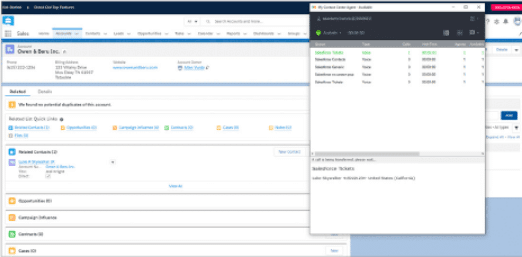
Salesforce holds a dominant 20% share of the CRM market. If you’re already using Salesforce, you can integrate it with Towner Contact Center to make calls directly from the app and automatically log call details and other important data in your client records.
2. Slack
Many hybrid and remote teams use Slack and seek to enhance its functionality by integrating it with their contact center. This integration enables real-time alerts, allowing you to quickly deescalate issues and maintain smooth operations.
3. Zendesk
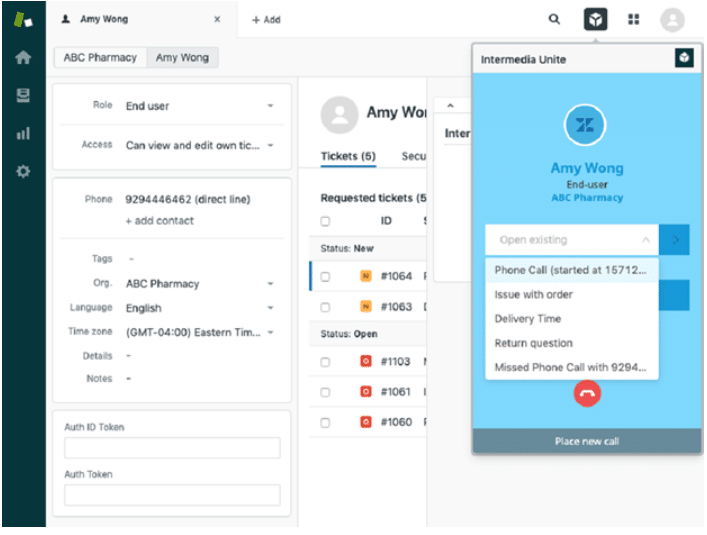
Zendesk is a widely-used CRM known for its user-friendly interface, making it one of our top contact center integrations. A standout feature is the screen pops, which automatically display customer information when you receive an incoming call.
4. ServiceNow
If you manage your workflows in ServiceNow, enhance customer journeys with contact center integration. Effortlessly log call details and maintain records of interactions within client files.
5. NextGen
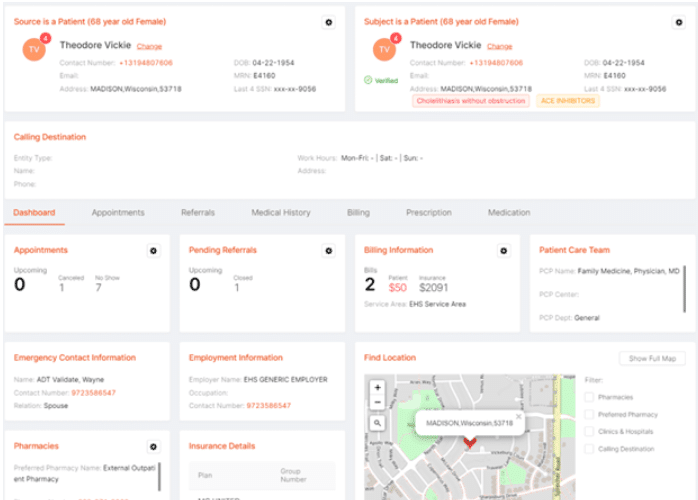
Medical facilities require contact center integrations that streamline communications while adhering to regulatory compliance. Towner’s contact center integration with NextGen accelerates patient verification by automatically displaying a secure dashboard with relevant information for each incoming call. This saves your agents time by eliminating the need to search for patient details.
6. ConnectWise
Managed service providers can leverage the pre-built ConnectWise integration to enhance customer service. This integration requires minimal training and implementation costs, allowing agents to quickly improve efficiency while supporting clients.
Choose the Platform with the Best Contact Center Integrations Today
Elevate your team with Towner Contact Center integrations. Contact us today to learn how our platform can help you deliver the ultimate customer experience.
As artificial intelligence becomes more advanced and conversational, the aversion to “talking to a machine” is steadily diminishing. In fact, 73% of consumers now expect websites to incorporate AI chatbot programs as a self-service option.
Whether you’re already leveraging chatbots and seeking to maximize their value, or you’re new to these tools and looking for ideas on where to begin, we’ve got you covered.
Explore practical ways to utilize AI chatbot applications to boost customer service and enhance employee efficiency.
Key Points:
Strategically decide when to use proactive chatbots that initiate conversations and reactive ones that respond to user interactions.
Key chatbot applications include customer support, reservations, surveys, and lead qualification.
AI chatbots can also function as virtual assistants, enhancing employee productivity.
Proactive vs. Reactive: Choosing the Right AI Chatbot Strategy for Your Business
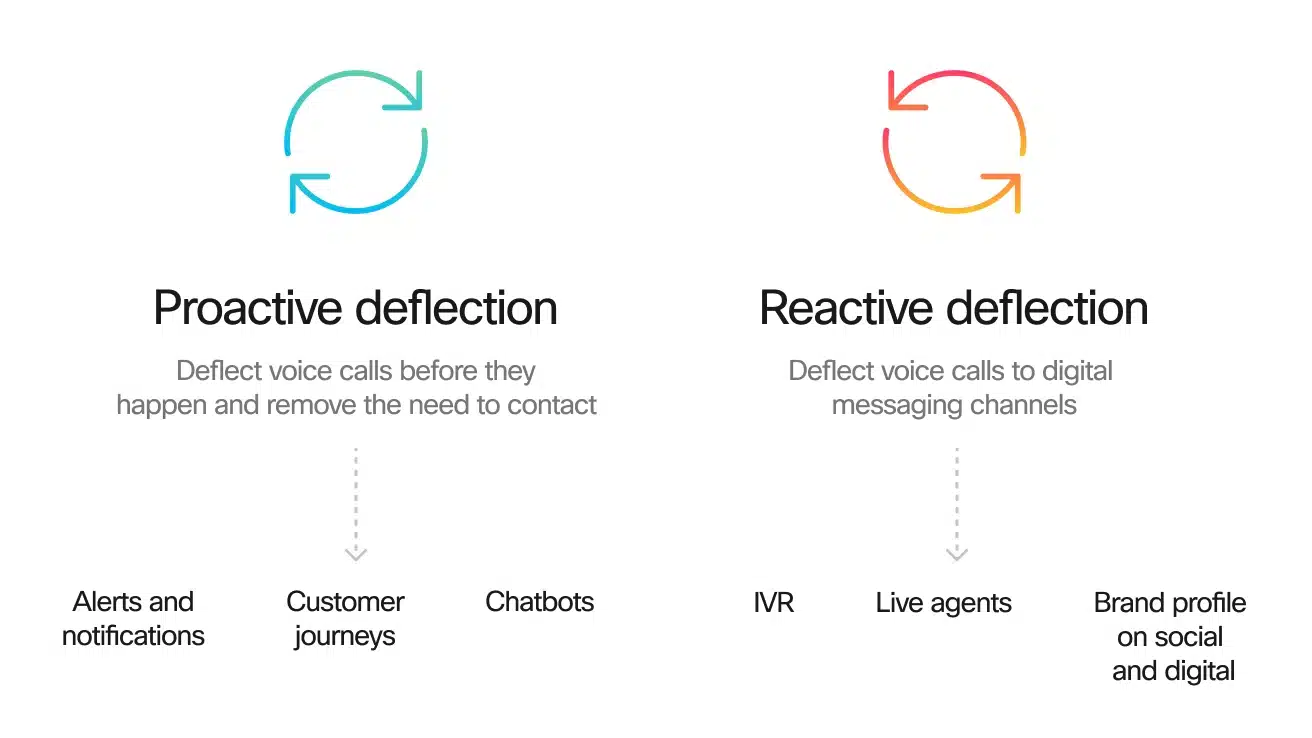
Proactive chatbots initiate interactions with users without any prompting, often popping up to offer assistance or share reminders.
On the other hand, reactive chatbots respond to user actions or requests. When a person seeks help from your team, the chatbot attempts to address the issue before escalating it to a human agent.
Deciding Which One To Use
Just as you wouldn’t want to be overly pushy in person, avoid having proactive chatbots pop up too frequently, disrupting the user experience. Place proactive chatbots in locations where they are likely to be necessary or welcomed by users.
For example, an AI chatbot could appear shortly after a visitor lands on your homepage, asking them what they’re looking for and directing them to the appropriate sections of your site.
On a blog post, the user’s primary intent is usually to read the content, so a chatbot appearing at the start could be intrusive. Instead, place a proactive chatbot at the end of the post to serve as a call to action, encouraging further engagement or conversions.
Reactive chatbots are generally suitable as an initial response to user requests. If the user prefers to interact with a human, they can request it specifically from the system.
Key AI Chatbot Application Use Cases
There are countless ways to utilize AI chatbots, but these examples are a great starting point.
1. Customer Support and Experience
Customer support is often the first application for an AI chatbot. The main goal is to ensure customers feel promptly attended to whenever an issue arises.
The chatbot can begin by answering common questions or directing users to helpful resources such as videos or articles. For more complex issues, it can escalate the matter to a human agent or create a support ticket for a quick callback.
Additionally, chatbots can facilitate basic account management in a secure environment. With natural language processing, customers can easily handle tasks like payments and transfers using simple conversational inputs.
2. Tailored Discounts and Special Offers
When a customer browses your site, they might also be checking out your competitors for the best deal. If the person is a returning customer, the chatbot can analyze their browsing and purchase history, along with other interactions, to determine if they qualify for a special discount.
This personalized approach is often more effective than generic, time-limited promotions or coupons that appear when users are about to leave.
3. Lead Qualification and Customer Surveys
For significant purchases that involve a longer sales cycle and multiple interactions, AI chatbots can effectively engage prospects in the early stages of the buyer’s journey. Users are often more willing to respond to chatbot queries than to emails or phone calls, leading to higher conversion rates.
Additionally, chatbots can gather valuable insights through quick polls or surveys, helping you understand customer preferences and improving your marketing and sales strategies.
4. Personalized Product Recommendations
When a customer repeatedly searches your site for similar items without making a purchase, the chatbot can step in with personalized product recommendations. This approach is often more helpful and engaging than a generic abandoned cart notification.
5. Simplifying Reservations
Even with a well-designed website, some users may find it challenging to navigate the reservation process. An AI chatbot can serve as the perfect virtual assistant, guiding users step-by-step to make reservations effortlessly.
6. Secure and Confidential Interactions
Some customers prefer not to discuss sensitive information with a human agent. Your AI chatbot can handle inquiries and provide account details while adhering to strict privacy and data protection regulations, ensuring secure and confidential interactions.
7. Timely Notifications and Updates
Keeping customers informed with relevant news updates can add significant value, especially in the B2B market. If you’re in an industry where timely information is crucial, such as finance, a proactive chatbot can share important bulletins and reminders with your clients.
8. Streamlining Hiring, Training, and Work Tasks
AI chatbots aren’t just for customer service; they’re valuable tools for your employees too. In human resources, chatbots can interact with and qualify prospective hires, making the recruitment process more efficient.
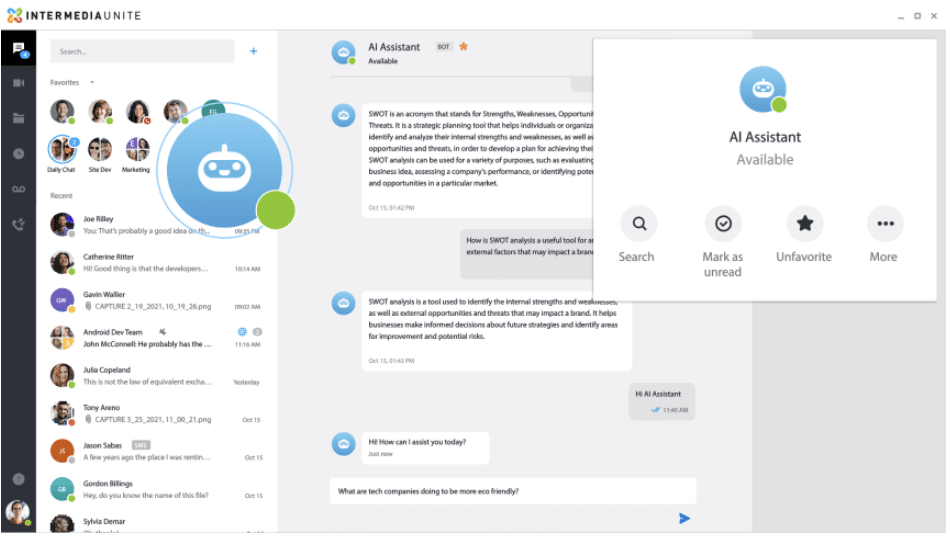
Additionally, employees can use AI assistants to handle repetitive tasks, answer questions, translate information, summarize text, and manage various other assignments, boosting overall productivity.
9. Reducing Costs
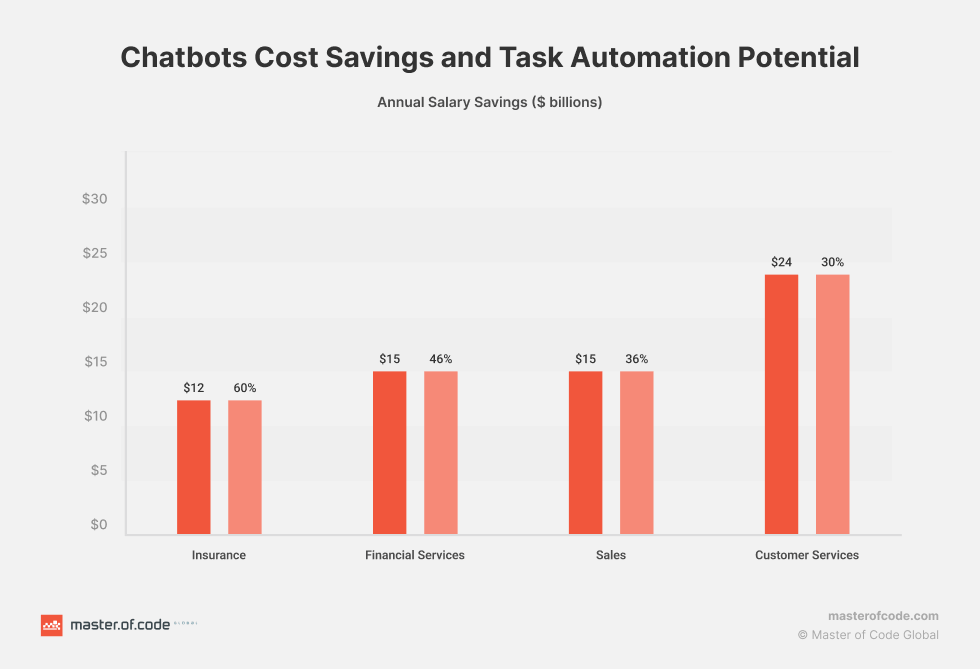
By automating customer interactions and routine tasks, AI chatbots can reduce the need for a large support team, leading to significant cost savings. This makes them a cost-effective solution for businesses of all sizes.
10. Improving Data Collection and Analysis
Chatbots can gather valuable data on customer preferences, behavior, and feedback. This information can be analyzed to gain actionable insights, helping you make informed business decisions.
Integrate Your AI Chatbot with a World-Class Contact Center
Whatever AI chatbot application you choose, it should be part of a robust contact center solution. For a cloud-based service that enables smarter customer engagement, reach out to us at Towner Communications to learn about our world-class software.
Switching to VoIP (Voice over Internet Protocol) can revolutionize your business communications, offering flexibility, scalability, and cost savings. But before you make the switch, there’s one crucial factor to consider: bandwidth. Without the right bandwidth, even the best VoIP system can falter. For businesses in Kansas City, where internet connectivity varies across neighborhoods and industries, understanding your VoIP bandwidth requirements is essential.
In this guide, we’ll break down everything Kansas City businesses need to know about VoIP bandwidth requirements, from what it is, why it matters, and how to calculate it, to optimizing your connection for seamless communication. Let’s dive in!
What is Bandwidth, and Why Does It Matter for VoIP?
Bandwidth refers to the maximum amount of data your internet connection can handle at any given time. Measured in Mbps (megabits per second), bandwidth determines how quickly and reliably data can be sent and received. For VoIP, this is critical because voice data packets must travel in real-time, without delays or interruptions, to ensure clear and uninterrupted calls.
Why Bandwidth Matters for VoIP:
Call Quality: Insufficient bandwidth leads to poor call quality, including dropped calls, jitter, or delays.
Scalability: As your Kansas City business grows, your bandwidth must support more simultaneous calls and other internet-based activities.
Customer Experience: For customer-facing industries, poor VoIP performance can hurt your reputation.
Minimum Bandwidth Requirements for VoIP
The bandwidth required for VoIP depends on several factors, including:
Number of Users: More simultaneous calls require higher bandwidth.
Codec Used: Codecs compress and decompress voice data. For instance, G.711 (uncompressed) requires more bandwidth than G.729 (compressed).
General Bandwidth Guidelines:
G.711 Codec: Requires approximately 85 kbps (kilobits per second) per call.
G.729 Codec: Requires about 31 kbps per call.
Example Calculation:
If your Kansas City office has 20 employees, and 10 are typically on calls simultaneously, here’s what you need:
Add at least 20% overhead for stability, bringing the total to approximately 1 Mbps for G.711 or 0.4 Mbps for G.729.
Bandwidth Challenges for Kansas City Businesses
1. Neighborhood Connectivity Variances
While areas like Downtown Kansas City and Overland Park often enjoy high-speed internet, businesses in more rural areas like Northland or Grandview may face limited options. Always check local ISPs to ensure they can deliver the required speeds.
2. Simultaneous Internet Usage
Bandwidth isn’t just for VoIP. If your team streams videos, downloads large files, or uses cloud-based applications, those activities consume bandwidth, leaving less for VoIP.
3. Network Congestion
Kansas City businesses operating in shared office spaces or during peak hours may experience congestion, affecting VoIP performance.
How to Calculate Your VoIP Bandwidth Needs
Step 1: Assess Simultaneous Users
Estimate the maximum number of simultaneous calls at peak times.
Step 2: Determine the Codec
Check with your VoIP provider to understand which codec your system uses.
Step 3: Account for Overhead
Add a buffer (20%-30%) to ensure consistent performance, even during busy periods.
Step 4: Factor in Other Activities
Consider additional bandwidth for internet browsing, video conferencing, and other data-heavy tasks.
Optimizing Bandwidth for VoIP in Kansas City
Here are actionable steps to ensure your bandwidth supports seamless VoIP communication:
1. Upgrade Your Internet Plan
Work with a local ISP to secure a business-grade plan with guaranteed speeds. Providers like Google Fiber and Spectrum offer reliable options for Kansas City businesses.
2. Prioritize VoIP Traffic with QoS
Quality of Service (QoS) settings allow you to prioritize VoIP traffic over other types of data, reducing lag and improving call quality.
3. Use Wired Connections
Whenever possible, connect VoIP phones via Ethernet cables instead of Wi-Fi to avoid interference and ensure stability.
4. Monitor and Adjust
Regularly test your bandwidth using tools like Speedtest.net and adjust your plan as needed.
Why VoIP is a Smart Choice for Kansas City Businesses
VoIP isn’t just about cutting costs—it’s about improving communication and enabling growth. Here are a few Kansas City success stories:
Downtown Startups: Small teams saved thousands annually by switching to VoIP without compromising call quality.
Healthcare Practices in Overland Park: Ensured HIPAA compliance while optimizing bandwidth for seamless patient communication.
Reliable options include Google Fiber for high speeds and Spectrum for widespread availability.
Let’s Optimize Your VoIP!
Ready to boost your communication game? Towner Communications is here to help Kansas City businesses optimize bandwidth for VoIP. Contact us today for a free consultation, and let’s ensure your system runs smoothly!
In today’s digital age, small and medium-sized businesses (SMBs) need nimble communication solutions that scale with their growth. Cloud communications have become the secret sauce, offering flexibility and powerful features that empower businesses to stay competitive and agile.
Main Takeaways
Scalability and Flexibility: Cloud communications adapt effortlessly as your business grows, ensuring your infrastructure always fits your evolving needs.
Cost Efficiency: Pay only for what you use, saving significantly on upfront and maintenance costs compared to traditional systems.
Remote Work Enablement: Seamless collaboration across dispersed teams with features like video conferencing, virtual phones, and instant messaging.
Integrations: Advanced features like AI analytics and integrations with key business tools enhance productivity and customer service.
Disaster Recovery and Reliability: Keep your communications running, even during emergencies, with secure data storage and failover capabilities.
Data Analytics for Informed Decisions: Gain actionable insights from call volumes and customer interactions to refine strategies and support growth.
Scalability and Flexibility
With cloud communications, expanding to new users, offices, or features is a breeze. No more rigid infrastructure—just easy scaling to meet changing demands and support your growth.
Cost Efficiency
Traditional systems are costly, but with cloud communications, you pay as you go, managing budgets effortlessly while benefiting from the provider’s maintenance and upgrades.
Remote Work Enablement
Cloud communications enable remote work with ease, keeping teams and clients connected through virtual phone systems, video conferencing, and instant messaging.
Integrations
Integrate with your favorite business tools and leverage AI analytics, video conferencing, and more to streamline workflows and improve customer service.
Disaster Recovery and Reliability
Stay resilient during unexpected events with robust disaster recovery capabilities that keep your communications running, even in emergencies.
Data Analytics for Informed Decisions
Leverage cloud analytics to uncover insights that refine your strategies, optimize customer experiences, and align your communication with business goals.
Empower Your Business with Cloud Communications
Ready to supercharge your communications? Cloud communications provide the flexibility, cost efficiency, and powerful features SMBs need to thrive. Get in touch for a personalized consultation to discover how our solutions can be tailored to your business, driving scalable growth and success.
Lots of people are familiar with VoIP—Voice over Internet Protocol, which allows you to make affordable calls over the internet. For years, this technology has provided the benefit of low-cost, high-quality conversations.
Yet, there’s another technology that has become just as vital, particularly for businesses. Since 1996, Session Initiation Protocol, or SIP, has revolutionized the way VoIP is accessed, making it a staple in today’s tech landscape.
Considering a cloud-based private branch exchange using VoIP? You’ll probably need SIP trunking. Let’s explore the role of SIP trunk port numbers and determine how many SIP trunks you actually need.
Key Points:
Towner SIP trunking facilitates VoIP for both voice calls and multimedia communications.
With Towner SIP trunking, you gain access to unlimited business lines at a low cost because the system operates virtually.
The crucial SIP trunk port numbers are 5060 and 5061, which manage the majority of your VoIP communications; however, with Towner’s world-class support, managing these details becomes hassle-free.
What Is SIP, and What’s Its Role in VoIP?
VoIP was the breakthrough technology that made digital calling over the internet possible. However, there was a challenge in enabling these calls to connect across different systems and providers.
SIP technology provided the solution and has since become the standard for facilitating VoIP communications. Think of it this way: if a VoIP call is like a subway car carrying your messages, then SIP is the station and tracks that guide each car to its destination.
SIP manages the initiation of calls, maintaining the connection, and disconnecting calls when finished.
Moreover, SIP has enabled the integration of video and text messaging into your VoIP systems. This is why you can upgrade your cloud-based PBX into a comprehensive unified communications service without needing extra devices or hardware.
What Exactly Is a SIP Trunk?
Trunking is the process that links your PBX lines both internally and with the external world, facilitating calls. Ever wonder where the term “trunk” originated? Historically, an analog PBX was connected to the outside world using a physical trunk device.
Here’s an easy way to picture it: Imagine a PBX as a tree filled with separate extensions or branches. These branches would connect to the outside world of public switched telephone lines through a trunk.
So, a trunk essentially acts as a central hub connecting a group of lines. In the past, due to the limitations of physical hardware, a traditional T3 trunk could handle only up to 28 lines. If more lines were needed, additional trunks were required.
However, the advent of SIP technology has revolutionized this setup. With everything being virtual, a single SIP trunk can support virtually unlimited lines.
How Many SIP Trunks Are Necessary for Your Business?
You might have already guessed the answer to this question: You only need one SIP trunk! This is because these virtual solutions allow you to host unlimited lines (or “channels”) on your system.
So, the real question becomes: How many channels do you need for SIP trunking?
Although the system is virtual, the calls, conferences, and messages your system handles are still transmitting data. Your provider manages this data securely from their data centers, which is why professional VoIP and SIP trunking services still come at a cost.
Additionally, consider that the number of channels and the volume of calls you manage will require adequate internet bandwidth to ensure smooth and clear connections. It’s wise to discuss your needs with your communications service provider to determine if you need to upgrade your internet to a service that can adequately support a business line.
What Is the Purpose of a SIP Trunk Port Number?
Talking about SIP port numbers can dive deep into technical jargon pretty fast. You don’t need to grasp all the details unless you’re an IT professional.
What’s important to know is that these ports are virtual pathways that manage the flow of data for various activities. The two main port numbers used for SIP traffic are 5060 and 5061.
Port 5060 facilitates the majority of your VoIP calls through quick, non-encrypted connections. In contrast, Port 5061 is designated for traffic that requires transport layer security.
Previously, knowing these port numbers was crucial for troubleshooting. However, with today’s advanced cloud-based VoIP business lines, these details are often handled by your service provider. They should provide 24/7 support to monitor your system and guide you through any troubleshooting steps as needed.
What Advantages Does SIP Trunking Offer?
If you’re still using a legacy PBX, you might be wondering if it’s worth making the switch to the cloud. Here’s why it definitely is:
Cost Savings: Virtual systems are generally cheaper to start with, and you won’t have to pay for extra lines. You can easily scale your system up or down as needed without additional costs.
Remote and Hybrid Work Capabilities: With a secure communications system that only requires internet access, you can maintain reliable communication with your team, no matter where they are.
Reliable, Future-Proof Technology: Your service is supported by multiple data centers through your provider, ensuring business continuity even during outages or disasters.
For more insights, consider the experiences of customers who have successfully transitioned to a cloud-based phone service.
Ready to Upgrade Your PBX to the 21st Century with SIP Trunking?
Towner SIP trunking simplifies the process of setting up a virtual business line more than ever before. Many companies can even have their cloud-based PBX up and running within just a few days, or sometimes even on the same day!
To tap into the advantages of SIP trunking, reach out to us at Towner. Whether you’re modernizing an old system or building from the ground up, we’ll help you boost flexibility and cut costs with a contemporary business phone service.
Customer service automation is an excellent tool to simplify processes and free up your team to concentrate on customer interactions. In fact, Gartner forecasts that by 2025, 85% of companies will ramp up their use of automation.
If you haven’t yet integrated automation in your contact center and communication strategies, you might be missing out. A key component of this automation is automated call routing.
Why might this technology outperform human operators in delivering personalized customer service? Let’s explore how automated routing functions and why it’s essential for your business.
Key Points:
An automated call routing system ensures calls are directed to the right agents in your contact center.
It operates on preset rules to assess, queue, and assign calls effectively.
Today’s contact center technology allows effortless setup and customization of your call routing system.
Implementing automatizations leads to more satisfied customers, reduced call abandonment, and a boost in team productivity.
Understanding Automated Call Routing: What It Is and How It Works
How Does Automated Call Routing Work?
The process of automated call routing involves three key stages:
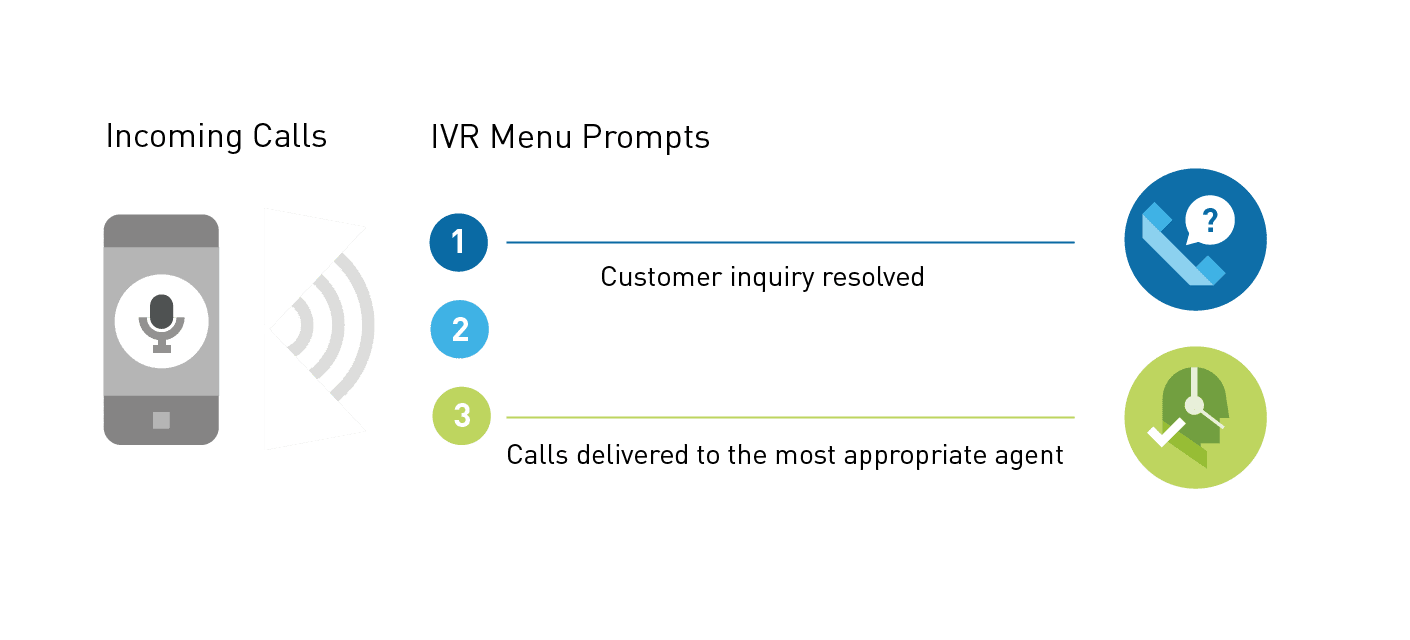
Call Qualifying First, your system has to determine your callers’ reasons for contacting you. The automated call routing service can do this with an interactive voice response system. With IVR, callers select an option from a menu using either their keypad or a vocal response. Additionally, you can also qualify calls with information from the caller ID, your customer relationship management software, and which business number the person called. For example, a call from a certain area code might indicate a caller is more likely to speak a specific language.
Call Queuing Once the call’s purpose is clear, the system places the caller in a relevant queue. They remain on hold until an agent from the appropriate department is available to take the call.
Call Distributing Automated call routing does more than direct calls to the right department. Using the information gathered in the qualifying phase, the system uses predefined rules to transfer the call to the agent best equipped to handle the caller’s needs.
What Types of ACR Rules Can You Implement?
The rules you establish dictate which agents receive calls, enabling you to deliver superior customer service.
Round-Robin Routing This method distributes calls evenly among your agents. Automated call routing software cycles through a list of agents, assigning each one a caller in sequence before starting the cycle anew.
Uniform Routing Similar to round-robin, uniform routing aims to balance the workload fairly. However, it directs calls to the agent who has been idle the longest or who has the least amount of talk time, helping to prevent team burnout.
Time-Based Routing This approach routes calls to agents in the same or a nearby time zone as the caller. Ideal for businesses serving national or international markets, it ensures that callers interact with agents who are likely awake and available.</p>
Skills-Based Routing Enhance your first-contact resolution rates with skills-based routing. This system routes calls to agents with the specific skills and authority needed to resolve more complex issues, reducing the need to transfer the call multiple times.
VIP or Relationship-Based Routing VIP routing prioritizes certain high-value customers, ensuring they receive prompt attention. Additionally, you can assign dedicated relationship managers to specific customers who merit extra care, optimizing service for those who contribute the most to your profits.
AI-Assisted Predictive Behavior Routing Leverage artificial intelligence to refine how calls are routed. Using machine learning algorithms, your system can predict which agent is best suited for a caller based on live and historical data. This insight also helps in recognizing and rewarding top-performing agents.
What Are the Benefits of Automatization
Automated call routing offers several key advantages for your organization.
Happier Customers Automated call routing helps resolve customer issues faster and enhances overall interactions with agents. This results in shorter wait times and often leads to higher customer satisfaction ratings.
More Productive and Efficient Workforce Automated call routing alleviates common problems like idle agents and overworked team members, which can lead to employee burnout and high turnover rates. By optimizing workflows with this technology, you can foster a more engaged and productive workforce.
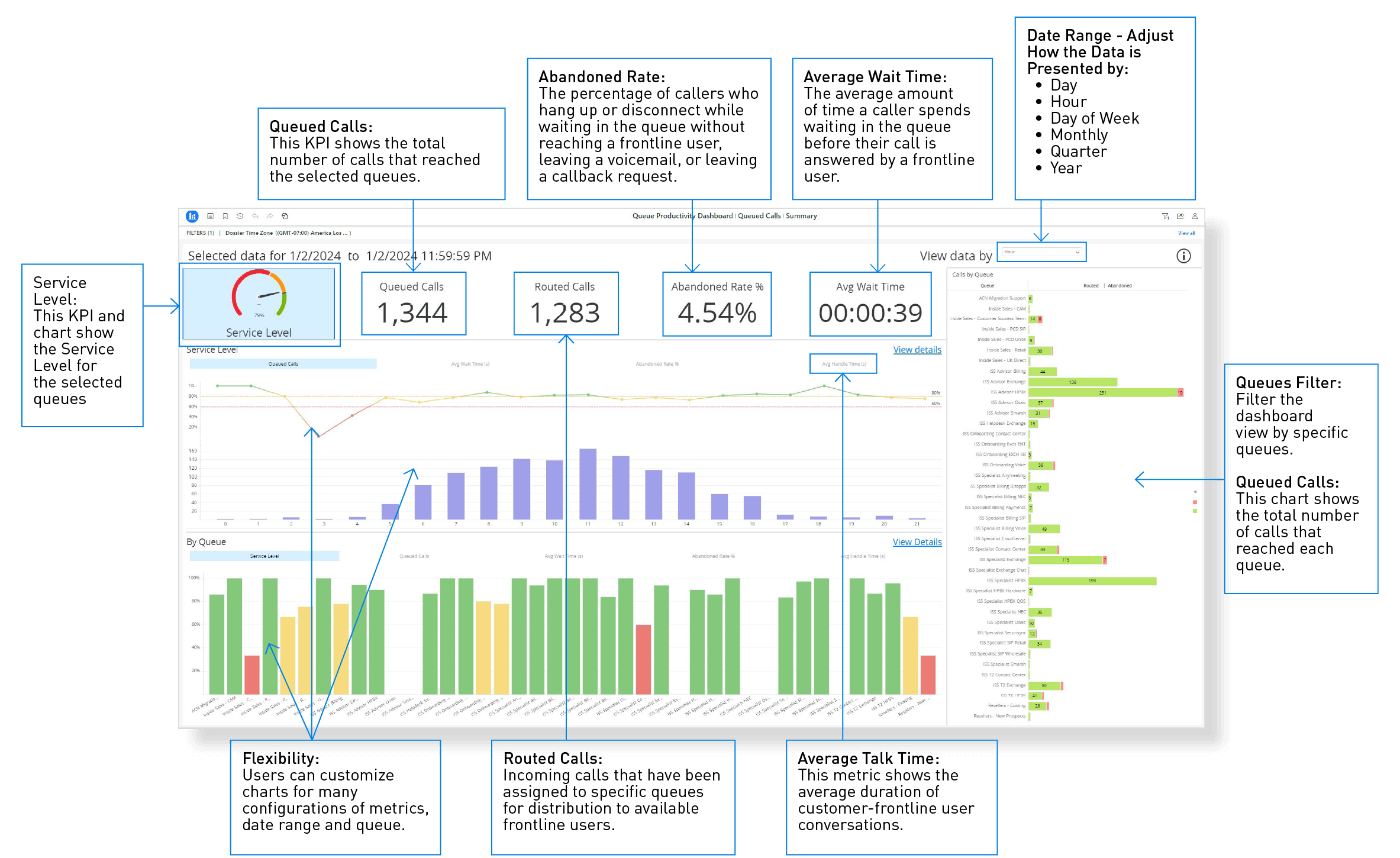
Additionally, your contact center software continuously records performance stats and provides an intuitive dashboard for easy analysis. Insights gained from this data help you refine your call routing rules and schedule your team more effectively, boosting overall operational efficiency.
Reduced Call Abandonment Rates Callers who hang up due to long wait times might seek services from your competitors. By enhancing the customer experience with automated call routing, you can decrease the number of abandoned calls, reduce the need for callbacks, and ultimately lower customer churn.
How Can You Quickly Implement Automated Call Routing?
Automated call routing comes packed with features your customers will appreciate. Thankfully, you don’t need to search for new software to integrate into your contact center to enjoy these benefits. Leading cloud contact center solutions already include advanced call routing capabilities.
Contact us to learn how Towner’s Contact Center simplifies the implementation of automated call routing.