Mitel MiCollab: Unified Communications & Collaboration Software
Bring business calling, messaging, presence, and collaboration together in one connected experience. Mitel MiCollab helps employees communicate across desktop and mobile devices, while integrating with supported Mitel phone systems and Microsoft Teams environments.


Why Choose Mitel MiCollab?
One App. Better Communication.
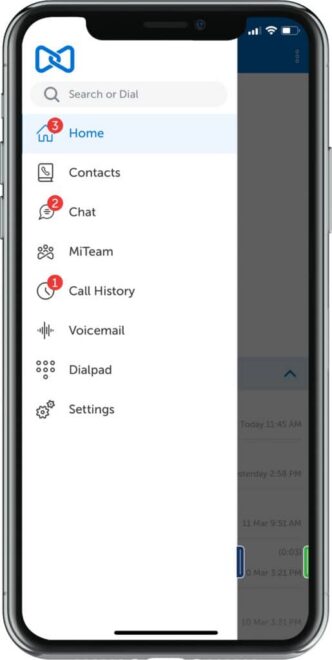
Bring business calling, messaging, presence, and collaboration together in a single application. Mitel MiCollab keeps employees connected across desktop and mobile devices without constantly switching between tools.
Work Anywhere. Stay Connected.
Give employees access to their business communications whether they’re at their desks, working remotely, or on the move. MiCollab helps teams stay reachable through supported desktop and mobile clients.
Get More From Your Mitel Investment.
Extend collaboration capabilities across supported Mitel communications environments without automatically replacing your existing phone system. Towner helps identify the right integration and deployment approach.
Less Back-and-Forth. More Progress.
See colleague availability, connect through messaging, and move conversations to voice when needed. MiCollab helps teams collaborate more efficiently and respond faster to business needs.
Mitel MiCollab Features: Business Calling, Messaging & Collaboration
Your team shouldn’t have to juggle multiple applications just to have a conversation.
Mitel MiCollab brings essential business communication tools into one connected experience. From managing calls and checking coworker availability to sending messages and collaborating across locations, MiCollab helps employees stay productive without being tied to a desk.
Business Calling & Softphone
Make, receive, and manage business calls using supported desktop and mobile clients. MiCollab extends your organization’s Mitel communications environment to employees working in the office, remotely, or on the move.
Instant Messaging & Team Collaboration
Communicate through individual and group messaging, share information, and keep conversations moving without relying on lengthy email chains. Supported collaboration capabilities help teams work together across departments and locations.
Conferencing & Meetings
Connect colleagues through supported conferencing and meeting integrations. MiCollab helps employees move from individual conversations to group discussions, with available capabilities depending on the deployment and licensing configuration.
Presence & Availability
See whether colleagues are available before reaching out. Real-time presence information helps employees choose the right way to connect, reducing unnecessary interruptions and missed connections.
Mobile & Desktop Communications
Access business communications through supported Windows, Mac, web, iOS, and Android clients. Employees can stay connected across devices while maintaining access to their organization’s communications tools.
Microsoft Teams Integration
For organizations using Microsoft Teams alongside Mitel communications, supported MiCollab integrations can connect collaboration workflows with enterprise telephony and presence capabilities.
Towner helps businesses evaluate compatibility, licensing, and integration requirements before deployment.
Mitel MiCollab and Microsoft Teams Integration
Your team uses Microsoft Teams. Your business runs on Mitel. They don’t have to work separately.
Organizations using Microsoft Teams alongside Mitel communications don’t necessarily need to replace their existing phone system to improve collaboration.
With supported MiCollab and Microsoft Teams integrations, employees can access enterprise calling capabilities, coordinate availability, and work across their communications tools more efficiently.

Keep Your Existing Mitel Investment Working
Modernizing collaboration doesn’t automatically require replacing your phone infrastructure. Towner helps organizations evaluate how their existing Mitel environment can support Microsoft Teams integration.
Simplify Presence and Availability
Supported presence synchronization helps employees understand colleague availability across communications platforms, reducing unnecessary interruptions and improving coordination.
Connect Teams Collaboration With Mitel Calling
Bring supported Mitel enterprise telephony capabilities into Microsoft Teams workflows, helping employees communicate without constantly moving between disconnected applications.
Get the Integration Right the First Time
Compatibility matters. Towner’s experienced Mitel engineers help evaluate platform versions, licensing, deployment requirements, and integration options before recommending a solution.
Mitel MiCollab Implementation, Integration & Support From Towner
The software matters. The people behind it matter more.
MiCollab is designed to make business communications easier. Getting the most from it requires more than installing an application and handing employees a login.
Since 1947, Towner Communications has helped businesses keep their communications working. Our experienced Mitel engineers understand the technology behind the application, from enterprise telephony and collaboration to system integration and ongoing support.

Experienced Mitel Engineers. Real Answers.
Our team brings decades of hands-on Mitel experience to complex communications environments. When something needs attention, you work with people who understand Mitel systems, not a generic support queue reading from a script.
Integration That Makes Sense for Your Business
Already using MiVoice Business or Microsoft Teams? We’ll help evaluate your existing infrastructure, supported integrations, licensing, and deployment requirements before recommending changes.
The goal isn’t to replace technology that’s working. It’s to make your communications work better together.
Support Beyond Installation
Business communications don’t stop being important after deployment. Towner provides ongoing technical assistance, configuration support, troubleshooting, and guidance as your organization’s needs evolve.
Local Relationships. Broader Reach.
Headquartered in Kansas City, Towner supports organizations throughout Missouri, Kansas, Wisconsin, and the greater Midwest, with additional remote support capabilities for businesses operating across multiple locations.
You get the experience of an established telecommunications provider with the accountability of a team that knows its customers.
Your Mitel investment deserves more than a software installation. It deserves people who know what they’re doing.
Mitel MiCollab FAQs: Compatibility, Features & Support
What is Mitel MiCollab used for?
Mitel MiCollab is unified communications and collaboration software that brings business calling, instant messaging, presence, conferencing, and mobility into one connected experience. It allows employees to communicate through supported desktop, web, and mobile applications while working with their organization’s Mitel communications infrastructure.
Can Mitel MiCollab integrate with Microsoft Teams?
Yes. Supported MiCollab integrations allow organizations to combine Mitel enterprise calling with Microsoft Teams collaboration. Depending on the configuration, capabilities can include business telephony, corporate directory access, and bidirectional presence synchronization. Towner Communications helps organizations evaluate compatibility and integration requirements before deployment.
Do we need to replace our existing Mitel phone system to use MiCollab?
Not necessarily. MiCollab is designed to integrate with supported Mitel communications platforms, including MiVoice Business. Organizations may be able to expand collaboration capabilities while retaining their existing telephony infrastructure. Towner can evaluate the current system, software versions, and licensing to determine the appropriate approach.
Does MiCollab work with Mitel MiVoice Business?
Yes. MiCollab integrates with Mitel MiVoice Business to extend enterprise communications capabilities to desktop and mobile users. Employees can access supported calling, voicemail, presence, and collaboration features without relying exclusively on a physical desk phone. Available functionality depends on system versions, configuration, and licensing.
Can employees use MiCollab on their smartphones?
Yes. MiCollab provides mobile applications for supported iOS and Android devices, allowing employees to access business communications while working remotely or traveling. Depending on their configuration and permissions, users can manage calls, access voicemail, communicate with colleagues, and use supported collaboration features.
Can Towner Communications install, upgrade, and support Mitel MiCollab?
Yes. Towner Communications provides Mitel communications integration, configuration, troubleshooting, and ongoing technical support. Our experienced Mitel engineers can evaluate existing environments, identify compatibility requirements, and help organizations implement or improve MiCollab deployments.
Headquartered in Kansas City, Towner supports organizations across Missouri, Kansas, Wisconsin, and the greater Midwest.
Have Questions About Your MiCollab Environment?

Let's Talk About Your Mitel MiCollab Needs
By submitting this form, you agree to receive communications from Towner Communications regarding your inquiry. If you opt in to marketing emails, you can unsubscribe at any time.