Cloud Phone Systems for Business
Calling, messaging, meetings and mobility, without managing an on-site phone system.
Calling, messaging, meetings and mobility—without managing an on-site phone system.

DESK PHONE
Feature rich phones that Towner pre-programs for you. Ready to plug and play no matter where you’re doing business from.
SOFT PHONE
Towner’s app lets you make and receive calls, chat with your team, host or join video calls and share files straight from your Mac or PC.
MOBILE PHONE
Switch between your workstation and your Apple or Android seamlessly with the Towner app. Never miss a call.
CONTACT CENTER
Skyrocket productivity and drastically improve your customer’s experience with industry leading call center features.
FREE
Get a Free Desk Phone with Each Eligible New Cloud Use
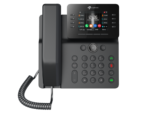
Fanvil V64
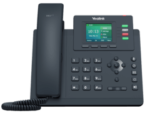
Yealink T33G
Save BIG today and get a FREE phone! Use our calculator to see how much you would save each month when you move to Elevate.
The offer does not apply to new lines added to Towner’s legacy Cloud PBX service. Additional service, licensing, installation, shipping or contract terms may apply.
Cloud Phone Systems at a Glance
- Deployment: Provider-hosted business communications without an on-site phone server
- User access: Desk phones, desktop software, browser tools and mobile applications
- Core capabilities: Calling, voicemail, auto attendants, call queues, messaging and video meetings
- Collaboration: Team chat, presence, file sharing and meeting tools
- Integrations: Microsoft Teams, customer management platforms and other business applications
- Administration: Centralized user, number, feature and call-routing management
- Implementation: Planning, configuration, number porting, deployment and employee training
- Support: Ongoing assistance from Towner’s communications team
Cloud Phone System Features
Auto Attendant
Route callers according to business hours, departments, employee availability and other call-handling rules. Recorded greetings can provide consistent information and help callers reach the correct destination.
Voicemail and Call Forwarding
Users can receive voicemail notifications, forward calls to approved devices and manage how calls reach them when they are away from a desk.
Supported plans can combine internal team chat and business SMS with the organization’s calling platform. Messaging configurations should follow applicable registration, consent and compliance requirements.
Presence and Availability
Employees can see whether coworkers are available, busy, away or already on a call before transferring a customer or starting a conversation.
Call Queues and Hunt Groups
Distribute incoming calls across a department or group of employees. Routing can follow a defined order, ring multiple users or place callers into a queue until someone becomes available.
Business Integrations
Connect calling and communication workflows with Microsoft Teams, customer relationship management software and other supported business applications.
Security for Cloud Phone Systems
Intermedia describes its cloud-communications security approach as Triple Shield Security. It addresses three primary areas: user access, applications and devices, and the underlying cloud infrastructure.
Security and Compliance Requirements
Supported Intermedia services use encryption for various communications and stored content, including calls, messaging, recordings and shared files. Exact protections and configuration options vary by application and service.
Cloud Infrastructure
Intermedia operates through geographically distributed data centers with physical safeguards, network controls, monitoring and threat-detection processes.
User and Administrator Access
Intermedia maintains security documentation covering controls and certifications such as ISO 27001 and SOC reporting. Healthcare organizations can request a Business Associate Agreement for supported services. Every organization should confirm that its selected services and configuration meet its specific legal, regulatory and retention requirements.
Applications, Calls and Stored Data
Supported Intermedia services use encryption for various communications and stored content, including calls, messaging, recordings and shared files. Exact protections and configuration options vary by application and service.
Cloud Phone System Integration with Microsoft Teams

Organizations that already use Microsoft Teams can connect business calling with the collaboration environment employees use every day. Towner’s Elevate for Teams Advanced combines Microsoft Teams with supported cloud voice, routing and communication capabilities.
Depending on the selected configuration, employees can:
- Make and receive external business calls within Microsoft Teams
- Use an established business telephone number
- Access call routing, auto attendants and call queues
- Use supported business texting capabilities
- Maintain calling access through additional desktop, mobile or desk-phone options
- Receive implementation and ongoing support from Towner
Microsoft licensing, voice configuration and feature availability should be reviewed during system design.
Learn more about Elevate for Microsoft Teams.
Cloud Communications Archiving and Retention
Organizations in regulated industries or those with formal record-retention policies may need to preserve business communications beyond standard platform storage.
Elevate Archiving can capture and retain supported communication records, which may include:
- Business calls and call recordings
- SMS messages
- Team chat conversations
- Meetings and related communication records
- Associated metadata
Authorized users can search retained content according to the organization’s configuration and access permissions. Retention periods, recording rules, employee notice, legal holds and industry requirements should be reviewed before deployment.
Learn more about Elevate Archiving for business communications.
How Towner Deploys a Cloud Phone System
1. Discovery and Requirements
Towner documents users, locations, existing telephone numbers, call flows, integrations, mobility requirements and known problems with the current system.
2. Network and Readiness Review
The project team reviews internet connectivity, network conditions, equipment requirements and continuity plans that may affect call quality or availability.
3. System Configuration and Number Porting
Users, numbers, auto attendants, queues, schedules, permissions and other calling rules are configured before launch. Existing business numbers are transferred through a coordinated porting process.
4. Deployment and Training
Towner activates the platform, deploys supported phones and applications, tests calling workflows and provides guidance for employees and administrators.
5. Ongoing Support
After deployment, Towner assists with troubleshooting, user changes, feature adoption, system administration and future expansion.
Frequently Asked Questions About Cloud Phone Systems
Is cloud VoIP the same as a cloud phone system?
Cloud VoIP describes voice calling delivered through a provider-hosted internet protocol platform. A cloud phone system may include VoIP calling plus voicemail, messaging, video meetings, mobile applications, administration and other unified communications features.
Does a cloud phone system require an on-site telephone server?
Generally, no. The provider hosts and manages the core communications platform. Businesses may still need compatible desk phones, network equipment, internet connectivity and local power protection.
Can we keep our existing business phone numbers?
Most established business numbers can be transferred, but portability must be confirmed before implementation. The current service should remain active until the transfer is complete and inbound and outbound calling have been tested.
What happens if the internet connection fails?
The result depends on the platform and continuity design. Calls may be redirected to mobile phones, alternate locations or other approved destinations. Backup internet service and protected network equipment can provide additional resilience.
Do employees need desk phones?
Not necessarily. Employees may use supported desktop, browser or mobile applications. Some roles may still benefit from desk phones, conference phones, headsets or other dedicated equipment.
How much does a cloud phone system cost?
Cost depends on the number of users, selected features, equipment, integrations, implementation requirements and support plan. A complete proposal should identify recurring licenses and one-time charges, including phones, configuration, number porting, installation, taxes and fees.
Can cloud phone systems support multiple locations?
Yes. A shared cloud platform can connect users across offices, homes and job sites while maintaining common dialing, routing, administration and business identity.
Our cloud communication solutions are trusted by businesses in Kansas City and throughout the Midwest, and Central Missouri helping companies streamline their operations.
Compare Cloud Phone System Options for Your Business
The right cloud platform depends on your users, locations, calling workflows, integrations, reliability requirements and current contracts. Towner can evaluate your existing environment, explain the available options and build a transition plan around how your organization actually communicates.
Talk with Towner about a new cloud phone system, an upcoming contract renewal, a multi-location rollout or problems with your current provider.
Prefer to call? 913.780.3166