Kansas City’s Guide to Microsoft Teams Network Monitoring

In today’s hybrid work environment, Microsoft Teams network monitoring has become essential for businesses that rely on seamless collaboration. While Teams is a powerful platform, its performance depends heavily on local network stability and quality. Even small network issues—like latency, jitter, and packet loss—can cause poor call quality, dropped meetings, and significant productivity loss. To maintain a reliable Teams experience, implementing robust network monitoring solutions is critical. For Kansas City businesses, a trusted partner like Towner Communications ensures your Microsoft Teams platform runs smoothly, with optimized call quality and reduced downtime.
Why Microsoft Teams Performance Matters
Microsoft Teams usage has skyrocketed, with over 320 million monthly active users (Statista, 2024). Yet, 70% of Teams call quality issues stem not from Microsoft’s cloud infrastructure but from local network conditions—your LAN, ISP, firewalls, and endpoint configurations. This places the responsibility for performance squarely on your IT team and network infrastructure.
The Business Impact of Poor Teams Performance
When your network can’t keep up, the ripple effects impact every corner of your organization:
- Lost Productivity: Employees spend an average of 4.3 hours per week troubleshooting Teams issues (Forrester, 2023).
- Customer Frustration: In industries like healthcare and financial services, even a 5-second delay in a critical Teams call can lead to miscommunication and lost trust.
- Competitive Disadvantage: 72% of business leaders say poor collaboration tools impact their ability to innovate (Harvard Business Review, 2024).
- Reputation Damage: Imagine a high-profile Teams meeting with your largest client marred by choppy video and dropped calls.
Why Local Networks Matter More Than You Think
Many companies assume that since Teams is hosted in Microsoft’s cloud, the burden of performance is on them. Wrong. Microsoft’s SLA guarantees 99.9% uptime on their end—but they don’t control your local infrastructure.
- Last Mile Performance: In Kansas City, ISP packet loss rates can range from 0.5% to 2%, enough to degrade call quality significantly.
- Wi-Fi Congestion: According to Cisco’s 2024 Enterprise Network Report, 85% of Teams users work on Wi-Fi at least part of the time, and 70% of corporate Wi-Fi networks are oversubscribed, leading to packet drops and jitter.
- Device Configuration: Gartner estimates that 1 in 5 Teams issues are caused by endpoint misconfigurations—outdated NIC drivers, poor QoS settings, or conflicting security software.
The High Cost of “Good Enough” Networks
Too often, businesses think “good enough” is sufficient—until it isn’t. A single hour of Teams downtime costs the average mid-sized business in the Midwest $4,500 in lost productivity (IDC, 2023).
Fact: Organizations that invest in proactive network monitoring see 32% fewer call quality issues and 19% higher user satisfaction (Nemertes Research).
Understanding Microsoft Teams Network Requirements
Before diving into monitoring solutions, it’s essential to understand the technical thresholds every IT leader should know.
Bandwidth Requirements:
Teams’ performance is bandwidth-intensive, especially for video and screen sharing:
Activity
Audio Calls
Video Calls (1:1)
Video Meetings
Screen Sharing
Minimum
58 kbps
150 kbps
250 kbps
200 kbps
Recommended
76 kbps
1.5 Mbps
2.5 Mbps
1.5 Mbps
Best Performance
100 kbps
4 Mbps
4 Mbps
4 Mbps
Tip: These are per endpoint—so if a user joins on both their laptop and phone, double it.
Latency (Round-Trip Time)
High latency leads to talk-over, echo, and frustration.
Metric
Optimal
Acceptable
Poor
Threshold
<100 ms
<200 ms
<300 ms
Jitter
Inconsistent packet arrival results in choppy audio/video.
Metric
Optimal
Poor
Threshold
<30 ms
>30 ms
Packet Loss
Even small losses can kill call quality.
Metric
Optimal
Acceptable
Poor
Threshold
<1%
1% – 2.5%
>2.5%
Tools for Monitoring & Analysis
When it comes to ensuring a seamless Microsoft Teams experience, monitoring and analysis tools are your first line of defense against call quality issues. Microsoft offers a suite of built-in tools designed to help IT teams in Kansas City—and beyond—proactively manage network performance, identify problem areas, and ensure consistent Teams call quality.
Call Quality Dashboard (CQD)
The Call Quality Dashboard (CQD) is a robust, web-based analytics tool that aggregates call and meeting data across your entire organization. It’s your high-level view into how Teams is performing, allowing you to slice and dice data by:
-
Region or Office Location: Identify if specific sites—like your Kansas City headquarters or satellite offices—experience more Teams issues than others.
-
Departments or User Groups: Pinpoint which teams (e.g., customer service vs. finance) face the most call drops or latency problems.
-
Time Periods: Analyze performance trends over time—are issues happening at certain times of day, or after network changes?
Best Practice:
Set up custom reports in CQD to monitor key metrics like packet loss, jitter, and average call quality score. Review these weekly to catch trends before they become user complaints.
Call Analytics
While CQD gives you a macro view, Call Analytics offers a micro view—perfect for troubleshooting individual calls or meetings. Think of it as your IT detective toolkit. With Call Analytics, you can:
-
Drill Down on a Single Call: See device details, user endpoints, network path, and specific call metrics.
-
Identify Root Causes: Determine if issues stem from the user’s Wi-Fi, their VPN, or a local network configuration.
-
Resolve Issues Faster: With real-time insights, IT teams can quickly implement fixes and follow up with users.
Best Practice:
Integrate Call Analytics into your help desk workflow so your support team can resolve complaints faster—and impress end-users with speedy solutions.
Power BI Integration
For even deeper insights, export your CQD data to Power BI. This integration allows you to:
-
Create Custom Dashboards: Visualize trends in latency, jitter, and packet loss across multiple offices in Kansas City.
-
Correlate Network Data: Combine Teams call data with ISP performance or VPN configurations to find hidden performance bottlenecks.
-
Share Reports with Leadership: Build executive-friendly dashboards that translate tech-speak into actionable business insights.
Best Practice:
Set up automated Power BI dashboards with daily or weekly refreshes to give IT and leadership teams a real-time snapshot of Teams health.
Pro Tip: Don’t Stop at Microsoft’s Tools
While Microsoft’s tools are a great starting point, Towner Communications recommends supplementing them with third-party solutions like:
- For synthetic testing and real-time diagnostics.
- ata-start=”3833″ data-end=”3890″>
Obkio: For comprehensive network path monitoring.
-
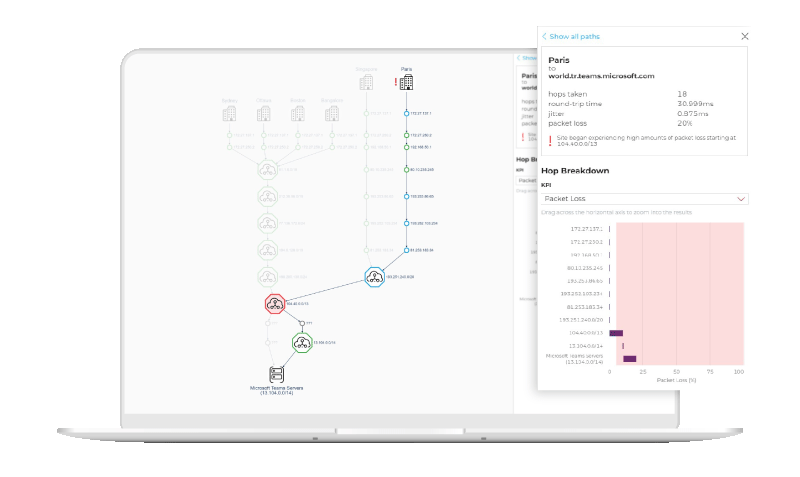
Martello’s Vantage DX: For detailed hop-by-hop network analysis.
Why? Because layering these solutions gives Kansas City businesses a 360-degree view of their Teams performance—from the cloud to the last mile.
Towner’s Microsoft Teams Network Monitoring Solution
At Towner Communications, we understand that Kansas City businesses need more than just basic monitoring—they need a partner who’s invested in their success. Our Microsoft Teams Network Monitoring Solution is designed to deliver seamless performance, crystal-clear call quality, and peace of mind.
Here’s how we make that happen:
24/7 Performance Monitoring
Unlike one-size-fits-all tools, we continuously monitor your entire Microsoft Teams environment, including:
-
Latency: Ensuring calls don’t experience delays or talk-over issues.
-
Jitter: Stabilizing packet delivery to avoid choppy audio/video.
-
Packet Loss: Proactively catching data drop-offs that cause call disruptions.
Why It Matters:
With Kansas City’s mix of ISPs, office setups, and remote users, issues can strike anytime. Our real-time dashboards and instant alerts mean we catch problems before they reach your users—keeping productivity high and headaches low.
Root Cause Analysis
Most providers stop at telling you there’s a problem—we go further. Our team performs deep-dive diagnostics to pinpoint:
-
LAN Issues: Wi-Fi congestion, misconfigured switches, or aging cabling.
-
ISP Bottlenecks: Kansas City’s unique ISP mix means some providers excel while others lag.
-
Microsoft Service Hiccups: Rare, but they happen. We’ll confirm it’s not on your end.
Why It Matters:
No more finger-pointing between IT, vendors, and ISPs. Towner’s approach identifies the real cause and builds an action plan that gets you back on track fast.
ISP Performance Benchmarking
We don’t just monitor your internal network—we hold your ISP accountable.
-
Benchmark Reports: We compare your ISP’s performance to industry standards and competitors.
-
Service Level Agreement (SLA) Validation: We help ensure your ISP is meeting promised speeds and reliability.
-
Local Expertise: Our Kansas City team knows the local ISPs by name—and by reputation.
Why It Matters:
If your ISP is underperforming, your Teams calls suffer. We empower you to have data-driven conversations with your provider, so you get the service you’re paying for.
Custom Alerts & Dashboards
We build tailored dashboards for your team so you can see:
-
Real-time call quality scores.
-
Geographic hotspots for performance issues (think local offices, remote users).
-
Historical trends to help plan for growth.
Plus, custom alerts keep you informed—without overwhelming you.
Why It Matters:
You get actionable insights, not just raw data—so your IT team can spend less time troubleshooting and more time innovating.
Network Path Verification
Your Teams performance depends on every hop between your user and Microsoft’s cloud. We verify:
-
VPN Configurations: Avoiding bottlenecks that slow down calls.
-
DNS Performance: Ensuring fast, reliable name resolution.
-
Firewall Rules & Edge Devices: Confirming traffic is optimized for Teams.
Why It Matters:
Misconfigurations in these areas are among the top causes of Teams call quality issues—and they often go undetected without specialized tools. Towner’s expertise means we catch these issues before they become user complaints.

Why Towner Stands Out
Ready to Experience Teams at Its Best?
Let’s turn your Microsoft Teams into the collaboration powerhouse it was meant to be. Contact Towner Communications today for a FREE Network Assessment—and discover how we can make your Teams environment seamless, reliable, and headache-free.