Facial recognition solutions are transforming security across schools, businesses, and government facilities. And while the technology itself is powerful, how it’s implemented makes all the difference. At Towner, we lead with ethics, transparency, and trust to help organizations use facial recognition the right way—from day one.
What Is Facial Recognition (And What It’s Not)
Facial recognition is a biometric software application that uses algorithms to map facial features from photos or video and compares this data to a database of known faces. It’s used everywhere from unlocking your iPhone to catching airport security threats. But don’t confuse it with surveillance for the sake of surveillance. Responsible deployment means purpose-driven use—and we’ll get into that.
52% of U.S. adults express concern about how their biometric data is being used. (Pew Research)
Over 25 U.S. states have introduced biometric privacy laws.
As of 2024, several federal proposals are also gaining traction to standardize biometric data handling.
Translation: It’s not enough to deploy tech. You have to deploy it ethically.
Towner’s Approach: Facial Recognition That Doesn’t Cross The Line
We don’t believe in tech for tech’s sake. At Towner, we partner with industry leaders like Verkada to provide smart, compliant, and context-aware facial recognition solutions.
Our 5 Pillars of Responsible Facial Recognition:
Purpose-built deployment: You define the “why,” we help define the “how.”
Consent-driven usage: No stealth mode. Transparency is the policy.
Data minimization: If we don’t need it, we don’t collect it.
End-to-end encryption: Your data stays locked down.
Auditability: You can always see the who, what, and when.
Pro Tip for Admins: Apply role-based access controls to your facial recognition data to enhance compliance and limit internal risk.
Where Facial Recognition Works Best
Towner tailors facial recognition to support mission-critical safety and operational goals in:
How Verkada’s Facial Recognition Tech (Delivered by Towner) Works
We work exclusively with Verkada’s cloud-based platform for facial recognition because of its reliability, data ethics, and ease of use.
Top features:
Person of Interest Search: Upload a face to find all related footage.
Live Face Blur: Hide faces by default unless flagged.
Face Match Confidence: Human + AI decision support.
Integrated Access Control: Link faces to doors, badges, and alerts.
All hosted on a secure, SOC 2 Type II certified cloud. Learn more about how we integrate physical security at Towner’s Security Solutions.
Real Talk: Why Businesses Choose Towner
When you work with Towner, you don’t just get a camera or a login. You get:
Real human support
Local installation and servicing
Customized system design
Training for admins and front-line staff
SLA-backed response times
Our clients come to us because they don’t want to be left in the dark when it comes to tech. We illuminate the path forward.
Why Towner is the Smart Choice for Facial Recognition
Facial recognition doesn’t have to feel creepy. With the right strategy, it becomes a tool for safety, trust, and operational clarity. At Towner, we don’t just implement it. We make it work for you and for the people you serve.
FAQs
About Facial Recognition
Is facial recognition legal in Missouri or Kansas?
Yes—with responsible implementation. Neither Missouri nor Kansas currently has biometric-specific privacy legislation. However, that doesn’t mean FRT is a free-for-all. To operate responsibly, Towner recommends:
Posting clear signage that FRT is in use
Restricting data collection to business-critical needs
Encrypting biometric data with SOC 2-certified systems
Allowing individuals access to their data if requested
We help our Missouri and Kansas clients adopt future-proof compliance standards, not just minimum legal requirements.
Is facial recognition secure?
Absolutely—if implemented correctly. Towner uses Verkada’s cloud-based system with end-to-end encryption, role-based access controls, and audit logs that track every interaction with your system.
Our FRT is backed by:
SOC 2 Type II certification
Zero-trust security architecture
Geo-fenced access rules
Remote video redaction and face-blur controls
We treat biometric data with the same care as financial and healthcare records.
Is facial recognition legal in my state?
It varies widely. While federal regulation is still evolving, over 25 states have passed biometric privacy laws that impact facial recognition technology (FRT). For example:
Illinois’ BIPA law requires written consent before collecting facial data.
Texas and Washington have similar opt-in laws.
Other states have introduced legislation, with varying degrees of restriction and enforcement.
At Towner, we stay ahead of legislation and help clients deploy solutions that are fully compliant, with consent-based data handling, visible disclosures, and configurable privacy settings.
Can facial recognition integrate with our other security systems?
Yes. Towner designs fully integrated security ecosystems where FRT isn’t a standalone product—it’s a smart layer that enhances your entire infrastructure.
Our integrations include:
Access control systems (badge, mobile, door sensors)
With FRT at the core, you gain real-time insight and seamless control across your facilities.
How accurate is facial recognition—and what about false positives?
Facial recognition systems aren’t perfect, but Towner minimizes risk through:
AI confidence scoring
Human review protocols
Customizable sensitivity levels
Smart filtering (e.g., only alert on persons of interest)
False positives are rare when configured properly. Our systems are trained to reduce demographic bias and are updated frequently to reflect best practices in computer vision. If needed, we can enable privacy-first modes that blur all faces by default until a manual review is triggered.
Ready to see it in action?
We’ll show you how facial recognition can enhance your security without compromising your values.
Phishing protection in Kansas City is more critical than ever. With businesses in the area increasingly targeted by sophisticated scams, protecting your data and reputation is essential. At Towner Communications, we offer comprehensive solutions to help Kansas City businesses outsmart phishing attacks in 2025.
At Towner Communications, we don’t just offer solutions; we build resilience. With over 75 years of expertise and cutting-edge tools, we’ve helped local businesses outsmart scammers and thrive in today’s digital world. Ready to protect your business like a pro? Let’s dive in.
What is Phishing? It’s Not Just Emails Anymore
Gone are the days of poorly written emails from “princes” asking for money. Phishing has evolved into a sophisticated web of deception, using emails, text messages (smishing), phone calls (vishing), and even QR codes to trick businesses and employees.
Why It Matters:
Over 90% of cyber attacks start with phishing.
Midwest businesses are increasingly targeted by cybercriminals using industry-specific scams.
Example: A Kansas City logistics company recently fell victim to a phishing scam that mimicked an urgent vendor payment request, resulting in a $75,000 loss. Don’t let this be your story.
7 Ways to Outsmart Phishing Scams in 2025
1. Train Like You Mean It (Because You Should)
Your employees are either your greatest defense or your weakest link. Phishing attempts succeed because scammers exploit busy, untrained individuals.
Action Steps:
Conduct monthly phishing simulations to keep employees on their toes.
Share real phishing examples and teach employees how to verify suspicious emails.
Establish a clear “report phishing” process.
Towner’s Solution: Our customized training programs turn your team into phishing-detection pros, helping you stop scams before they start.
2. Secure Your Inbox: Email Defense 2.0
Your inbox is the first battleground. Basic spam filters won’t cut it anymore—scammers are too smart for that.
Action Steps:
Use advanced email security tools to block phishing emails in real-time.
Implement encryption for sensitive communications.
Monitor for unusual email activity, such as login attempts from unknown locations.
Towner’s Solution: Our Email Security and API Integration provides cutting-edge protection, ensuring that only trusted emails land in your inbox.
3. Monitor Your Network Like a Pro
Cybercriminals don’t stop at emails—they exploit network vulnerabilities, especially in hybrid or remote work setups.
Action Steps:
Use real-time network monitoring to identify unusual activity.
Secure access points for employees working remotely.
Perform regular network audits to detect weak spots.
Towner’s Solution: Our Microsoft Teams Network Monitoring ensures secure, uninterrupted communication while identifying potential threats.
4. Make Multi-Factor Authentication (MFA) Mandatory
Passwords alone are no longer enough. MFA adds an extra layer of protection, requiring users to verify their identity twice before accessing critical systems.
Action Steps:
Set up MFA for all company accounts, especially those accessing sensitive data.
Encourage app-based authentication over SMS-based methods for better security.
Why It Works: MFA drastically reduces the risk of account breaches, even if login credentials are stolen.
5. Patch It Up: Stay Updated or Stay Vulnerable
Hackers love outdated software—it’s like an open invitation to exploit vulnerabilities. Regular updates keep your defenses strong.
Action Steps:
Automate software updates across all systems and devices.
Conduct quarterly audits to ensure compliance with the latest security standards.
Towner’s IT Services: We handle your updates and patches, so you can focus on growing your business while staying secure.
6. Trust but Verify (Actually, Just Verify)
Phishing scams often mimic legitimate requests, like an urgent invoice or password reset. Always verify before you trust.
Action Steps:
Train employees to hover over links to see their actual destinations.
Use a “when in doubt, call it out” policy to double-check suspicious requests.
Pro Tip: Never rush. Cybercriminals use urgency as a weapon to lower your guard.
7. Back It Up: Recovery Starts With Preparation
Sometimes, even the best defenses fail. Regular backups ensure you’re ready to recover quickly without losing critical data.
Action Steps:
Automate backups to secure both on-site and cloud storage.
Regularly test your backup recovery process.
Towner’s Expertise: Our backup solutions keep your data secure and accessible, minimizing downtime and damage.
Phishing Trends to Watch in Kansas City
Cybercriminals are increasingly targeting local industries like healthcare, finance, and logistics. In the past year alone, phishing scams impersonating trusted vendors and payroll systems have surged.
Hometown Example: A Kansas City healthcare provider avoided a six-figure breach by integrating Towner’s email security tools and running monthly phishing drills. The result? Zero downtime, zero stolen data, and a stronger, more confident team.
Phishing Prevention FAQs: Answers to Common Questions for Small Businesses
A: Phishing is a type of cyber attack where scammers impersonate trusted entities to steal sensitive information like passwords or payment details. It’s dangerous for businesses because one successful phishing attack can lead to financial loss, data breaches, and reputational damage.
A: Businesses can protect themselves by training employees, implementing advanced email security tools, using multi-factor authentication (MFA), and regularly monitoring their networks. Solutions like those offered by Towner Communications provide robust protection tailored to local businesses.
A: Absolutely! Cybercriminals often target small businesses because they typically have fewer resources for cybersecurity. Small businesses in Kansas City can stay protected with affordable, scalable solutions like those offered by Towner.
A: Email security tools filter out malicious emails, flag suspicious activity, and encrypt sensitive communications. Towner’s Email Security and API Integration ensures your inbox stays secure.
A: Phishing attacks commonly target industries like healthcare, finance, and manufacturing. Businesses in these sectors should prioritize employee training and advanced cybersecurity tools.
Why Partner With Towner Communications?
For over four decades, we’ve helped Kansas City businesses protect their data, secure their networks, and train their teams to outsmart cybercriminals.
What Sets Us Apart:
Locally Trusted: We know the unique challenges Kansas City businesses face.
Proactive Support: 24/7 monitoring and personalized solutions.
Tailored Tools: From email encryption to network monitoring, our services fit your business needs.
Take Action Today
Cybercriminals don’t wait, and neither should you. Equip your business with the tools, training, and support it needs to thrive in 2025 and beyond.
You can feel confident that your private data is safe with Towner’s comprehensive security guide . Our Triple Shield Security takes a multipronged approach to protecting your business data with technologies that address three potential points of vulnerability – protecting user access, securing applications, and defending the cloud infrastructure. Our system utilizes state-of-the-art technologies designed to constantly monitor for, and defend against, malicious intruders.
Our comprehensive security platform provides comprehensive security features that are constantly evolving in order to respond to, and help mitigate, potential threats. The platform capabilities and the technologies it employs are regularly examined and reviewed by our security team to help ensure an extremely secure communications and collaboration experience that can be trusted to protect you and your businesses.
INFRASTRUCTURE & NETWORK SECURITY
We invest considerable human and capital resources to help ensure high levels of security and protection that give you peace of mind. We understand that if you’re to trust us with your communications and data, you need to understand how we’ll protect it. Vigilance is essential to keeping your business safe.
Highly Secure Datacenters Our cloud is hosted in geographically dispersed, highly secure and monitored datacenters by certified tier-three providers. All of the datacenters used to deliver the Elevate service are either ISO 27001-certified or are subject to regular SOC security audits. Each of the world-class datacenters that are used in the delivery of the Elevate service also adhere to adheres to strict standards in physical security. Each datacenter is closely monitored and guarded 24/7/365. Secure access is strictly enforced using the latest technology, including electronic man-trap devices between lobby and datacenter, motion sensors, and controlled ID key-cards.
Infrastructure Protection System and network security is important to us and our customers. In order to maintain a secure infrastructure, Elevate is supported by several layers of security controls in operation. These controls include processes for managing user access to critical systems and devices, formal policies for authentication and password controls, and configuration standards for firewalls. Secure VPN and two-factor authentication (2FA) are widely utilized across the Elevate infrastructure to prevent unauthorized access.
We also implemented several monitoring controls to identify potential security threats and notify relevant personnel of the severity of the threat. Firewalls are in place and configured to prevent unauthorized communications. Network-based monitoring detection systems are configured to detect attacks or suspicious behavior, and vulnerability scans are performed to identify potential weakness in the security and confidentiality of systems and data.
We also run advanced, next-generation antivirus technology across our systems to help detect and deter malicious computer usage that often cannot be caught by a conventional methods. The technology monitors for unusual patterns and behaviors, alerting security engineers of suspicious activity, 24x7x365. This endpoint technology can also help prevent attacks against vulnerable services; data-driven attacks on applications; host-based attacks such as privilege escalation; unauthorized logins and access to sensitive files; and malware (e.g., viruses, Trojan horses, and worms).
We utilize a combination of commercial and proprietary security tooling to assist with threat and vulnerability management; security information event management; identity, access, and password audits; secrets and key management; managed detection and response; secure development lifecycle; managed security operations; and bug bounty programs. We also perform regular penetration testing and/or red team assessments on our applications and systems infrastructure using respected independent cybersecurity consultants on at least an annual basis.
Other security highlights:
Commercial-grade edge routers are configured to resist IP-based network attacks
We subscribe to Distributed Denial of Service (DDoS) protection through a leading provider of network security
Our production network is physically and logically separated with highly restricted access and multiple authentication levels
Operational functions include monitoring, system hardening, and vulnerability scans
Employee Security Our employees, regardless of role, undergo rigorous background checks. Employee access to systems, applications and networks is strictly controlled using two-factor authentication and role-based access control. Access to servers is restricted to a limited number of authorized engineers and monitored regularly.
Dedicated Security Staff and Monitoring We employ a dedicated, full-time security staff who are certified in information security. This team is involved with all aspects of security, including log and event monitoring, penetration testing, incident response, managing endpoint protection, vulnerability management, perimeter defense, service and architecture testing, and source code reviews.
DATA PROTECTION & PRIVACY
We are committed to protecting the privacy of your data and making sure you have full visibility regarding where and how it’s used. Your cloud contains extremely valuable and confidential content, including intellectual property, customer data, financial information, and sensitive personal data. You need to have confidence in how it’s stored and managed.
Locations of Data Handling/Storage We maintain datacenter locations in the Eastern and Western United States, Canada, the United Kingdom, Germany, Australia, and Japan. With respect to user content that is processed through the Elevate service, we generally aim to handle and store such data in the customer’s geographic region, when possible. As of the date of this report, the core components of the Towner service are able to be delivered through the following datacenter locations: • Voice Services: Any of our global datacenter locations • ShareSync: United States, Canada, United Kingdom, and Japan • Online Meeting/Chat: United States
In instances where a particular service is not able to be serviced through a datacenter in a customer’s geographic region, the user content will generally be handled and stored in the datacenter closest to the customer’s location. Business and financial information related to Towner accounts, such as billing, order history and account contacts, is processed and stored in the United States.
Data Encryption Data encryption protects sensitive customer and call data from unauthorized access. In addition, numerous national, local, and industry regulations regarding customer and patient privacy mandate encryption of data. We employ encryption, both in transit (using TLS encryption) and at-rest (using AES 256-bit keys), as an essential component of our “secure-by-design” product architecture to help keep your data private and secure. Data encrypted while at rest includes voicemails, call recordings, meeting recordings/chat/notes, chat and SMS history, chat attachments, and ShareSync files.
PHONES/DEVICES/APP SECURITY
Encryption technology is important to keep conversations and data secure from prying eyes. However, encryption only tells part of the story. We have several technologies designed to keep intruders from accessing your internal systems and apps.
Secure Handset Protection To verify that phones and devices are secure from cyber threats and attacks like eavesdropping, we require strong passwords on all SIP endpoints. Each device is securely provisioned using “HTTPS” with mutual authentication to prevent intrusion.
Authentication for Elevate Apps Elevate Desktop and Mobile Apps allow users to use their business phone system while working remotely or on-the-go. These apps can require a username and password and can also be enabled with 2-factor authentication for access.
Google Chromium Browser Security Platform The Elevate Desktop App is built using Google Chromium browser technology. It makes use of the very latest security enhancements available and is updated regularly to keep current with the latest security patches. Chromium’s architecture focuses on preventing attacks from persistent malware, transient keyloggers, and file theft.
MONITORING & DETECTION
Automated 24/7 Toll Fraud & Threat Detection We monitor call patterns to international (and high-cost) locations on a constant basis and consistently look to improve our fraud monitoring systems. If any customer exceeds the call thresholds for any international areas, we will disable international calling and notify the purchaser, informing them that international calling has been disabled based on possible fraudulent activity. To protect the customer, we will not re-enable international calling until the account holder has given us authorization. Additionally, we employ active monitoring to detect and notify customers of suspicious login activity and unrecognized devices on their network.
Spam Caller Protection* Every account is enabled with Spam Caller Protection – helping to keep you and your employees free from calls originated by autodialers and known fraudsters. It allows administrators to decide how to route these calls. Depending on your organization’s preferences, you can tag these calls in the Caller ID screen, send them to voicemail, or block them. This protection extends to every device, including the Desktop and Mobile Apps
SECURITY & COMPLIANCE
SOC 2 SOC 2 is a technical audit specifically designed for service providers who store customer data in the cloud. We have a SOC 2 report from an independent auditor that has validated that, in their opinion, our controls and processes are effective in minimizing risk and exposure to this data.
PCI-DSS The Payment Card Industry Data Security Standard (PCI DSS) is a set of security standards designed to ensure that ALL companies that accept, process, store, or transmit credit card information maintain a secure environment.
The payment processing system that supports Elevate has passed these strict testing procedures and is compliant with PCI DSS. This helps ensure that your payment information will not be accessed by unauthorized parties or shared with unscrupulous vendors.
GDPR and Other Privacy Regulations We have extensive experience managing a highly secure infrastructure and complying with complex regulations. We are committed to comply with the EU’s General Data Protection Regulation (GDPR) and other privacy regulations across our services. We maintain a security environment that meets the requirements of the GDPR, and we offer Data Processing Agreements (DPAs) to our partners and customers to help assure them that our processing and handling of their data will meet applicable regulatory standards, including all required security measures.
Healthcare Industry Security Compliance Countries around the world impose strict legal and regulatory requirements on the handling of medical and other health-related information by healthcare providers. Our robust set of security features enables customers in the healthcare industry to configure Elevate to help them comply with those stringent requirements. For instance, Elevate offers a range of security settings, and a Business Associate Agreement (BAA) is available upon request, to support businesses in their efforts to comply with the administrative, physical, and technical standards required by the U.S. Health Insurance Portability and Accountability Act of 1996 (HIPAA).
Telecommunications-Related Security Requirements Consumers are understandably concerned about the security of the sensitive, personal data they provide to their service providers. Many countries’ telecommunications regulations include encryption and other security-related requirements applicable to data processed and stored in connection with the services, and we are committed to complying with those requirements wherever we offer our services. As just one example, the United States Federal Communications Commission (FCC) requires carriers like us to establish and maintain systems designed to ensure that we protect our subscribers’ Customer Proprietary Network Information (CPNI), and we file an annual certification documenting our compliance with these rules
ELEVATE SECURITY FEATURES AND CONTROLS
Calling – The account administrator can request TLS transport for desktop telephones
Mobile Softphone – TLS transport can be enabled in application settings to enable encrypted signaling
Call Recording – The account administrator can control call recording on a per user basis. Call recording can be activated on demand by the user
Voicemail to Email – Voicemail to email is a convenient feature but for maximum security it can be disabled per user
Voicemail Transcription – Voicemail transcription can be enabled or disabled on a per user basis for maximum security
Visual Voicemail – Visual voicemail is available in the Desktop and Mobile apps and is protected by the same robust access controls including optional 2FA
Desktop Softphone – The Desktop Softphone uses TLS and SRTP to ensure communication is always encrypted
Chat – Chat messages are encrypted both at rest and in transit
ShareSync – Share data is encrypted both at rest and in transit
Online Meeting meetings, chat, notes – This data is encrypted at rest and in transit. WebRTC technology is used to encrypt meetings
Integrations – Integrations vary depending upon the 3rd party system, but typically use REST over HTTPs transport for encryption
Administrator Control Elevate features many flexible security features that allow the system administrator granular control over their security policies.
Administrator-defined passwords – Elevate supports both user and administrator-defined passwords for access to services
No compromised passwords – Elevate users benefit from password validation services; this prevents users from selecting passwords which are known as compromised
Forced password resets – Administrators can force all users to change their passwords, either for administrative reasons or company policy reasons
Custom password policies – Password policies can be defined to align with existing business practices or policies
Flexible password expiration – Password expiration can be defined to align with existing business practices or policies
Dynamic blocking feature – Administrator-defined policies monitor unsuccessful logon attempts and can dynamically restrict and release user accounts. This feature can be fully customized to align with existing business practices or policies
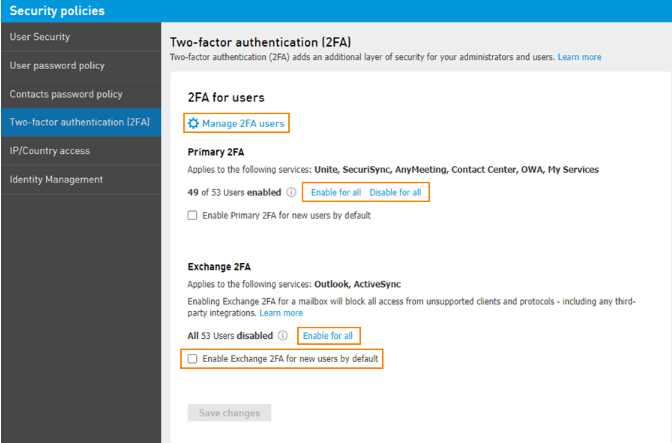
Two-Factor Authentication (DoubleSafe)
This additional security layer can be activated for Elevate, Online Meeting, Contact Center and ShareSync applications. Two-factor authentication (2FA) requires an additional authentication challenge to access Elevate services. This feature is fully configurable to suit your business needs. 2FA supports Push Notification via the DoubleSafe mobile application, SMS messaging and voice calls. 2FA can be enabled on a per-user or per-organization basis and supports challenges for every login, daily, weekly, monthly or only when logging into Elevate services from a new device. DoubleSafe is included with every Towner Elevate account.