When: March 19, 2019 4:00pm – 7:00pm Where: Tom’s Town Distilling Company, 1701 Main St., Kansas City, MO 6410
Mark your calendar to join Towner Communications and RingCentral for networking and thought-provoking conversation. You’ll also be entered in our raffle, with a chance to win a $200, $300 or $500 Amazon gift card!
Learn how your business communications can be improved with a comprehensive cloud phone system that integrates phone, video, meetings, and messaging in one reliable, easy-to-use solution.
Afterward, you’ll have the opportunity to go on a tour and see how Tom’s Town spirits are made, learn their history, and sample their award-winning spirits.
We look forward to seeing you there![/vc_column_text][/vc_column][/vc_row]
How integrating multichannel cloud business
communications and applications drives innovation
and productivity across the enterprise.
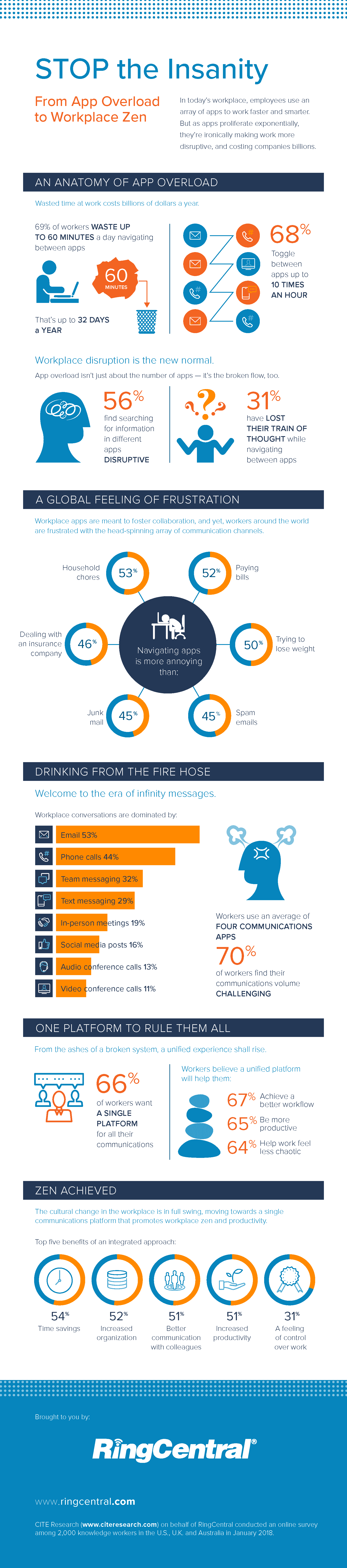
January 2015 marked 100 years since the first cross-country telephone call. “Mr. Watson, are you there? Do you hear me?” This landmark event spawned an era in which analog voice calls became the primary communication tool for business. But times have changed; and although the telephone is still critical for building relationships, business communications now rely on a mix of voice plus everything from email to group chat. Additionally, knowledge workers have moved beyond simple desk phones to embrace mobile devices and softphones, as well as new desk phones that incorporate cutting-edge voice and video technology.
Plus, businesses haven’t just changed the way they communicate; they have also changed the way they work. This includes organizing workflows around business apps, including customer relationship management (CRM), human resource management (HRM), and enterprise resource planning (ERP). In recent years, many enterprises have moved these critical systems out of the data center and into the cloud. This includes not only software as a service (SaaS) models such as Salesforce, but also homegrown business applications developed by enterprise IT departments and deployed on public, private, or hybrid clouds.
However, many businesses find themselves struggling with on-premise phone systems that carry forward the limitations of decades-old technology. The result is a huge gap between communications platforms and essential business apps as well as the apps employees increasingly use for multiple modes of communications.
For example, while cloud-based apps, such as Gmail™, Microsoft Office 365™, and Salesforce® provide tremendous costsavings and are vital to greater efficiency and productivity, thus far, these systems have not been integrated with business communications. Communication data remains siloed from business app data, preventing management from having a unified view of the business. And with the exception of email, most modes of communication—such as voice calls, text, voicemail, fax, and online meetings—still require employees to perform tedious, error-prone manual data entry to log a conversation. The data stored in call logs is also typically isolated from other systems. For example, if a sales rep uses a call, text, or web meeting to communicate with a customer, critical information gained by the rep during the conversation can easily be lost or forgotten.
Cloud phone systems, on the other hand, grew up with mobile networks, new internet-based communications tools, and cloud business apps, making them ideally suited to today’s enterprises. This paper discusses how a robust, extensible cloud communications platform—which includes cloud APIs and SDKs for developers—can enable a new era of integrations between business communications and key business processes and workflows.
Seamlessly integrating communications into the new workspace
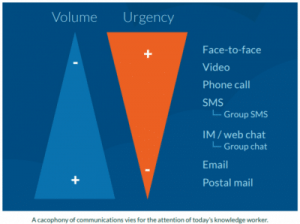
Today’s knowledge workers often use multiple devices—desktops, smartphones, and tablets—to communicate in a dizzying variety of ways, including voice calls, SMS, group SMS, instant messaging, email, and chat. In addition, business apps pile on additional channels of communications with customers, coworkers, and partners.
The constant chatter from all these devices and channels inundates employees. And to make matters worse, the highest volume communications are not necessarily the most urgent.
Matching IT technology with the multimodal way people work today requires a comprehensive enterprise business communications platform. Prebuilt and custom integrations in such a platform not only give employees a workspace with everything in one view, but can also surface the most important and urgent communications in the most appropriate way.
Previously, any company that wanted to create this type of seamless workflow between phone calls or other communication methods and their business applications discovered it was costly, complicated, and often impossible to achieve. This is primarily because of the inability of business apps to connect with closed, single-purpose phone systems. Gaps can also exist between the various apps commonly used by companies and among the various communications tools used by their employees. The advent of truly enterprise-class cloud communications systems now makes it possible to integrate business applications with business communications.
Leveraging cloud PBX for business communications
A cloud communications system overcomes many of the limitations inherent in legacy on-premise PBX systems to deliver greatly improved communications. For example, workers in one location can easily connect with colleagues in other offices using direct transfers and direct extension dialing. Once employees leave a location, calls automatically follow them wherever they go, and they can access voicemail, fax, conferencing, and all other company communications functions as seamlessly as if they were at the office.
A comprehensive cloud communications platform also delivers a range of new features and capabilities—such as a rich collaboration space that includes everything from online meetings to group chat.
Beyond email: group productivity with rich collaborations
As enterprise communications have evolved, the need for rich collaborations among teams, groups, and departments has become an essential capability. Collaboration tools such as audio and video conferencing, web meetings, chat, and SMS on desktop devices or smartphones allow employees to share their ideas and improve office productivity and efficiency, and they allow groups to work together more cohesively.
Empowered chat
As employees bring new forms of communication into the workplace, chat and SMS have become as much a part of a worker’s daily routine as voice calls. Until recently, text-based communications were not supported by enterprise IT departments and were not widely adopted in industries with major concerns regarding data security and compliance. The cloud changes how text-based communications can be supported. Enterprise-grade chat clients and support for SMS are now widely available on desktop and mobile devices. History logs as well as IT administration capabilities give control back to the CIO and help ensure security and compliance.
A variety of chat integrations can empower teams with richer collaboration. For example, advanced features and integrations between the phone system and instant messaging make it easy to escalate a group IM to a conference call. Or, the integration of empowered group chat into the phone system can help users increase productivity with direct access to features such as file sharing, tasks, notes, image annotations, video conferencing, and screen-sharing technology. Team
members also have the ability to assign tasks and integrate group meetings with the calendar.
Users can also link a chat meeting with other cloud services, such as Box, Dropbox™, Google, Evernote®, and JIRA®. This includes the ability to manage file sharing and storage that is relevant to the group collaboration.
Audio conferencing and online meetings
Audio conferencing integrated into a cloud phone system allows employees to connect with colleagues from a single conference bridge. Conference calling also enables mobile and remote workers to easily and cost-effectively work from any location and collaborate as if they were in the office. Online meetings give staff members the flexibility they need to share and work together at any time and from any location. Employees can deliver presentations from a computer, tablet, or smartphone. They can share their screens, web pages, and files from their devices or cloud storage accounts to add context and collaborate more effectively.
The trusted enterprise cloud platform
The RingCentral platform provides best-in-class cloud communications designed to serve today’s modern businesses. It delivers a completely integrated cloud communications solution that includes voice, SMS, fax, collaboration, and other powerful capabilities—with enterprise-grade security and carrier-grade reliability. This platform, which is based on a decade of R&D and is used by more than 350,000 businesses worldwide, also provides significant advantages, such as the ability to scale the phone system and manage it remotely without the need for staff with PBX experience at each business location.
Standard integrations with the most popular business apps
The platform includes prebuilt solutions that integrate the RingCentral Office® cloud phone system with popular cloud services such Microsoft Office 365, G Suite (a suite of tools that includes Gmail and Google Docs™), Salesforce, Zendesk®, and Dropbox.
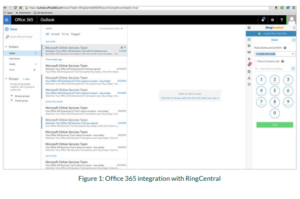
The example in Figure 1 shows how RingCentral created a seamless integration with Office 365. RingCentral for Office 365 users can access a dialer, audio conferencing, Business SMS, and virtually the entire RingCentral Office feature set from within the email interface. Employees can make or receive calls and have text conversations on their mobile devices—all seamlessly. With more and more large organizations using Office 365 as their preferred email solution, this capability creates a natural, intuitive workflow.
With another integration example, RingCentral for Salesforce, Sales teams can make or receive calls, use Business SMS, or initiate a conference call without leaving their familiar work environment. Incoming callers are instantly matched to existing contact records, which are automatically displayed. The sales rep can also take notes while on a call and can choose to save those to the customer’s CRM record.
The first open, self-service cloud communications platform
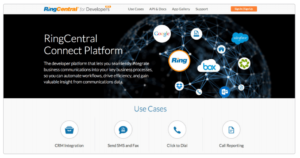
This powerful platform is also open to developers, partners, and customers, allowing businesses to easily integrate robust communications capabilities into key enterprise applications. The RingCentral Connect Platform™ for developers (developer. ringcentral.com) offers a family of cloud APIs with a comprehensive SDK that integrates voice, SMS, and fax communications within important business processes.
With the RingCentral Connect Platform, developers, customers, and ISVs can now access the power of multimodal, realtime communications supported by extensive business logic and customer data management and reporting. This makes it easy for developers to not only enable their applications to send and receive calls and texts, but also to deeply embed communications functionality into the workflow of critical business applications.
For example, the RingCentral Connect Platform provides an SDK, tutorials, and developer support to create robust CTI integrations that seamlessly connect the RingCentral platform with Zoho, Salesforce, and other leading CRMs. The RingCentral Connect Platform also enables IT teams to create customized services that automate workflows, drive efficiency, and improve customer satisfaction. For example, a national locksmith service company connected its CRM and dispatch software with the RingCentral platform. This custom integration makes it possible to dispatch locksmiths via SMS. Customers then receive SMS notices that a locksmith is on the way. The integration includes an immersive custom workflow that connects to back-end business systems, allowing the agent to quickly match the locksmith with the customer.
A future-proofed business communications system
Now, companies can bridge the gap between disparate business systems or between systems and users by integrating this self-service cloud communications offering with any application. In addition, customers and ISV partners can easily create differentiated product offerings by incorporating next-generation communications features.
This is critical for businesses in today’s competitive environment, where the company with the best technology often wins. Looking at the seamless blend of services and communications in offerings such as Uber shows that these types of integrations can even disrupt entire industries. For enterprise IT departments looking to drive competitiveness through technology, the RingCentral platform offers an open path to staying competitive today and in the future.
What developers do with the power and capabilities of the RingCentral platform is limited only by their imaginations. For example…
A taxi or limousine service that uses RingCentral Office for voice dispatch could add automated SMS confirmations (for example, “Your car will arrive in two minutes”) to its custom dispatch software. Or, if a customer needed to meet a limo driver at the airport, the phone system could automatically send a photo of the driver by text or email.
An online electronics retailer could improve both sales and customer satisfaction by integrating a custom CRM system with real-time access to information. For example, a pop-up note based on the incoming caller ID could provide information about the customer’s prior orders and help the associate provide the caller with relevant information.
A medical office could integrate its back-end appointment system with patient contact information and automatically send appointment reminders via text message, and patients could reply to confirm or request a change.
An independent developer could create an integration that enables shoppers to connect with product reviewers. Reviewers wouldn’t even need to be online. They could receive questions via SMS, and their responses could post to the retailer’s website in real time.
Insights from communications metadata in the era of big data
Day-to-day business communications generate an invaluable stream of metadata. However, most of that data remains siloed, unstructured, or unavailable. For example, account managers often use mobile phones to continue working when they leave the office. But because many businesses rely on legacy, on-premise PBX systems, the records of those customer calls can easily be lost. With big data and the ability to derive valuable insights from analyzing that data, this lack of integration with a robust platform results in lost opportunities.
Metrics such as conversion, engagement, and utilization rates are not just important in web-enabled applications but also in real-time communications. IT managers, ISVs, and system integrators understand that these stats can drive intelligent decision making.
The RingCentral platform captures and stores a wealth of valuable data about your company’s or your customers’ communication behaviors (for example, when, where, and with whom they communicated), as well as levels of engagement, utilization, and success. This data even includes the steps that were taken before and after the engagement and which endpoints (desktop, web, mobile, etc.) were used. With RingCentral, application integrations can be easily customized to measure these business analytics and create reports or real-time dashboards.
Summary
Many knowledge workers today live in business apps such as Microsoft Office 365, G Suite, and Salesforce. They also rely on multiple communication apps—on multiple devices—to stay in touch with customers and collaborate with teams. These workers also expect their own devices and apps to integrate smoothly into the company phone system and enterprise business systems. All the while, IT must ensure reliability and security.
It takes a comprehensive enterprise-grade communications platform to satisfy these business needs. RingCentral provides an industry-leading UCaaS platform that offers a full suite of communications tools that are essential for today’s workers. More importantly, RingCentral integrates these tools with many of the most popular cloud apps, giving management a better view into the business and workers a better, more collaborative work environment. A robust developer’s platform also makes it easy for IT teams to create custom integrations and unique new service offerings.
This is the new work environment. From intelligence in the platform that can surface the most urgent messages to automatic dialing from within apps such as Office 365 or Gmail to empowered chat, by offering the strongest foundation for businesses to create new, disruptive service offerings, the RingCentral platform is the leading choice to equip your workforce for the challenges of tomorrow.
About RingCentral
RingCentral, Inc. (NYSE: RNG) is a global provider of cloud unified communications and collaboration solutions. More flexible and cost-effective than legacy on-premise systems, RingCentral empowers today’s mobile and distributed workforces to be connected anywhere and on any device through voice, video, team messaging, collaboration, SMS, conferencing, online meetings, contact center, and fax. RingCentral provides an open platform that integrates with today’s leading business apps while giving customers the flexibility to customize their own workflows. RingCentral is a leader in the 2017 Gartner Magic Quadrant for Unified Communications as a Service Worldwide for the third consecutive year. RingCentral is headquartered in Belmont, Calif.
Arm your business with a Cloud customer experience that blows your competition out of the water and generates the sales and service results you’ve been dreaming of!
Super slick and quick inbound call routing
Towner Communications & RingCentral’s Contact Center intelligently routes calls to your best customer service agents for the most impactful resolution. This delivers the best customer experience with skills-based call routing, leaving your clients smiling!
Best of brand outbound capabilities
Who wants stellar outbound sales connections. No more awkward delays when greeting callers while increasing agent productivity with our capability for multiple, simultaneous predictive calls. Agents are connected at the first hello, paving the way to better outcomes, higher conversion rates, and increased revenues.
Omnichannel routing
Empower agents across all channels—voice and digital—with a single, intuitive agent interface. Communicate with your customers the way they want to on their device of choice and increase customer loyalty and satisfaction.
Workforce management
Optimize agent availability and achieve your goals with efficient and actionable schedules. Powerful forecasts and adherence measurements help you maximize agent availability and minimize agent downtime to reduce costs.
Quality management
Ensure you are getting the best performance from your agents with our agent-centric approach to Quality Management. Features such as call screening, agent self-evaluations, and automated feedback and workflows give your team the tools they need to provide the best possible service.
Real time analytics
RingCentral Contact Center Analytics offer a wide range of customizable, visual ways to make business-critical decisions in real time. With up-to-the-minute data accessed through easily customizable dashboards, you’ll be better equipped to address business issues in your call center as soon as they happen.
Customer surverys
Towner Communications Contact Center supports a wide range of survey methodologies for measuring customer satisfaction. Choose from Net Promoter® Score (NPS) surveys, Customer Effort Scores, general satisfaction ratings, and more.
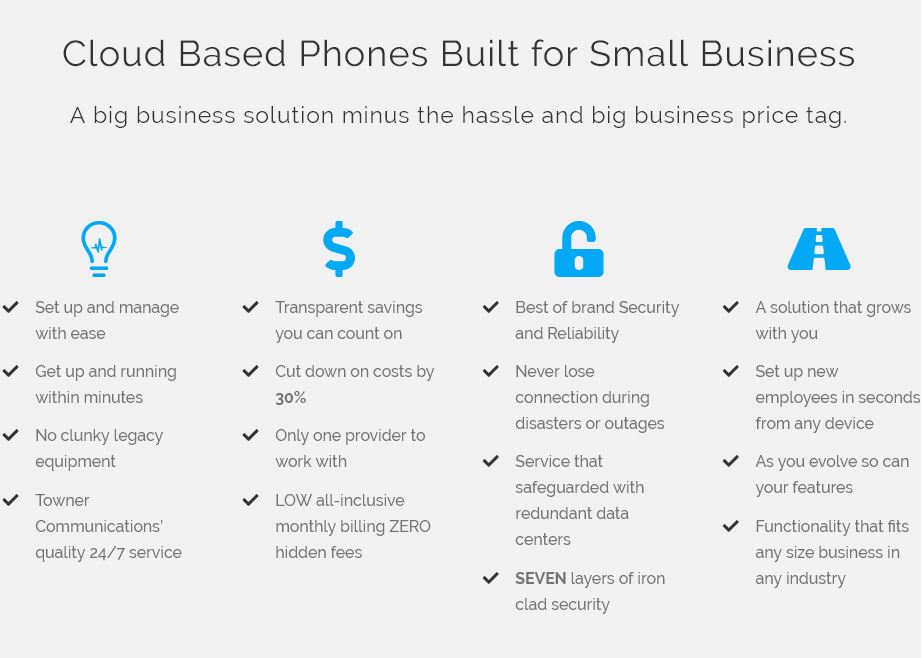
Cloud Based Phone solutions for small business allow you and your team to work exponentially better and far smarter with intuitive team collaboration, and the ability to integrate with nearly every business application on the market.
The cloud based phones are mind blowingly simple to implement and manage through out the life and growth of your small, medium, or enterprise business.
Make sure that your team has the freedom to break out of their inboxes and build stronger relationships with effective real-time messaging, video calling, file sharing, tasks, and more.
Got apps that are mission critical?
Great! There’s 100+ that we seamlessly integrate with!
There are some really exciting things going on in the tech world right now! We’re pretty excited to see what Ring Central is doing to support the inclusion of women in the tech space! So excited in fact that we stole their blog and are sharing it with you, so you can get just as stoked as we are! Welcome More Women in Technology!!!
From the Women in Tech luncheon that RingCentral EVP of Innovation Kira Makagon facilitated to the keynote by Girls Who Code Founder and CEO Reshma Saujani, women in high tech was a key topic of discussion at ConnectCentral® 2018.
The percentage of women holding computer science jobs has been on the decline since 1995, when 37% were female. Today this number is down to just 25%, and that figure is projected to decline to 22% by 2025. Why is this happening, and why does it matter?
Girls Who Code Founder Saujani points to cultural norms and the fact that we’re not encouraging girls to pursue computer science as a career. Boys are raised from birth to be brave, take risks, deal with failure, and move forward, she stated. But girls are coddled, taught to be perfect, and not encouraged to explore math and science. RingCentral’s Makagon said having women in computer science careers matters not just for diversity and because it’s where the jobs are, but also because research points to companies performing better when women are a part of the management team.
The challenge for women in science
Saujani’s Girls Who Code has produced 90,000 graduates in seven years, and these girls major in computer science at a rate of 16 times the average. But today, she’s less worried about the pipeline of girls entering computer science programs and more focused on attrition once they declare computer science as a major. The University of Pennsylvania, for instance, reports that, before joining the National Center for Women and Information Technology’s Academic Alliance, its attrition rate for women in the computer science major was 13.6% compared with 2.5% for men.
Saujani points to the need for a cultural shift at universities—so women aren’t as isolated, plagued with insecurities, and subjected to microaggression. She speaks of being in the “2.0 phase now,” which moves beyond teaching girls to changing culture, so girls are encouraged and feel like they belong in the world of computer science.
Cultural change can be powerful—Saujani noted that in the 1970s, less than 10% of doctors and lawyers were women. But then came popular TV shows like Ally McBeal and Grey’s Anatomy, and today 50% of doctors and lawyers are women.
How to help
So how can any working man or woman help change high-tech culture to welcome more women? Three themes bubbled up from both Saujani and Makagon’s sessions:
The power of male allies: When men actively support women, change happens. Saujani mentioned a Rhode Island Institute of Technology men’s club that encouraged women in science and helped shift the percentage of girls graduating with coding skills from less than 14% to over 27%. Makagon’s panel and audience agreed it helps when men enter a room full of men and ask, “Where are the women?” or notice women who aren’t speaking up and ask them for their thoughts.
Role models matter: Both leaders talked about the influence of women who came before them—role models—as being helpful. Makagon brought up Margaret Hamilton and the NASA women coders who sent John Glenn into orbit as examples. Saujani, Makagon, and the members of the WiT panel are all role models whose real life stories, highlighted at technology conferences such as ConnectCentral, offer encouragement to other women.
Culture matters: An example of how culture influences behavior that Saujani relayed is a Barbie book that told the story of how Barbie needed help from Ken to solve a complex computing problem. Clearly, the message is that girls should consult men where math and science are concerned. Contrast this example with one she shared of a Girls Who Code student who programmed a game called “Tampon Run”. Its opening screen declares “Menstruation. It’s totally normal. And yet, women are taught that it’s embarrassing. And crude. We disagree. So we made a game to combat the stigma. Our hero is armed with tampons. Her mission is to rid the world of the menstrual taboo.” It’s a simple “shoot them with tampons before they get you” type of game, but as Saujani said, when girls are dropping out of school or staying home sick because they have their period, this game can normalize an uncomfortable situation. And it’s an issue that men are not likely to solve.
Girls Who Code is one avenue for closing the gender gap in technology. But even being aware of the gender disparity is a first step in driving change. Next time you enter a conference room, look around and ask where the women are.
The biggest buzz words in business and in our government are CYBER SECURITY and CLOUD. The evolution of the “cloud” has gone from where we’ve stored pdf and pictures to hosting our telecommunications and basically storing our entire business. Critical and sensitive business and personal information is exchanged and stored making it a hacker’s personal heaven. One do non-tech people really understand what “The Cloud” is, and two if you don’t really understand what the cloud is how can you really have piece of mind that you’re safe and protected? Brace yourself, but the easy and unpleasant answer…You are never nor will you ever be 100% safe. Now, hold on to your pants because there are very basic and very key steps that you can take to ensure that your exposures are reduced almost down to nothing. The key is, hire experts and then listen to your experts! Here’s why Towner Communications the Cloud Telecommunications Experts in the Midwest…Yes we can claim that, are telling you to get in the cloud.
Here’s our top 3 reasons we propose Cloud Solutions to almost if not all of the small to medium size partners we consult for.
1. Physical Real estate in their office: Premise telecom solutions can be massive and take up more space in your office than you can give up. The entire concept the cloud is that everything is off site and tucked into a server in a far off land. Use that extra room for your ping pong table, or an extra office.
2. Cost Savings: Unlike on premise solutions, unless you purchase the equipment you’ll be using, there is little to no upfront major cash lay out. Flexible plans mean you can rent the equipment and ALL your telecom services and needs are wrapped into one nice tight little monthly payment.
3. Flexibility: As your business grows so can you’re solution. As you’re business becomes seasonal so can your solution.
These are all great selling points of the cloud and are the apex of what small and medium companies need to grow and stay competitive. HOWEVER please proceed with caution when you’re evaluating a provider!!! You have to ask the right questions and receive the responses that are clear and accurate and fit the culture of your business. Not all carriers are created equal and not all fire sale tactics (like tossing in phones for free) or promising the lowest prices in the industry mean you’re getting a great deal. Usually these companies deal in volume and aren’t concerned about your specific business needs. This is why you’ll experience more frequent outrages, less than desirable customer service, and more importantly cookie cutter cyber security measures that leave you exposed to costly attacks.
These are the exact questions you have to ask when looking for the perfect telecom partnership:
What solution offers the most cyber security VIOP or cloud?
Best Answer: It’s important to understand that VoIP is a universal term for Internet based telephony which also includes cloud. If they don’t tell you that VOIP and Cloud are virtually the same RUN. Both terms mean that the calls are delivered via the internet. Now here’s the key point…Any call that is made over public internet is going to have a high level of exposure.
Who has control of your data if you go cloud?
Best Answer: Here’s the deal…Cloud is a sexy word that everyone throws around to seem like their on the cutting edge and super with it. The magical cloud is simply a system (much like you would have on site) that resides in a data center somewhere in a location that doesn’t even have to be remotely close in proximity to your physical location. This means that any and all security concerns are no different to when there is a physical phone system. What’s really important is the promise of the security level that your partner is giving you. On site the it would equate to the level of security your IT guy is promising you.
Is VOIP more vulnerable to hacks?
Best Answer: HECK YES! Analogue phones are by definition secure. Often times when companies think about cyber security and getting hacked, the last thing they realize is that their phone systems are one of the most vulnerable. Because of this, they don’t encourage their staff to update passwords as frequently as they do with their computers, they don’t educate their team members on the things to look for to identify possible security breaches. The key here is that any expert provider knows that they can give you that ISDN security with call encryption on VoIP.
Key take aways here are that you don’t buy on price or promise. That you buy on reputation. Cloud solutions are amazingly reliable and secure and can take most if not all of the headache of the telecom portion of your business off your plate. However it’s not the solution that you need to evaluate it’s your provider. Look at reviews, talk to your peers. Throw the lowest and highest prices out and by all means, pick a local vendor who can give you customized and speedy service and solutions!
Attacks against a core internet firm play havoc with some of the world’s most popular websites.
Across the US on Friday, people screamed at their phones and computers and went a little crazy trying to figure out which of their favorite websites were still working.
At 7 a.m. local time, folks on the East Coast discovered that sites like Twitter, Spotify, Etsy, Netflix and software code-management service GitHub were knocked for a loop. Hackers had flooded Dyn, one of the biggest internet management companies in the country, with junk traffic — effectively shutting down services and websites throughout the region.
The outages eased after two hours but returned with a vengeance at midday, affecting areas across the US and parts of Europe.
“The earlier issues have resurfaced & some people may still be having trouble accessing Twitter,” the company tweeted. “We’re working on it!” Meanwhile, the US Department of Homeland Security said it was “investigating all potential causes.”
It wasn’t until late in the day that Dyn said the issue had been resolved.
Hackers had used what’s known as a distributed denial of service attack (DDoS) — conscripting hordes of internet-connected devices like computers, routers and security cameras into a botnet — to cripple Dyn’s servers.
Based in New Hampshire, Dyn is both a DNS service provider — translating URLs into IP addresses — and an internet management company, helping website customers get the best-possible online performance. It also filters out bad traffic headed to the websites, and that’s where things fell apart Friday. By overwhelming Dyn, the attackers were able to overwhelm many of its customers.
Last month, noted security expert Bruce Schneier said core internet companies were seeing people probing their networks to learn how well they could respond to DDoS attacks. The title of his blog post: “Someone is learning how to take down the internet.”
Cybersecurity company Flashpoint said Friday the botnet attacking Dyn was built with the same malicious software that launched the attack against Krebs and French website OVH — the two most powerful DDoS attacks on record. Called Mirai, the malware works by “enslaving vast numbers of these devices into a botnet, which is then used to conduct DDoS attacks,” Flashpoint researchers said in a statement.
Until now, successful attacks on sites as large and popular as Twitter, Reddit and Netflix have been rare.
“Given the drastic increase lately in the size and scope of DDoS attacks, DNS providers [like Dyn] are scrambling to increase bandwidth capacity to withstand the latest attacks,” said Jeremiah Grossman, chief of security for cybersecurity company SentinelOne. “They are attractive targets for large-scale DDoS attacks.”
Having just about everything connected to the internet doesn’t help. Before, the bad guys had to rope in thousands of computers to launch their attacks. Now they have potentially millions of smart TVs, refrigerators, home routers, security cameras — even baby monitors — at their disposal.
Given how easy these devices tend to be for hackers to compromise, researchers like Shankar Somasundaram of Symantec think DDoS attacks will just get worse.
“There will be more of these attacks,” he said.
First published October 21 at 6:52 a.m. PT. Most recently updated on October 22 at 8:58 a.m.: After updates throughout the day Friday, which included the addition of comments from Twitter and others, as well as various background information, this story was recast Saturday to reflect that the outage had been brought under control.
Towner Communications LLC is committed to being the number one provider of cutting edge telecommunication technology in the Kansas City area. With the ability to service multi-million dollar accounts as well as s mall business accounts, we strive to build and foster long lasting relationships with all of our clients
A Look at Emerging Cloud Communications Technologies
Communications is more than just connecting people. The right communications technology helps businesses connect the dots between where they are today and where they want to be tomorrow. In this chapter, you explore the future of emerging cloud communications technologies and how they can help your business today and into the future.
Tighter mobile integration
Predicting the need for tighter integration between business communications systems, core business applications, and users’ mobile devices doesn’t take a crystal ball. The mobile workforce of today and the future expects its mobile phones to work everywhere, so productivity can happen anywhere.
Emerging technologies for tighter mobile integration include the following:
Voice over long term evolution (VoLTE) networks: This is a specification that enables more efficient use of available bandwidth and tighter integration with apps over an LTE network.
All IP‐based communications: Carriers move voice services from 2G/3G circuit‐switched (CS) networks to LTE, enabling redeployment and reuse of limited spectrum, and develop apps that are natively voice‐enabled. Today, voice and data are separate, and not all voice is IP‐based — even on LTE networks. In the near future, all LTE connections, both voice and data, will be IP‐based.
Convergence of mobile and enterprise communications (no more “apps”): Today, most unified communications (UC) vendors provide an app for smartphones that enables enterprise communications. Users will soon be able to make and receive corporate calls on their smartphones—not from a separate app, but from a native dialer.
Intelligent reachability: Intelligent reachability allows users to be reached on any of their devices through a single phone number with intelligent call routing capabilities, using location data, Bluetooth, and Wi‐Fi, among others, to route the call to the most appropriate device (rather than simply ringing every device).
New use cases: These enable mobile apps to leverage real‐time communications. Today, an app can trigger the dialer to make a call, but the call happens outside the app. In the future, mobile apps will be natively communications‐enabled via seamless integration to network‐based communications capabilities.
Enterprise routing capabilities: These use location and contextual awareness through more intelligent and capable mobile networks as UC vendors and cellular carriers develop new technologies together.
Software‐defined networking over Internet
Today, cloud communications customers generally connect to their service providers over either a multiprotocol label switching (MPLS) wide-area network or an over the top (OTT) Internet connection. At least some OTT is typically used in almost all environments. For example, it’s common to find MPLS at office locations, while employees use OTT at home or on the road.
MPLS offers the best quality, but it’s more expensive than other options. Many service providers include MPLS services and guarantee the quality of service for their customers.
OTT is less expensive, but it’s basically just an Internet connection. There’s no quality of service guarantee, and voice quality can degrade and even become unacceptable at times. For example, if a neighbor on the same network streams a video during a call, the download could interfere with your call.
A new innovation, known as software‐defined wide area networking (SD‐WAN) is emerging, offering businesses the best of both the MPLS and OTT worlds— better quality at a lower cost. SD‐WAN delivers these benefits by using multiple network connections, including a mixture of OTT and/or OTT with MPLS services.
SD‐WAN provides enterprise‐grade performance, visibility, and control over Internet broadband and private links. WAN traffic is automatically steered across the best links and most‐optimal paths. Dynamic multipath packets are steered to the optimal link based on performance metrics, application requirements, business priority of the application, and link cost. This technology can create a virtual, high‐bandwidth pipe from multiple, inexpensive broadband links and leased lines, providing businesses with improved WAN economics and quality.
Workstream messaging / Team collaboration
Unified communications technology generally includes instant messaging (IM). However, IM generally only supports internal users and is designed primarily for one‐to‐one communications. But a new category of communications is emerging: workstream messaging, sometimes called team collaboration. These messaging services are specifically designed for business collaboration.
Workstream messaging provides the same familiar experience of consumer‐based messaging applications, but offers enterprise‐oriented capabilities, like:
Persistence
Directory integration
Search
Single sign‐on (SSO) support
Integration with other enterprise applications, such as customer relationship management (CRM)
Workstream messaging tools started with basic messaging services but has been expanding into real‐time communications. A cloud communications provider can offer workstream messaging software with extensive real-time capabilities, including support for desk phones and public switched telephone networks (PSTNs).
Because workstream messaging also organizes and shares content (like files and photos), it provides contacts, content, and communications—all in one place. Workstream messaging will combine the benefits of asynchronous communications (like messages and files) with real‐time communications (like voice and video), and become central to business workflows.
Workstream messaging isn’t just another feature of unified communications—it often becomes the preferred means for real‐time communications in an organization.
Workstream messaging is self-organizing, which offers many benefits for users compared to an unwieldy “catch‐all” email inbox. Also, messages are more collaborative because they tend to drive more frequent, less formal, and concise interactions between communicating parties.
Workstream messaging is also superior to IM because, like actual workgroups and teams, it extends beyond organizational boundaries. In the consumer world, messaging‐based apps now dominate communications, but those services do not suitably address enterprise requirements, like security and integration.
Workstream messaging has the potential to change the nature of communications applications, like email, in the future. Organizations using workstream messaging solutions today have benefitted from a significant reduction in internal email volume because these solutions offer many advantages over traditional email systems, like self-organizing message streams.
Some might argue that reduced email isn’t much of a business benefit because messages are effectively moved from one application to another. However, the storage footprint for workstream messaging is generally smaller than for email, and there are numerous other advantages, including:
Organization. Email tends to follow a last‐in‐first‐out model, but organizing content chronologically is not always ideal. Workstream messaging tools organize messages by logically defined containers that group people or topics together. A new message arrives in that space, and the space itself is promoted to the top.
Search. Rather than store conversation history in individual email folders, workstream messaging tools share a single copy of the history among the participants. Everything is in one tool, along with content such as documents or photos.
History. Group history can be easily shared with new members to quickly bring others “up to speed” on a conversation topic.
Shared knowledge. Some workstream messaging tools allow containers to be searched by non‐participants. If someone in the company is looking for someone with knowledge of widgets, for example, then conversations about widgets can be identified to reveal potential experts.
Many cloud communications providers are moving to continuous upgrades rather than scheduled upgrade cycles. Thus, another advantage of cloud communications software is that it’s not only the most current, but also that it’s more secure than premises‐based solutions, in which continuous upgrades aren’t practical.
1. How you can enable a mobile workforce with cloud communications
We’re all busy today. But we’re not always productive. For example, we spend several hours every week checking emails, schedules, text messages, and voicemails in multiple applications and on multiple devices just to make sure we’re not missing something. But ironically, managing multiple collaboration tools on multiple devices is a sure way to miss something.
Cloud communications opens up and unifies collaboration so businesses begin thinking outside their inboxes.
It brings employees, customers, and partners into the conversation from wherever they are, on whatever device they’re on. And it lets them pick up the conversation quickly, by organizing everything into a single cloud‐based application where voicemails, videos, chats, and more can be stored and easily accessed whenever they’re needed.
The key to better collaboration is through your mobile phone. If you’re like most of us, it’s the first thing you check in the morning, the last thing you see at night, and it goes wherever you go. That’s a far cry from where most legacy phone systems are today, which were designed well before the mobile era and handle mobile communications as an afterthought.
The rise of the mobile workforce has challenged modern perceptions of what a traditional office environment should be.
Gone are the large spaces filled with wall‐to‐wall cubicle farms. Instead, they’ve been replaced with functional work spaces where people collaborate and are more productive, and mobile working, once seen as a major hassle for organizations, is no longer considered a compromise for businesses trying to accommodate unique work situations like flexible working schedules and office closings due to severe weather. Today, everything is digital, and remote employees—equipped with the right communications tools—can be as productive outside the office as they are in the office.
Consider the following mobile workforce trends:
Nearly 70 percent of employees use their personal device for email
26 percent of employees are productive while outside the office or home
36 percent of employees use up to three mobile devices to do their work
Cloud communications also means no mobile app gets left behind. Your business apps are integrated into the communications fabric so you can share information, ideas, and images from a single screen without constantly opening and closing apps or worrying about interoperability.
Regardless of how your organization compares with other forward‐looking mobile organizations, your business is constantly moving. Work is done while eating breakfast at home, riding in a car, walking to lunch, sitting in a hotel lobby, or waiting in line at the airport. Your employees work remotely—blasting out emails and text messages, and answering calls from customers and clients (or prospective customers and clients) at all hours of the day and night, whenever and wherever they’re needed—regardless of whether they’re “at work.”
Life is mobile, and your communications system should be too. You should be able to be as productive on your mobile phone as you are at your desk.
2. Supporting multiple locations with cloud communications
In addition to supporting mobile workers from any location, modern business communications systems need to support remote workers from multiple locations. Unlike mobile workers, remote workers perform their work from a fixed location—it’s just not located at your main campus or headquarters. Perhaps it’s a branch office located in another city or country, or a temporary office setup to support a new project, or even a home office for a teleworker.
Regardless of the specific situation, remote workers all have unique communications requirements that are often similar to deskbound workers at your main office location, but without the same resources—equipment, connectivity, and support.
Legacy private branch exchange (PBX) systems are usually cost prohibitive for smaller remote locations consisting of fewer than ten users.
For this reason, remote workers at smaller locations are often equipped with Centrex phone systems, analog lines, or residential phone services that lack the features and functionality of a business communications system. They may also be required to connect to the main office over a virtual private network (VPN) connection, which can negatively impact voice quality.
Cloud communications effectively creates a virtual communications system across all remote locations for an organization, extending the solutions available for both mobile and remote workers, to include:
Mobile phones
Desk (hard) phones
PC (soft) phones
Contact center agents
Both on‐premises and cloud communications systems support mobile and remote workers. However, on‐premises systems treat these workers as the exception: Mobile/remote access has to be approved and set up, a VPN or other similar security measures need to be configured, and additional network bandwidth may need to be provisioned (for remote access).
Cloud communications treats office, mobile, and remote workers all the same.
It completely eliminates location from the equation and provides users with the same set of features that they have in the office, regardless of their location.
Learn how 62 local chapters and 27,000 Make-A-Wish volunteers rely on hybrid cloud communications from Mitel to make wishes come true >
3. Reducing costs with cloud communications
Not all dollars cost the same. A dollar invested in a technology project that has a low return on investment (ROI) has opportunity costs that may amount to far more than the initial investment itself. Similarly, many technology projects require ongoing commitments—sunk costs—that further erode profitability for a business: the proverbial “throwing good money after bad.”
Large investments involve risk.
Not only is there a heavy financial stake, but also the organization is essentially placing a series of bets on the investment:
Is this the right technology for our business? How will the technology change over the next three, five, and 10 years?
Is this the right vendor to partner with for our business? Will they be around in three, five, or 10 years?
How quickly will our business grow over the next three, five, and 10 years? Will this investment scale to support that growth?
Capital budgeting is always a very subjective process. A capital expenditure (CapEx) is usually defined by a minimum investment threshold, for example one thousand dollars, and the investment must have a valuable life of more than one year.
CapEx may, in some cases, include bundled equipment, installation and project management costs, implementation services, freight expenses, and initial training costs, among others. Businesses can depreciate a capital investment, typically over a five‐ or seven‐year period, but they must also pay property taxes and maintain fixed asset records on all capital investments throughout the useful life of the investments.
And of course, most technology today is obsolete well before its five‐ or seven‐year depreciation period.
It all gets extremely complicated, extremely quickly.
For these and many other reasons, most businesses prefer operating expenses (OpEx) instead of CapEx. OpEx costs—like utilities, rent, perpetual licensing fees, and software maintenance—are typically lower (in the short term) than CapEx costs. This is particularly true in terms of upfront costs required, which frees up cash for other projects that drive revenue and growth for the business.
OpEx costs are typically more stable and predictable than CapEx costs and provide more flexibility for a business should requirements change.
For example, a service provider will usually charge a known recurring rate for a given level of usage, a per‐user (or per‐seat) fee, or a monthly subscriber fee.
The original thought behind premises‐based communications systems was to keep costs down by owning the solution. But as those systems have aged, businesses find themselves owning the problem of maintaining, upgrading, and expanding those systems.
The cloud offers a better path for growth.
It not only saves you money through economy of scale, but also it scales cost-effectively as you grow. You never have to worry about adding more servers and switches as you add more employees. You simply add another seat in the cloud at a fixed monthly cost and have the assurance that new employees are connected into all of your business communications from day one.
If you’re looking to reduce communications costs, cloud communications can save you money:
No costly, upfront investments in servers, switches, and PBXs
No budget “surprises” with consistent or predictable calling plans
No costly, across‐the‐board software upgrades as new features and versions are released — you get the latest versions immediately, automatically
No wasted money on overprovisioned trunks or underutilized hardware
No high energy and cooling costs to run a roomful of equipment, and rent to store it all
As part of your ROI analysis, you should compare the total cost of ownership (TCO) of cloud‐based and premises‐based communications solutions.
Remember, a cloud‐based solution consists almost entirely of OpEx costs, whereas a premises-based solution requires both CapEx and OpEx (in the form of ongoing software assurance and upgrades).
Learn more about saving money with cloud communications >
4. Focusing on business, not infrastructure
Technology has the ability to transform your business and drive innovation. But it can also drive you crazy if all you’re doing is putting out fires to maintain the status quo. Think of it this way: Would you rather have your engineers fixing the phones or finding new ways to delight your customers?
Cloud‐based communications solutions are exactly that: solutions. Fixing bugs and repairing hardware are the cloud provider’s problems, and most of them make sure it never becomes a problem for their customers—even going so far as to guarantee systems uptime and availability in their service level agreements (SLAs).
While you never have to worry about losing dial tone, your IT department can focus on making sure you don’t lose your competitive edge in the market.
Innovation is the key to continued growth in today’s business environment. Cloud‐based communications ensure your business is on the leading edge and in tune with the millennial workforce that will drive your business into the future.
5. Staying current with evergreen cloud-based software
Keeping your communications systems current is important—not only to ensure your business leverages the full functionality and latest capabilities available in your communications system, but also to ensure security and stability.
However, software and firmware upgrades can be risky and challenging, particularly for an IT team that only occasionally performs system upgrades.
They require a lot of planning and coordination. Maintenance windows must be planned around business cycles and downtime is never acceptable—even when it’s planned!
Most premises‐based communications solutions offer software maintenance for an added cost. But the risk and hassle of actually performing the upgrade belongs to the customer—and there are costs associated with performing those upgrades. The current state of the system must be documented, the upgrade must be downloaded and tested, the maintenance window has to be scheduled and communicated, contingency and back out plans prepared, and extended support provided for “the morning after.”
A cloud communications solution also requires regular upgrades, but the risk belongs squarely with the service provider.
Of course, if the upgrade goes awry, your business may suffer, but your service provider should have the resources in place to minimize the likelihood, as well as service‐level agreements (SLAs) to mitigate the impact.