For many, the cloud is still a mystery. In fact, there’s so much complexity surrounding it that, for a wary IT manager, things can easily become foggy. Do a Google search right now on “cloud computing,” and you’ll find thousands of varying results—some nice and others not so much. So, how can IT teams dig deep to discover the truths of the cloud? Two words: the numbers.
It may seem that not a day goes by that a skeptical IT manager isn’t discrediting the cloud, but don’t be fooled—the numbers never lie. Let’s take a look at a few of the most common cloud myths.
MYTH 1: The cloud is only a way to save money
For some reason, a lot of people believe that one—if not the only—benefit of the cloud is cost savings. Sure, the majority of C-level executives reported an annual cost savings of over 20 percent after moving legacy applications to the cloud, but cost-savings are only one of many great advantages of embracing cloud communications.
MYTH 2: The cloud doesn’t offer customized solutions
The cloud isn’t a bland, one-way-street kind of solution. In actuality, many cloud offerings feature configuration parameters, application programming interfaces and unique integration capabilities that adapt to the needs of the user. In fact, over half of SMBs surveyed by Microsoft said that they turn to the cloud because they have so many different applications and infrastructures, and the cloud offers a single, easy-to-use way of supporting them.
MYTH 3: The cloud isn’t secure
This likely tops skeptics’ lists of cloud insecurities; however, the truth is that cloud security concerns often are unfounded. In fact, the only reason security is a main concern is because of a lack of IT initiative. Consider that over half of IT and IT security practitioners admitted to lacking a formal strategy to govern moving data, according to IBM.
Now when you’re stuck at the water cooler or in the kitchen next to an IT guy, you’ll have something pretty interesting to chat about. Throw these facts and stats out there and you’ll impress even the most seasoned IT manager. Ready for MYTH 4? Check out our nine cloud myths slideshow here.
How Do You Measure and Monitor What’s Happening in Your Contact Center?
The old adage “if you can’t measure it, you can’t manage it” applies to the world of call and contact centers as much as it does to any management discipline.
One of the areas that’s changed in recent years is the sheer volume of data that a contact center generates and how supervisors and managers can turn that data into meaningful information in a timely manner.
In fact, for many organizations, the contact center is now the number one generator of data.
That data can include a combination of voice calls, call recordings, screen recordings, emails, web chats, SMS messages, social media and more. As a result, Big Data analytics is increasingly being applied to the contact center, and according to Forbes1, organizations making extensive use of customer analytics are more likely to outperform the market. But let’s save that topic for a future post.
Most contact centers have some sort of reporting functionality and some provide tools for real-time monitoring to help deliver an optimum level of service. However, in the small-to-medium business arena, there are plenty of contact centers that are run with little formal measurement and monitoring—where it’s assumed that the supervisor can get the best out of the team without relying on technology. Our customers know better.
Even the smallest contact center benefits from reporting and monitoring.
Let’s look at the monitoring provided with the MiContact Center Office package as an example. For starters, the RealViewer displays real-time call, email and agent statistics directly on the agent’s screen. This sort of information often used to appear on dedicated wallboards, but is now typically displayed on laptops and low-cost screens in prominent positions around the center, making real-time data more accessible.
Agents also like to see this real-time information as it lets them know how busy the center is, how they’re performing against key metrics and when a sensible time to take a break might be. It can also highlight problems as they occur using visual and audible alarms.
Similarly, you can use Real-Time Reporter Pro to see historical and real-time reporting on over 200 filterable statistics, with over 500 real-time graphical displays and over 100 historical reports. It can be easily configured to show any of an extensive suite of reports. Those reports can be invaluable to a supervisor for monitoring performance and resourcing levels, or for uncovering anomalies that need further investigation. In this system, the supervisor has access to agent alarms set against wrap-up time, free status, not available, etc. There is also call monitoring and control with options to answer, transfer, steal and disconnect employee calls. An Auto Reporter option extends the functionality of the package with advanced report scheduling and publishing, real-time statistics and alarms.
Don’t take my word for it—watch this short video clip of a Towner Communications customer Intelling Ltd explaining how MiContact Center Office helps them run a highly professional contact center:
What Seamless Communications & Collaboration Really Looks Like
We begin to deliver upon the vision of seamless communications and collaboration for the connected mobile enterprise with our initial launch of Embedded Communications with FieldAware, a leading field service management mobile application. The solution integrates contact center, CRM, field service management, real-time communications and mobile messaging technologies.
Consider a manufacturing company that experiences an outage in its production line due to a malfunction of a critical piece of heavy machinery. The operations manager contacts the equipment manufacturer for service. Imagine the service level delivered to this customer if:
The initial request via phone, web chat or mobile messaging immediately identifies the customer, matches records and identifies the initial sale of the equipment within the equipment company’s CRM system.
Instantaneously, the field service management system has the details of the outage and need of service through integration of the CRM system and the field service management application.
Within minutes, an available and qualified field service technician can be notified of the outage, the location and the potential supply list needed for repair.
The location of the field technician is intersected with traffic conditions to notify the operations manager via mobile messaging of the field tech’s name, when to expect him on site and a second notification is received when the tech arrives on site.
The field tech has the capability to roam from mobile network to Wi-Fi network coverage to use the field service management application and communications capabilities on a mobile or tablet.
The field tech finds available experts within their company, communicates with them, shares video of the problem, and resolves difficulties when conducting repair, so the job is accomplished first time, every time.
Upon completion of the work, the field tech closes out the job with the operations manager. The act of closing out the job adds context to the customer’s account and previous work.
The equipment manufacturer has a record of all work and communications–whether voice, messaging or video. The company also has location and timestamped records attached to the customer’s
Each Embedded Communications activity adds additional context to data captured from previous work conducted by the equipment manufacturer. The customer’s expectations are properly set at each stage of service. The field tech has the ability to solve the problem or seek advice with a high degree of information via mobile applications and communications right at the job site. In this example, there is potential for real-time service responsiveness, a better chance to complete the job the first time and greater potential for incrementing jobs into a field service worker’s day.
In summary, the field service tech, dispatcher and administration staff are able to better serve the customer with Towner Communications and FieldAware-enabled seamless communications and collaboration because the company has become a field service connected mobile enterprise.
These days, it seems as though there are as many cloud service providers as there are clouds in the sky, so how do you know which hybrid cloud is right for your business communications? After all, different business applications have different requirements for scalability, performance and latency—what works for a CRM application, for example, might not work for real-time videoconferencing. To add more confusion, businesses offer a variety of cloud options to choose from, including private, public and hybrid cloud solutions. In order to help provide some clarity, here are four questions that can help you choose the right path to the cloud for your business.
1. What happens when my network goes down?
Business continuity and disaster recovery are critical for many business applications, but particularly for business communications. If your call center is unreachable for an hour, it begins to have a significant impact not only on bottom-line revenue but also on your brand’s image. A private cloud is ultimately only as strong as the wide area network (WAN) that supports it, while a public or hybrid cloud system can usually offer greater degrees of resiliency through geo-redundancy (i.e., hardware deployed in multiple, geographically distinct data centers).
2. Is my data really secure in the cloud?
This is where on-premises models tend to have the advantage, because they allow the enterprise to have granular control over policy and security. Especially in industries, like finance and healthcare, where industry compliance is a necessity (e.g., SOX, PCI, HIPAA), on-premises systems can provide an important extra layer of security. Many enterprises opt for a hybrid cloud model for this reason, as it affords them the best mix of security (on-premises) and cost-efficient scalability (public cloud).
3. What happens if we outgrow our current hybrid cloud?
It’s not unusual to see an enterprise roll out communications into the cloud in stages, often beginning with voice and eventually adding unified communications (i.e., audio/videoconferencing, collaboration, email, etc.) and even contact center. With a private cloud, enterprises still need to deploy hardware and software in order to add capacity, which takes time and reduces enterprise agility. With a hybrid cloud solution, enterprises can seamlessly scale up internal communications quickly without deploying additional hardware and—just as importantly for businesses with seasonal communications spikes—scale it down again.
4. How quickly can I add new offices and remote users?
In both public and private cloud models, automated provisioning is a key advantage, as it allows IT departments to quickly add new users or even entire offices to networked communications and applications using role-based templates. A hybrid cloud can simplify this process even further by providing secure access to those applications whether the office/user is connected to the corporate WAN or not. An example would be a contact center that uses a mix of on-premise and remote agents; using a hybrid cloud would allow all agents to access the same tools even if they’re using different networks to access them.
Ultimately, choosing a cloud communications provider is a personal decision based on your business’ unique personality. Cost, reliability, features, voice quality, compatibility and security are all considerations that weigh into the final decision, and each may be weighted differently depending on your business requirements. It’s one of the main reasons why we don’t offer a single cloud option, but a family of cloud solutions under Towner Communication’s MiCloud brand.
Decision Tree: Cloud vs On-Primises vs Hybrid Communications
If you’ve considered upgrading your business phone system, chances are you’ve looked at the differences between cloud hosted systems and on-premises systems—and maybe even discovered the hybrid communications system option, which bridges cloud and on-premises environments. You might also have uncovered a ton of information about the differences online. But what are you supposed to do with all that information? Does it put you any closer to a decision? For many businesses, the answer is no.
So we at Towner Communications put together this simple decision tree to help make things easier. It helps you work thought the most common, critical decision points that most businesses have to take into account. Is it a substitute for a consultation with a Mitel rep or your authorized Mitel partner? Probably not. But it’s a great place to start and will give you a much better idea of which way you should be leaning.
THE BUSY PERSON’S GUIDE TO CLOUD COMMUNICATIONS: As children, we discover that the cloud, like a snowflake, aren’t all created the same. There are cirrus clouds (wispy), cumulus clouds (white and fluffy) and stratus clouds (sheet-like) varieties with a seemingly endless number of sub-varieties. In the same way, cloud communications technology has its own categories—public, private and hybrid cloud communications systems. Telling them apart isn’t as simple as matching a shape with a name and, as a result, there’s a good deal of confusion around what each entails. We created this post to clear up some of that cloud confusion and help you decide which kind of cloud might be right for you.
Public Cloud
The public cloud is what most of us think of when we hear about a system or application being offered in the cloud. As its name implies, it’s publicly available infrastructure that is constructed as a multi-tenant system (i.e., multiple businesses using the same infrastructure) and leased to companies on a sliding monthly scale depending on the amount of cloud capacity they need. Amazon Web Services and Google’s Cloud Storage are examples of public cloud platforms, as are application-specific public cloud offerings like Adobe Creative Cloud and Salesforce.com.
Public clouds are popular because they often feature a low entry cost (remember, you’re not buying any hardware with a public cloud solution) and fast access to vast amounts of capacity during demand spikes. For example, a videoconferencing system deployed in a public cloud could scale out seamlessly to handle high demand during an all-hands meeting, then scale back down when the meeting has ended. Unfortunately, the “public” aspect of the public cloud can present security concerns for enterprises, particularly in heavily-regulated industries, like financial services and healthcare.
Private Cloud
In situations where security trumps cost, a private cloud is the better path. A private cloud often features many of the same scales of efficiency as a public cloud—virtualization, converged infrastructure, etc.—with the distinction that it’s a private, dedicated system residing in the enterprise’s own data center instead of hosted remotely by a third party. The shielded nature of the private cloud allows enterprises to manage access and security in order to meet industry compliance requirements and protect sensitive data. That security, however, comes at a cost; private clouds are typically more expensive than public clouds because of the investment in hardware and the IT resources required to manage them.
Hybrid Cloud
The third type of cloud, hybrid cloud, is really a mixture of public and private clouds. Why would you want to mix cloud types? Well, let’s consider our earlier scale-out example of videoconferencing. In a private cloud architecture, an enterprise would need to overprovision their private cloud to meet peak demand. In other words, much of the time, a sizeable portion of their private cloud would go unused. By extending their private cloud with extra capacity in the public cloud during peak usage periods—a technique known as cloudbursting—enterprises could ensure high performance levels at a lower cost without compromising security.
Which one’s right for you?
As you can see, choosing the right cloud for the job depends on the type of application you have in mind. To give you the most flexibility in the future, look for cloud solutions that support standards like OpenStack and popular hypervisors like VMware’s vSphere. That way, Towner will be able to integrate public and private cloud environments more easily when the need arises.
Business phone systems have changed dramatically over the last decade. Today’s calls travel across your data network, through cloud communications platforms, Microsoft Teams Phone, hybrid environments, and internet connections that also support video meetings, file transfers, and countless other business applications.
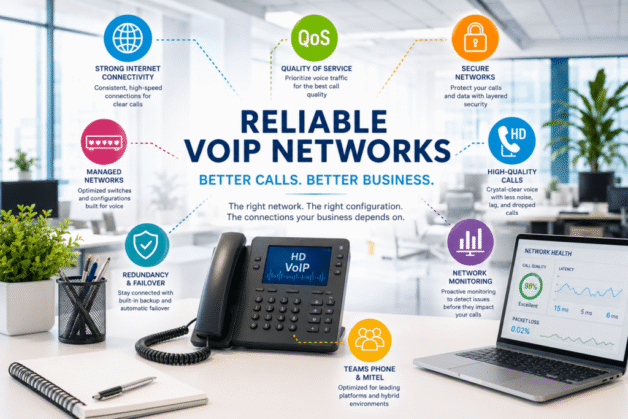
That means voice quality depends on much more than your phone system. A reliable VoIP network is built on the right infrastructure, thoughtful network design, and ongoing monitoring that keeps small issues from becoming business interruptions.
Whether you’re deploying a new cloud phone system, supporting an existing Mitel environment, or expanding Microsoft Teams Phone across multiple locations, your network plays a direct role in call quality, uptime, and the overall user experience.
In this guide, we’ll explain the key components of a reliable VoIP network, common causes of poor call quality, and practical ways to improve performance so your business communications remain clear, consistent, and dependable.
At A Glance: Reliable VoIP Network Essentials
A reliable VoIP network depends on more than bandwidth. Clear business communications require the right combination of network infrastructure, Quality of Service (QoS), voice VLANs, reliable switching and routing, ongoing monitoring, and redundancy to keep calls connected when network conditions change.
In this guide, you’ll learn:
What makes a VoIP network reliable
Why latency, jitter, and packet loss affect call quality
How QoS and voice VLANs prioritize voice traffic
When wired connections outperform Wi-Fi
Why network monitoring and redundancy matter
How Microsoft Teams Phone, Mitel, cloud, and hybrid communications rely on a healthy network
Common troubleshooting steps for poor call quality
A reliable VoIP network isn’t defined by a single piece of hardware or a fast internet connection. It’s the result of multiple components working together to deliver consistent, high-quality business communications.
Voice traffic is different from email or file downloads. A delayed email might go unnoticed, but even a fraction of a second of delay during a phone call can create choppy audio, echoes, or dropped conversations. That’s why business phone systems depend on networks designed to prioritize real-time voice traffic.
Whether your organization uses Microsoft Teams Phone, Mitel, or another cloud communications platform, every call relies on the health of your network. Routers, switches, firewalls, internet connectivity, structured cabling, and wireless infrastructure all play a role in delivering clear, reliable conversations.
The strongest VoIP networks are designed with reliability in mind. They prioritize voice traffic through Quality of Service (QoS), separate voice devices with dedicated VLANs when appropriate, monitor performance continuously, and include redundancy to reduce the impact of hardware failures or internet outages.
The sections below explore the key components that keep business communications running smoothly and the common issues that can affect call quality.
Network Design Is the Foundation of a Reliable VoIP Network
A reliable VoIP network starts long before the first phone is installed. It begins with a network designed to support real-time voice traffic alongside the other applications your business depends on every day.
A well-designed voice network considers the entire communications environment, including:
Switching infrastructure with sufficient capacity and Power over Ethernet (PoE) for IP phones
Business-grade routers and firewalls configured for voice traffic
Quality of Service (QoS) policies that prioritize calls over non-critical traffic
Voice VLANs that help separate voice devices from general network traffic when appropriate
Reliable structured cabling that supports consistent network performance
Internet connectivity that provides the stability and redundancy modern cloud communications require
Every business has different communication demands. A small office with a handful of users has very different networking requirements than a healthcare organization, manufacturer, or multi-location business handling hundreds of concurrent calls each day. Designing the network around how your organization communicates—not simply how many phones you have—creates a stronger foundation for long-term reliability.
Expert Insight
Reliable voice networks aren’t built by adding bandwidth after problems appear. They’re built by designing the network correctly from the beginning. When voice traffic is considered during planning instead of after deployment, organizations experience better call quality, fewer support issues, and a communications platform that can grow with the business.
How QoS, Latency, Jitter, and Packet Loss Affect VoIP Call Quality
Every VoIP call is made up of thousands of small packets of voice data traveling across your network. For conversations to sound natural, those packets must arrive quickly, consistently, and in the correct order. When they don’t, call quality suffers.
Four factors have the greatest impact on VoIP performance:
Quality of Service (QoS)
Quality of Service (QoS) allows your network to recognize voice traffic and prioritize it over less time-sensitive applications like file downloads or software updates. Without QoS, important business calls may compete with other network traffic, increasing the risk of delays and poor audio quality during busy periods.
Latency
Latency is the amount of time it takes for voice data to travel from one endpoint to another. High latency can make conversations feel delayed, causing participants to unintentionally interrupt one another or experience awkward pauses.
For most business VoIP deployments, one-way latency should remain below 150 milliseconds to maintain clear, natural conversations.
Jitter
Jitter measures the variation in how quickly voice packets arrive. Even if average latency is acceptable, inconsistent delivery can produce robotic audio, clipped words, or gaps in conversations.
A properly configured network helps keep jitter to a minimum by ensuring voice traffic follows a predictable path through the network.
Packet Loss
Packet loss occurs when some voice packets never reach their destination. Because live conversations cannot pause and resend missing packets, packet loss often results in missing words, distorted audio, or dropped calls.
Common causes include:
Network congestion
Overloaded switches or routers
Poor Wi-Fi coverage
Faulty cabling
ISP connectivity issues
Misconfigured network equipment
When organizations experience recurring call quality issues, these four areas are often the first place experienced communications engineers begin troubleshooting.
Expert Insight
Bandwidth alone rarely fixes poor call quality. In many business environments, properly configured QoS, stable switching infrastructure, and proactive monitoring have a greater impact on voice performance than simply purchasing faster internet service.
Should You Use Wi-Fi or Wired Connections for VoIP?
Today’s business Wi-Fi networks are faster and more reliable than ever, but that doesn’t mean every VoIP phone should connect wirelessly.
For employees using softphones on laptops or mobile devices, a well-designed business Wi-Fi network can provide excellent call quality. Modern wireless standards, proper access point placement, and sufficient coverage allow users to stay connected while moving throughout the office.
However, when reliability is the top priority, wired Ethernet connections remain the preferred choice for desk phones and other fixed communications devices.
A wired connection offers several advantages:
More consistent network performance with lower latency and jitter
Reduced susceptibility to wireless interference
Reliable Power over Ethernet (PoE) for compatible IP phones
Predictable call quality during periods of heavy network usage
Simplified troubleshooting when connectivity issues occur
That doesn’t mean Wi-Fi should be avoided. It simply needs to be designed with business communications in mind. Poor access point placement, overloaded wireless networks, or coverage gaps can all contribute to dropped calls, audio distortion, and inconsistent user experiences.
The right solution depends on how your employees work. Many organizations successfully combine wired desk phones with wireless devices, creating a flexible communications environment without sacrificing reliability.
Expert Insight
The question isn’t whether Wi-Fi or wired is “better.” The question is whether your network was designed for the way your employees communicate. Matching the connection method to the user and the environment consistently produces better results than applying a one-size-fits-all approach.
Why Proactive Network Monitoring Prevents VoIP Problems
The best time to fix a VoIP problem is before anyone notices it.
Many call quality issues don’t appear overnight. They develop gradually as network traffic increases, hardware ages, configuration changes are made, or internet performance fluctuates. Without visibility into what’s happening across the network, businesses often don’t discover a problem until employees start reporting dropped calls or poor audio quality.
Proactive network monitoring helps identify issues early by tracking the health of the infrastructure that supports business communications. Instead of reacting to complaints, IT teams can recognize trends and resolve potential problems before they disrupt daily operations.
An effective monitoring strategy includes:
Internet connection performance and availability
Network latency, jitter, and packet loss
Switch, router, and firewall health
Voice VLAN performance
Device availability and hardware alerts
Bandwidth utilization during peak business hours
Call quality trends across locations and users
Monitoring also provides valuable historical data. If users report intermittent call quality issues, performance trends can help determine whether the root cause is an internet outage, network congestion, hardware failure, or a configuration change.
For organizations with multiple offices or hybrid work environments, centralized monitoring becomes even more valuable by providing visibility across the entire communications infrastructure rather than requiring teams to troubleshoot each location independently.
Expert Insight
One poor call can be dismissed as a bad connection. A pattern of poor calls tells a different story. Businesses that monitor their communications environment continuously are far more likely to identify small issues before they become costly outages or widespread productivity problems.
Is Your VoIP Network Healthy?
Quick Health Checklist
Ask yourself:
Are call quality issues increasing during busy times of the day?
Have employees reported robotic audio, echoes, or dropped calls?
Can you quickly identify whether a problem is caused by your network, internet provider, or phone system?
Are your routers, switches, and firewalls monitored for performance and hardware issues?
Do you have visibility into latency, jitter, and packet loss over time?
If your primary internet connection fails, do you have a documented failover plan?
If you answered “no” to several of these questions, your network may benefit from a communications-focused assessment.
How Redundancy and Failover Keep Business Communications Running
Even the best-designed VoIP network can’t prevent every outage. Internet service interruptions, hardware failures, power disruptions, and unexpected equipment issues can happen without warning. The difference is how well your communications infrastructure is prepared to respond.
Redundancy and failover strategies help minimize downtime by ensuring there’s an alternate path for voice traffic when a component fails. Instead of bringing business communications to a halt, the network can continue operating while the underlying issue is resolved.
Depending on your environment, a business continuity strategy may include:
A secondary internet connection from a different provider
Automatic WAN failover or SD-WAN to redirect traffic during an outage
Redundant routers, switches, or firewalls in critical environments
Uninterruptible Power Supplies (UPS) to keep communications equipment running during short-term power interruptions
Cloud-based phone systems that allow employees to continue making and receiving calls from laptops or mobile devices if the office becomes unavailable
The right level of redundancy depends on how your organization communicates. For some businesses, a brief outage may be an inconvenience. For healthcare providers, manufacturers, financial institutions, public safety organizations, and customer service teams, even a few minutes of downtime can disrupt operations and affect customer experience.
Planning for failures isn’t about expecting the worst. It’s about building a communications environment that continues supporting your business when unexpected events occur.
Expert Insight
Business continuity isn’t defined by whether something fails—it’s defined by how quickly your organization recovers. A well-designed communications network assumes failures will happen and provides alternate paths to keep conversations moving.
Common Redundancy Options
Component
Primary Purpose
Business Benefit
Secondary Internet Circuit
Internet resilience
Maintains connectivity during ISP outages
SD-WAN or Automatic WAN Failover
Traffic rerouting
Keeps voice traffic online without manual intervention
UPS (Battery Backup)
Short-term power protection
Prevents calls from dropping during brief power interruptions
Cloud Communications Platform
Location independence
Employees can continue working from virtually anywhere
Redundant Network Hardware
Equipment resilience
Reduces single points of failure for critical infrastructure
Common VoIP Call Quality Problems and How to Troubleshoot Them
Even a well-designed VoIP network can experience occasional performance issues. The key is identifying the underlying cause instead of treating the symptoms. Many call quality problems have multiple potential causes, making a structured troubleshooting process essential.
The table below outlines some of the most common VoIP issues and where to begin investigating.
Problem
Possible Cause
Where to Start
Choppy or robotic audio
High jitter, network congestion, poor Wi-Fi
Check QoS policies, network utilization, and wireless coverage
Delayed conversations
High latency
Test internet performance and review routing between locations
Review internet reliability, failover status, and firewall logs
One-way audio
Firewall, NAT, or SIP configuration issues
Verify firewall rules and SIP settings
Echo during calls
Endpoint hardware, audio devices, network delay
Test alternate devices and inspect latency
Poor quality during busy hours
Network congestion or insufficient prioritization
Review bandwidth utilization and QoS configuration
While these issues may appear similar to users, the root cause is often different. A recurring problem shouldn’t be solved by replacing phones or increasing internet speed without first understanding what the network is telling you.
Effective troubleshooting typically follows a logical process:
Confirm whether the issue affects one user, one location, or the entire organization.
Review latency, jitter, and packet loss during the time the problem occurred.
Determine whether the issue is isolated to wired or wireless devices.
Review recent network or firewall configuration changes.
Evaluate internet provider performance if no internal network issues are identified.
A systematic approach helps resolve problems faster and prevents unnecessary equipment replacements or configuration changes that don’t address the real issue.
Expert Insight
One of the biggest mistakes organizations make is assuming every call quality issue is caused by their phone system. In reality, the network, internet connection, wireless infrastructure, endpoint devices, or firewall configuration are often contributing factors. Identifying the true source of the problem leads to faster resolution and more reliable business communications.
Frequently Asked Questions About Reliable VoIP Networks
What makes a VoIP network reliable?
A reliable VoIP network combines Quality of Service (QoS), low latency, minimal jitter, low packet loss, reliable internet connectivity, business-grade networking equipment, and proactive monitoring. Together, these components help deliver clear, consistent business communications while reducing downtime and call quality issues.
Does VoIP work well over Wi-Fi?
Yes, if the wireless network is designed for business communications. Modern Wi-Fi can support softphones and mobile users effectively, but desk phones and other fixed devices generally achieve the most consistent performance over wired Ethernet connections.
What causes poor VoIP call quality?
Common causes include:
High latency
Excessive jitter
Packet loss
Network congestion
Poor Wi-Fi coverage
Misconfigured firewalls
Failing switches or routers
Internet service interruptions
Identifying the root cause is often more important than replacing phones or increasing internet bandwidth.
Why is proactive network monitoring important for VoIP?
Continuous monitoring helps identify latency spikes, packet loss, hardware failures, and internet issues before they significantly impact users. Resolving problems early reduces downtime and helps maintain reliable business communications.
How much bandwidth does a reliable VoIP network need?
A reliable VoIP network combines Quality of Service (QoS), low latency, minimal jitter, low packet loss, reliable internet connectivity, business-grade networking equipment, and proactive monitoring. Together, these components help deliver clear, consistent business communications while reducing downtime and call quality issues.
What is Quality of Service (QoS) and why does it matter?
Quality of Service (QoS) allows your network to prioritize voice traffic over less time-sensitive data, such as large file downloads or software updates. Proper QoS configuration helps reduce latency, jitter, and packet loss, improving overall call quality.
Can Microsoft Teams Phone benefit from network optimization?
Absolutely. Microsoft Teams Phone relies on the same network infrastructure as other cloud-based voice platforms. Optimizing QoS, monitoring network performance, and maintaining reliable internet connectivity all contribute to clearer calls and a better user experience.
Should voice traffic be placed on a separate VLAN?
In many business environments, yes. A dedicated voice VLAN can help simplify network management, improve traffic prioritization, and enhance security. The best approach depends on your organization’s size, network design, and communications requirements.
When should a business consider a VoIP network assessment?
A network assessment is worthwhile if your organization is deploying a new cloud phone system, migrating to Microsoft Teams Phone, expanding to multiple locations, experiencing recurring call quality issues, or planning for future growth. Evaluating your network before problems arise often leads to better long-term performance and fewer unexpected disruptions.
Build a More Reliable VoIP Network
Whether you’re planning a new cloud communications deployment, optimizing Microsoft Teams Phone, supporting a Mitel environment, or troubleshooting recurring call quality issues, the network behind your phone system matters just as much as the phones themselves.
Towner Communications helps organizations design, optimize, and support reliable business communications networks that deliver clear conversations, minimize downtime, and scale with your business.
Ready to improve your VoIP network? Contact Towner Communications to schedule a business communications network assessment and talk with an experienced telecommunications specialist.
The business communications landscape is evolving significantly with technology, driven by smartphones, enabled by IP networks and advanced by new ways of working.
People are bringing their mobile phones and tablets to the office. The advent of BYOD (bring your own device) is changing IT costs and mobile strategies for businesses across the globe. Two large shifts underpin this change. 1) IT budgets are shifting from a Capex model, based on purchasing new equipment, to an Opex model, based on delivering security, enhanced compatibility and new processes. 2) Enterprises are supporting more of their enterprise functions on mobile devices, and enabling simpler communications solutions to be more deeply embedded into their apps and websites.
73% of senior executives see their mobile devices as critical to how they do business.
This creates the opportunity for enterprises to rethink internal and external processes. While most people do many things on their smartphones, Millennials (who make up one third of the world’s population) do almost everything on their preferred screens—phones, tablets, watches, and TVs. The majority of consumers will check a website before emailing or calling a company—which is transforming the way companies do business.
Layering in M2M, IoT and Big Data
But the mobile enterprise doesn’t end with simple mobile phones. Combining mobile advances with the growth of M2M and IoT means that enterprises can redesign processes and new customer experiences, adding personalized and contextual elements. Add in Big Data analytics and customer experiences can reach an entirely new level.
Imagine you open a chat with a call center agent to help you with your FitBit. Your FitBit has been transmitting real-time data back to the company, so the agent who answers your chat already knows that you restarted your FitBit 4 times. That agent can have more “contextual communications” with you since they have a more complete picture of what’s going on without you even having to relay the information—creating a faster, more effective, more accurate, more satisfying customer experience.
Bring on Real Time
The adoption of IP underlies the intersection of real-time communications between mobile and fixed carriers and today’s connected enterprise.
Real-time communications services bridge the convergence of communications – fixed, mobile and enterprise – and cloud. They allow operators and enterprises alike to extend experiences between domains. That means an employee can use the same business-critical voice and collaboration services at work as he or she uses on a mobile network. It also means a consumer can use the same high value services an employee does.
The game-changer is the seamless experience across both enterprise and wireless networks for the user.
It’s time for enterprises to look at the mobile evolution to not just virtualize, but revolutionize. The transformation to all-IP LTE and IMS networks is bringing revolutionary change to mobile services. The underlying transformation, driven by software virtualization, cloud and access like Wi-Fi, will impact every aspect of the mobile and enterprise ecosystem.
Deploying a new technology culture
Deployment models are changing from communications software installed on-premises to software purchased on-demand from the cloud. With cloud-based services offering a diverse set of voice features, unified communication and collaboration applications, enterprises have a wide range of choices and flexible deployment models to meet their unique communications requirements
The opportunity ahead is enabling simpler and more personal communications experiences.
Employees will no longer accept a culture of fragmentation for unified communications, but will look for opportunities to collaborate, and work more efficiently, effectively and seamlessly.
At Towner Communications, we know the way people fundamentally communicate in today’s business environment is increasingly mobile-centric. Voice is no longer the dominant mode of day-to-day business communications: messaging, IM, video, and web collaboration are all significant forms of real-time communications that are genuinely disrupting the way business is done.
It’s all coming together
Mobile + Enterprise + Cloud = Mobile Enterprise
Carriers of all types, including wireless, wireline operators and cable providers, are seeking to simplify their networks and operations while expanding their service delivery capabilities. This transformation is being driven by an underlying theme of IP convergence. Software-based, all-IP networks are sharing common enablers across consumer and enterprise services, eliminating process barriers. This is all coming together to provide new services while driving cost and inefficiency out of the system.
The growth of M2M combined with mobile device saturation means that enterprises can redesign processes and new customer experiences, adding personalized and contextual elements. Finally, as Big Data and analytics become more refined, the customer experience and journey will move to a new level.
As businesses and organizations look for cost savings, options to replace outdated legacy telecom systems and innovative ways to manage business growth, they are realizing that cloud communications provide new opportunities.
According to Gigaom, by 2020, North American companies will have over 27 million employees using hosted communications tools with the European market not far behind. And Towner Communications has a big piece of that hosted communications market—in 2015, we were named the #1 global market share leader in cloud communications for business, powering 1.6 million connections.
According to our research there are 10 major reasons companies are moving to cloud communications. The top reasons include cost savings, increased flexibility, increased scalability, and easier/fast deployment of applications and infrastructure. Find out the other top reasons by checking out our blog post. You can also explore seven key factors of whether or not your business should move communications to the cloud by downloading our paper “How Cloud Communications is Opening up Possibilities (and Floor Space).”
Here’s what Towner Communication hosted customers are saying about why they chose to move to a hosted solution:
“At Bancroft, our strategic goals are to become more agile, more affordable and more innovative. Mitel aligned with our company goals and has helped us unify our communications company-wide. Moving to the cloud allows us to see significant cost savings and be more agile.” – Fina Nash, VP of Information Technology, Bancroft
Read Bancroft’s story >
“When Mitel presented its cloud solution and the flexibility it provides, I realized it was the way for GPA to go moving forward.” —Mac McIntyre, VP of Technology, Group & Pension Administrators (GPA)
Read GPA’s story >
“The reliability, value and flexibility of our Mitel Cloud solution is a perfect fit for a growing startup.” – Warren Smith, Founder, Sacramento Republic Football Club LLC “The reliability, value and flexibility of our Mitel Cloud solution is a perfect fit for a growing startup.” —Warren Smith, Founder, Sacramento Republic Football Club LLC
Ready Sacramento Republic Football Club’s story >
“Our phone system is crucial and mission critical, especially when it comes to making 911 calls if necessary. It’s important to have a system that works well and is reliable.” —Don Ringelstein, Director of Technology, West Aurora School District