Business Phone Systems and VoIP Solutions in Kansas City
A business phone system should make it easier to reach customers, support employees and keep work moving, not create another technology problem to manage.
Towner designs, installs and supports business phone systems and VoIP solutions for Kansas City organizations. From cloud calling and Microsoft Teams integration to on-premises Mitel systems and hybrid environments, we help businesses select the right platform, move to it with less disruption and receive ongoing support from a local communications team that has served businesses since 1947.
Kansas City Business Phone Systems at a Glance
- Available options: Cloud VoIP, on-premises Mitel and hybrid phone systems
- Core capabilities: Business calling, mobile apps, voicemail, messaging, video meetings and call routing
- Integrations: Microsoft Teams, customer management platforms and other business applications
- Implementation: System planning, number porting, configuration, deployment and user training
- Ongoing support: Assistance from Towner’s Midwest-based communications team
- Best next step: Review your users, locations, current contracts, integrations and reliability requirements before selecting a platform
What Is a VoIP Business Phone System?
A VoIP business phone system carries voice calls over an internet protocol network instead of relying solely on traditional copper telephone lines. The system may be hosted in the cloud, managed on-site or designed as a hybrid environment.
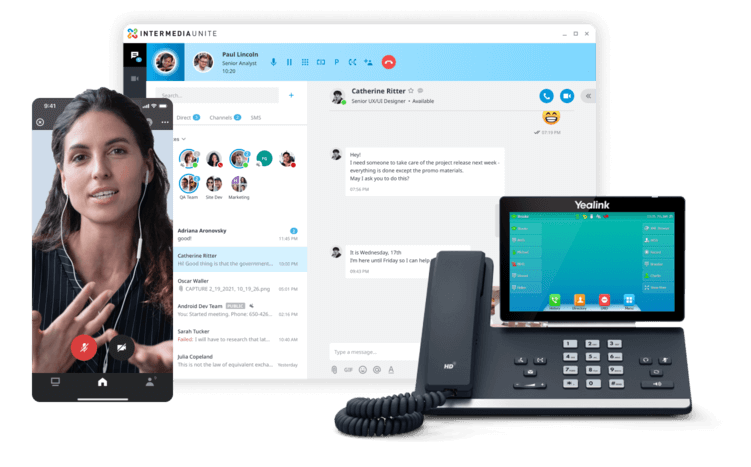
Employees can make and receive business calls using desk phones, computers, mobile apps or platforms such as Microsoft Teams. Administrators can manage users, phone numbers, call routing and system features through a central interface.
A properly planned VoIP system can provide:
- Auto attendants and call queues
- Call forwarding and mobile calling
- Voicemail-to-email
- Business texting
- Video meetings and team messaging
- Call recording and reporting
- CRM and Microsoft Teams integrations
- Easier expansion across users and locations
Business Phone System Options for Kansas City Organizations
The right phone system depends on how your organization works, the technology already in place and how much control you want over the platform. Towner supports cloud, on-premises and hybrid business communications environments.
Cloud VoIP Phone Systems
A cloud phone system places the core communications platform in secure provider-managed data centers. Businesses typically pay a recurring per-user fee and can use desk phones, desktop software and mobile apps without maintaining a phone server at each location.
Cloud systems are often a strong fit for growing companies, distributed teams and organizations that want simpler administration and predictable operating costs.
On-Premises Phone Systems
An on-premises platform, such as Mitel MiVoice Business, gives an organization greater control over its communications environment. It can support complex call routing, specialized integrations, campus environments and organizations that prefer to own or directly manage their core system.
Hybrid Phone Systems
A hybrid design combines existing on-premises technology with selected cloud services. This can help an organization modernize in stages, preserve useful investments or accommodate different requirements across locations.
The best choice is not automatically the newest option. It is the platform that fits your users, locations, integrations, reliability requirements, budget and long-term plans.
How Does VoIP Work?
- Internet-Based Calling: VoIP takes your voice, turns it into digital signals, and shoots it over the internet. Boom—you’re connected. When you call someone with a regular phone number, VoIP translates it back to regular phone signals.
- All the Bells and Whistles: VoIP isn’t just about making calls. We’re talking about features like call forwarding, voicemail to email, auto attendants, and even conference calling—everything you need, all in one sleek package.
- Built to Grow: Adding or removing users? Piece of cake. VoIP scales with you, making it perfect for businesses that plan to grow (or shrink—no judgment here).
Why Choose a Local Kansas City Business Phone Provider?
A business phone system affects customer service, sales, internal communication and daily operations. The provider should understand more than licensing and handset prices.
Working with a Kansas City communications company gives your organization access to people who can evaluate the existing environment, coordinate installation and provide support after deployment.
Towner’s local approach includes:
- System planning: We review users, locations, call flows, integrations and growth plans before recommending a platform.
- Multiple deployment options: Cloud, on-premises and hybrid solutions allow the recommendation to follow the business requirement.
- Number-porting coordination: Existing business numbers are moved through a planned process designed to reduce disruption.
- On-site capabilities: When a problem requires someone at the location, Towner has technicians serving Kansas City and the broader Midwest.
- Training and ongoing support: Employees and administrators receive guidance for using and managing the new system.
- Long-term communications experience: Towner has helped businesses navigate changing telephone and communications technology since 1947.
Kansas City Business Phone System Case Study: Cascade Hotel
When Cascade Hotel prepared to open in Kansas City’s Country Club Plaza district, its phone system needed to support both hotel operations and the guest experience. The platform had to connect employees across departments, route guest requests correctly and integrate with the hotel’s property management technology.
The Challenge
Cascade needed a dependable communications system for front-desk calls, room-service requests, internal coordination and other guest services. The hotel also needed a local partner capable of planning, configuring and supporting the system through its opening.
The Solution
Towner worked with the Cascade team to implement a VoIP business phone system designed around the hotel’s operating requirements. The deployment included:
- Integration with the hotel’s property management system
- Customized routing for departments and guest services
- Centralized administration for calls and voicemail
- Configuration and support from Towner’s Kansas City team
The Results
Following implementation, Cascade Hotel reported:
- A 25% increase in staff efficiency
- More positive guest feedback about reaching hotel services
- A smooth opening supported by a properly configured communications system
“Partnering with Towner was one of the best decisions we made. Their team handled everything seamlessly, and the VoIP system has been a game-changer for us. Our guests are happy, our staff is happy, and we’re definitely happy.” — Bob D., Cascade Hotel
How to Choose a Business Phone System in Kansas City
Comparing phone systems requires more than reviewing features and monthly prices. Before selecting a platform or provider, evaluate these seven areas:
1. Calling Requirements
Document the number of users, locations, phone numbers, call queues, auto attendants and specialized workflows the system must support.
2. Deployment Model
Decide whether a cloud, on-premises or hybrid system best fits your operational, financial and technical requirements.
3. Network Readiness and Reliability
Confirm that the network can prioritize voice traffic and support the expected call volume. Also determine how calls should continue during an internet, power or carrier outage.
4. Business Integrations
Identify required connections with Microsoft Teams, customer relationship management software, contact center tools, property management systems and other applications.
5. Implementation and Number Porting
Ask how the provider will configure the system, move existing telephone numbers, test call flows and coordinate the transition.
6. Training and Support
Understand who provides employee training, administrator guidance and ongoing technical support—and whether on-site assistance is available when required.
7. Total Cost and Contract Terms
Compare equipment, licensing, installation, support, taxes, fees, contract length, renewal provisions and potential termination costs. The lowest monthly price does not always represent the lowest operational cost.
What to Expect During a Business Phone System Deployment
Towner plans each deployment around the organization’s existing environment, operating requirements and transition schedule.
1. Discovery and Assessment
We document users, locations, current numbers, call flows, integrations, network conditions and known problems with the existing system.
2. System Design
Towner recommends a cloud, on-premises or hybrid configuration based on the organization’s requirements. The design identifies licensing, equipment, applications, integrations and implementation responsibilities.
3. Configuration and Number Porting
The new system is configured before launch. Telephone numbers, users, auto attendants, queues, schedules and routing rules are prepared and tested.
4. Deployment and Training
Towner coordinates the transition, installs or activates the required technology and trains employees and system administrators.
5. Ongoing Support
After deployment, Towner continues to assist with troubleshooting, user changes, system administration, feature adoption and future expansion.
Frequently Asked Questions About Business Phone Systems in Kansas City
How much does a business phone system cost?
Cost depends on the number of users, deployment model, equipment, features, integrations, implementation requirements and support plan. A proper quote should identify both recurring charges and one-time costs, including licensing, phones, installation, number porting, taxes and fees.
Is a VoIP phone system reliable?
VoIP reliability depends on the communications platform, internet connectivity, local network, power protection and outage planning. A properly designed system may use redundant connections, mobile applications, call forwarding and other continuity measures to keep calls moving when one component fails.
Will we need to replace our desk phones?
Not always. Compatibility depends on the existing phone models and the selected platform. Towner can determine whether current equipment can be reused or whether new desk phones, conference phones, headsets or mobile applications are required.
How long does implementation take?
The timeline depends on the number of users and locations, equipment availability, integrations, number-porting requirements and project complexity. Towner establishes the implementation schedule after assessing the existing environment and confirming the project scope.
Can we keep our existing business phone numbers?
In most cases, existing numbers can be transferred to the new provider. Number availability and porting requirements must be confirmed before the transition. Do not cancel the current telephone service until the numbers have been successfully moved and tested.
Should we choose a cloud or on-premises phone system?
Cloud systems often provide easier administration, mobility and predictable recurring costs. On-premises systems can offer greater control and support specialized environments. Hybrid systems combine elements of both. The right choice depends on the organization’s operations, integrations, budget and long-term plans.
Can a business phone system work with Microsoft Teams?
Yes. Depending on the platform and licensing, business calling can be integrated with Microsoft Teams so employees can make and receive external calls within Teams. The design should account for call routing, number management, network readiness and support responsibilities.