In today’s fast-paced digital landscape, staying ahead of the curve means leveraging the best tools and partners available. We at Towner Communications are thrilled to announce that our partner, Intermedia, has achieved a significant milestone, solidifying their position as a leader in delivering top-notch customer experiences. With their latest Microsoft Certification, Intermedia continues to prove why they are an industry frontrunner, and we, as their premier partner, are excited to bring these unparalleled solutions to you.
What Being A Microsoft Teams Certified Partner Means for Your Business
As Intermedia’s premier partner, Towner now offers you the best-in-class solutions that are Microsoft Teams Certified. This certification is not just a badge; it’s a testament to the rigorous standards and exceptional capabilities that Intermedia brings to the table. Here’s why this matters:
Seamless Integration:
Microsoft Teams Certification ensures that the solutions we provide integrate flawlessly with Microsoft Teams, enhancing your business communication and collaboration.
Reliability:
Certified solutions provide you with robust, reliable, and secure tools, all tested and verified by Microsoft.
Enhanced Customer Experience:
Intermedia’s certified solutions streamline your customer interactions, making them more efficient and ensuring better satisfaction and loyalty.
The Power of Partnership
Partnering with Intermedia allows Towner to offer you a comprehensive suite of solutions that are both innovative and trustworthy. Our collaboration means you benefit from:
Cutting-edge Technology:
Access to the latest advancements in customer experience management.
Expert Support:
Our teams are trained and equipped to support your business needs, ensuring you get the most out of your technology investments.
Scalability:
As your business grows, our solutions can scale with you, providing the flexibility needed in today’s dynamic market.
Why Choose Towner Communications?
At Towner, we pride ourselves on being more than just a service provider. We are your partners in success. Here’s what sets us apart:
Industry Expertise:
With years of experience and deep industry knowledge, we understand the unique challenges businesses face today.
Customer-Centric Approach:
Your success is our priority. We work closely with you to tailor solutions that meet your specific needs.
Proven Track Record:
Our partnership with Intermedia and Microsoft Teams Certification speaks volumes about our commitment to excellence.
In a world where customer experience can make or break a business, having the right tools and partners is crucial. With Towner and Intermedia by your side, you’re not just getting certified solutions; you’re getting a team dedicated to your success.
Ready to take your business to the next level with Microsoft Teams Certified solutions? Contact Towner Communications today and discover how Towner can help you deliver exceptional customer experiences
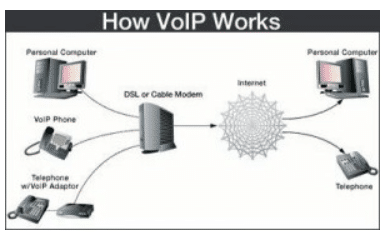
Switching to VoIP (Voice over Internet Protocol) can revolutionize your business communications, offering flexibility, scalability, and cost savings. But before you make the switch, there’s one crucial factor to consider: bandwidth. Without the right bandwidth, even the best VoIP system can falter. For businesses in Kansas City, where internet connectivity varies across neighborhoods and industries, understanding your VoIP bandwidth requirements is essential.
In this guide, we’ll break down everything Kansas City businesses need to know about VoIP bandwidth requirements, from what it is, why it matters, and how to calculate it, to optimizing your connection for seamless communication. Let’s dive in!
What is Bandwidth, and Why Does It Matter for VoIP?
Bandwidth refers to the maximum amount of data your internet connection can handle at any given time. Measured in Mbps (megabits per second), bandwidth determines how quickly and reliably data can be sent and received. For VoIP, this is critical because voice data packets must travel in real-time, without delays or interruptions, to ensure clear and uninterrupted calls.
Why Bandwidth Matters for VoIP:
Call Quality: Insufficient bandwidth leads to poor call quality, including dropped calls, jitter, or delays.
Scalability: As your Kansas City business grows, your bandwidth must support more simultaneous calls and other internet-based activities.
Customer Experience: For customer-facing industries, poor VoIP performance can hurt your reputation.
Minimum Bandwidth Requirements for VoIP
The bandwidth required for VoIP depends on several factors, including:
Number of Users: More simultaneous calls require higher bandwidth.
Codec Used: Codecs compress and decompress voice data. For instance, G.711 (uncompressed) requires more bandwidth than G.729 (compressed).
General Bandwidth Guidelines:
G.711 Codec: Requires approximately 85 kbps (kilobits per second) per call.
G.729 Codec: Requires about 31 kbps per call.
Example Calculation:
If your Kansas City office has 20 employees, and 10 are typically on calls simultaneously, here’s what you need:
Add at least 20% overhead for stability, bringing the total to approximately 1 Mbps for G.711 or 0.4 Mbps for G.729.
Bandwidth Challenges for Kansas City Businesses
1. Neighborhood Connectivity Variances
While areas like Downtown Kansas City and Overland Park often enjoy high-speed internet, businesses in more rural areas like Northland or Grandview may face limited options. Always check local ISPs to ensure they can deliver the required speeds.
2. Simultaneous Internet Usage
Bandwidth isn’t just for VoIP. If your team streams videos, downloads large files, or uses cloud-based applications, those activities consume bandwidth, leaving less for VoIP.
3. Network Congestion
Kansas City businesses operating in shared office spaces or during peak hours may experience congestion, affecting VoIP performance.
How to Calculate Your VoIP Bandwidth Needs
Step 1: Assess Simultaneous Users
Estimate the maximum number of simultaneous calls at peak times.
Step 2: Determine the Codec
Check with your VoIP provider to understand which codec your system uses.
Step 3: Account for Overhead
Add a buffer (20%-30%) to ensure consistent performance, even during busy periods.
Step 4: Factor in Other Activities
Consider additional bandwidth for internet browsing, video conferencing, and other data-heavy tasks.
Optimizing Bandwidth for VoIP in Kansas City
Here are actionable steps to ensure your bandwidth supports seamless VoIP communication:
1. Upgrade Your Internet Plan
Work with a local ISP to secure a business-grade plan with guaranteed speeds. Providers like Google Fiber and Spectrum offer reliable options for Kansas City businesses.
2. Prioritize VoIP Traffic with QoS
Quality of Service (QoS) settings allow you to prioritize VoIP traffic over other types of data, reducing lag and improving call quality.
3. Use Wired Connections
Whenever possible, connect VoIP phones via Ethernet cables instead of Wi-Fi to avoid interference and ensure stability.
4. Monitor and Adjust
Regularly test your bandwidth using tools like Speedtest.net and adjust your plan as needed.
Why VoIP is a Smart Choice for Kansas City Businesses
VoIP isn’t just about cutting costs—it’s about improving communication and enabling growth. Here are a few Kansas City success stories:
Downtown Startups: Small teams saved thousands annually by switching to VoIP without compromising call quality.
Healthcare Practices in Overland Park: Ensured HIPAA compliance while optimizing bandwidth for seamless patient communication.
Reliable options include Google Fiber for high speeds and Spectrum for widespread availability.
Let’s Optimize Your VoIP!
Ready to boost your communication game? Towner Communications is here to help Kansas City businesses optimize bandwidth for VoIP. Contact us today for a free consultation, and let’s ensure your system runs smoothly!
For a limited time, get your hands on a FREE device or enjoy instant rebates on select devices when you purchase an ELEVATE seat
DEVICES TO UP YOUR GAME
Check out this quarter’s promotional headsets, and accessories tailored to suit your business requirements. No need for complicated setups – simply plug your headset into your computer, and you’re good to roll.
Yealink WH62 Mono
Acoustic Shield Technology
Wireless range up to 525 ft
Multiple device connection
Logitech C270
Connection: USB-A Resolution: 720p Frame Rate: 30 fps Field of View: 60-degrees
In today’s digital age, small and medium-sized businesses (SMBs) need nimble communication solutions that scale with their growth. Cloud communications have become the secret sauce, offering flexibility and powerful features that empower businesses to stay competitive and agile.
Main Takeaways
Scalability and Flexibility: Cloud communications adapt effortlessly as your business grows, ensuring your infrastructure always fits your evolving needs.
Cost Efficiency: Pay only for what you use, saving significantly on upfront and maintenance costs compared to traditional systems.
Remote Work Enablement: Seamless collaboration across dispersed teams with features like video conferencing, virtual phones, and instant messaging.
Integrations: Advanced features like AI analytics and integrations with key business tools enhance productivity and customer service.
Disaster Recovery and Reliability: Keep your communications running, even during emergencies, with secure data storage and failover capabilities.
Data Analytics for Informed Decisions: Gain actionable insights from call volumes and customer interactions to refine strategies and support growth.
Scalability and Flexibility
With cloud communications, expanding to new users, offices, or features is a breeze. No more rigid infrastructure—just easy scaling to meet changing demands and support your growth.
Cost Efficiency
Traditional systems are costly, but with cloud communications, you pay as you go, managing budgets effortlessly while benefiting from the provider’s maintenance and upgrades.
Remote Work Enablement
Cloud communications enable remote work with ease, keeping teams and clients connected through virtual phone systems, video conferencing, and instant messaging.
Integrations
Integrate with your favorite business tools and leverage AI analytics, video conferencing, and more to streamline workflows and improve customer service.
Disaster Recovery and Reliability
Stay resilient during unexpected events with robust disaster recovery capabilities that keep your communications running, even in emergencies.
Data Analytics for Informed Decisions
Leverage cloud analytics to uncover insights that refine your strategies, optimize customer experiences, and align your communication with business goals.
Empower Your Business with Cloud Communications
Ready to supercharge your communications? Cloud communications provide the flexibility, cost efficiency, and powerful features SMBs need to thrive. Get in touch for a personalized consultation to discover how our solutions can be tailored to your business, driving scalable growth and success.
Lots of people are familiar with VoIP—Voice over Internet Protocol, which allows you to make affordable calls over the internet. For years, this technology has provided the benefit of low-cost, high-quality conversations.
Yet, there’s another technology that has become just as vital, particularly for businesses. Since 1996, Session Initiation Protocol, or SIP, has revolutionized the way VoIP is accessed, making it a staple in today’s tech landscape.

Considering a cloud-based private branch exchange using VoIP? You’ll probably need SIP trunking. Let’s explore the role of SIP trunk port numbers and determine how many SIP trunks you actually need.
Key Points:
Towner SIP trunking facilitates VoIP for both voice calls and multimedia communications.
With Towner SIP trunking, you gain access to unlimited business lines at a low cost because the system operates virtually.
The crucial SIP trunk port numbers are 5060 and 5061, which manage the majority of your VoIP communications; however, with Towner’s world-class support, managing these details becomes hassle-free.
What Is SIP, and What’s Its Role in VoIP?
VoIP was the breakthrough technology that made digital calling over the internet possible. However, there was a challenge in enabling these calls to connect across different systems and providers.
SIP technology provided the solution and has since become the standard for facilitating VoIP communications. Think of it this way: if a VoIP call is like a subway car carrying your messages, then SIP is the station and tracks that guide each car to its destination.
SIP manages the initiation of calls, maintaining the connection, and disconnecting calls when finished.
Moreover, SIP has enabled the integration of video and text messaging into your VoIP systems. This is why you can upgrade your cloud-based PBX into a comprehensive unified communications service without needing extra devices or hardware.
What Exactly Is a SIP Trunk?
Trunking is the process that links your PBX lines both internally and with the external world, facilitating calls. Ever wonder where the term “trunk” originated? Historically, an analog PBX was connected to the outside world using a physical trunk device.
Here’s an easy way to picture it: Imagine a PBX as a tree filled with separate extensions or branches. These branches would connect to the outside world of public switched telephone lines through a trunk.
So, a trunk essentially acts as a central hub connecting a group of lines. In the past, due to the limitations of physical hardware, a traditional T3 trunk could handle only up to 28 lines. If more lines were needed, additional trunks were required.
However, the advent of SIP technology has revolutionized this setup. With everything being virtual, a single SIP trunk can support virtually unlimited lines.
How Many SIP Trunks Are Necessary for Your Business?
You might have already guessed the answer to this question: You only need one SIP trunk! This is because these virtual solutions allow you to host unlimited lines (or “channels”) on your system.
So, the real question becomes: How many channels do you need for SIP trunking?
Although the system is virtual, the calls, conferences, and messages your system handles are still transmitting data. Your provider manages this data securely from their data centers, which is why professional VoIP and SIP trunking services still come at a cost.
Additionally, consider that the number of channels and the volume of calls you manage will require adequate internet bandwidth to ensure smooth and clear connections. It’s wise to discuss your needs with your communications service provider to determine if you need to upgrade your internet to a service that can adequately support a business line.
What Is the Purpose of a SIP Trunk Port Number?
Talking about SIP port numbers can dive deep into technical jargon pretty fast. You don’t need to grasp all the details unless you’re an IT professional.
What’s important to know is that these ports are virtual pathways that manage the flow of data for various activities. The two main port numbers used for SIP traffic are 5060 and 5061.
Port 5060 facilitates the majority of your VoIP calls through quick, non-encrypted connections. In contrast, Port 5061 is designated for traffic that requires transport layer security.
Previously, knowing these port numbers was crucial for troubleshooting. However, with today’s advanced cloud-based VoIP business lines, these details are often handled by your service provider. They should provide 24/7 support to monitor your system and guide you through any troubleshooting steps as needed.
What Advantages Does SIP Trunking Offer?
If you’re still using a legacy PBX, you might be wondering if it’s worth making the switch to the cloud. Here’s why it definitely is:
Cost Savings: Virtual systems are generally cheaper to start with, and you won’t have to pay for extra lines. You can easily scale your system up or down as needed without additional costs.
Remote and Hybrid Work Capabilities: With a secure communications system that only requires internet access, you can maintain reliable communication with your team, no matter where they are.
Reliable, Future-Proof Technology: Your service is supported by multiple data centers through your provider, ensuring business continuity even during outages or disasters.
For more insights, consider the experiences of customers who have successfully transitioned to a cloud-based phone service.
Ready to Upgrade Your PBX to the 21st Century with SIP Trunking?
Towner SIP trunking simplifies the process of setting up a virtual business line more than ever before. Many companies can even have their cloud-based PBX up and running within just a few days, or sometimes even on the same day!
To tap into the advantages of SIP trunking, reach out to us at Towner. Whether you’re modernizing an old system or building from the ground up, we’ll help you boost flexibility and cut costs with a contemporary business phone service.
As a dynamic professional navigating a bustling schedule, optimizing every moment and resource is paramount. Your clients echo this sentiment, seeking assurance that you value their time with swift and seamless interactions.
This is where the auto attendant emerges as an indispensable asset for forward-thinking businesses. Among the quarter of companies eager to amplify operational efficiency, investing in this technology is a strategic move.

Dive into the capabilities of auto attendants and discover why integrating one into your communication strategy is essential.
Key Points:
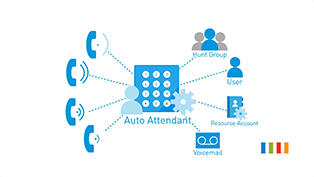
An auto attendant acts as a digital receptionist, efficiently managing and directing your company’s incoming calls.
An Interactive Voice Response (IVR) system represents a sophisticated iteration of the auto attendant, designed specifically for contact center environments.
By integrating auto attendants, businesses can significantly reduce operational costs and enhance overall efficiency.
The Mechanics of Auto Attendants
An auto attendant serves as a virtual system designed to welcome callers and guide them to their intended destination within your organization’s phone system. This automated solution seamlessly directs calls to specific extensions, eliminating the need for a live operator. Aptly termed a “virtual receptionist,” it offers an efficient call management solution.
Upon calling, the auto attendant greets individuals with a menu of options, allowing them to directly dial their desired department or person.
A pivotal aspect of the auto attendant’s functionality is its capability to manage calls beyond regular office hours. It serves as a reliable alternative when direct human interaction isn’t available, during after-hours, or amidst peak calling periods.
Furthermore, the system plays a crucial role in maintaining call flow and preventing bottlenecks. If the caller does not respond or act within a specified timeframe, the auto attendant ensures to clear the line by terminating the call.
Auto Attendant vs. IVR: Understanding the Difference
Auto attendants and IVR systems streamline calls but serve distinct business needs. IVR emerges as an evolved form of auto attendant, tailored for contact centers grappling with a high volume of calls. It’s the go-to choice for organizations entrenched in continuous customer support or outbound sales activities.
Auto attendants fit smaller businesses with manageable call volumes, sans constant outbound efforts.
A notable capability of IVR is its ability to comprehend spoken commands from callers, in addition to recognizing keypad selections. Enables extensive self-service like transactions, appointments, and accessing info without human help.
For companies looking to streamline their communication technologies into a cohesive system, unified communications offer a solution. An auto attendant is part of the broader UCaaS platform, like Towner Cloud. For advanced IVR needs, platforms like Intermedia Contact Center with Easy-IVR blend sophistication with UCaaS benefits.
Essential Features of Auto Attendants for Progressive Businesses
Innovative businesses choose unified communications with auto attendants for superior service and team collaboration. Wondering which system to select? Consider these pivotal features.
Simplicity in Setup and Customization
The value of an auto attendant diminishes if the navigation menu becomes so convoluted that callers invariably require direct human assistance to reach their desired contact. This scenario not only aggravates customers but also burdens your staff.
It’s crucial to have the capability to effortlessly craft and refine your menus to suit your customers’ needs. For instance, placing the most frequently sought-after departments or personnel prominently can streamline the calling process. Furthermore, ensuring clarity in distinguishing between departments with overlapping roles is essential to direct callers accurately.
Moreover, the incorporation of intuitive administrative interfaces enables the tailoring of menus for specific operational hours or geographical considerations, allowing for the customization of caller experiences based on the time or location of the call.
Managing High Call Volumes
It’s imperative to equip your auto attendant system and overall communications framework to manage the entirety of your incoming call traffic. A system that frequently disconnects callers can lead to customer attrition. Towner’s UCaaS offers unlimited calling capacity, ensuring all caller needs are met.
Directory Access via Name Dialing
A dial-by-name directory lets customers skip menus to quickly reach specific contacts. This feature enables callers to input the initial letters of an individual’s name, swiftly connecting them to the appropriate party.
Streamlining Communication with Multi-Format Message Delivery
Enhance efficiency for your team by enabling specific numbers to receive communications via text, email, or fax. This flexibility allows recipients to choose their preferred method of message delivery, facilitating quicker and more effective responses.
Spam Call Management
Configure your auto attendant to eliminate disruptive spam calls, enhancing productivity. You can achieve this by programming the system to automatically block calls from specific numbers or area codes. Alternatively, by requiring all callers to enter a basic keypad response upon connecting—a task spam bots cannot perform—you ensure that unauthorized calls are promptly disconnected, keeping your lines clear and your workflow uninterrupted.
Menus in Multiple Languages
Catering to a global audience? Offer multilingual menus to ensure easy access for all customers to appropriate contacts.
Start Today with Towner’s Auto Attendant
Use an auto attendant for 24/7 virtual reception, managing call flow with ease. Ready to leverage the comprehensive advantages of an auto attendant within a unified communications framework? Reach out to Towner to discover the steps to initiate your setup.
For decades, interactive voice response (IVR) systems have been a cornerstone of contact center operations. Despite their proven track record in efficiently managing incoming calls for countless businesses, some have been hesitant to adopt this technology.
If you prioritize offering a personalized experience to your clientele, you might resist automating certain aspects of your business communications, including customer interactions. However, by overlooking IVR, you could be forfeiting valuable benefits and opportunities for both you and your customers.
Key Points:
Save money on operations and enhance customer analytics by implementing an IVR service.
Improve the customer experience and increase team productivity with an IVR system.
Elevate your company’s professionalism through the use of IVR software.
Recognizing 7 Telltale Signs for Implementing an IVR Service:
While there may be numerous reasons to consider implementing an IVR service, the following list highlights seven of the most compelling ones.
1. Seeking Solutions for Reducing Operational Expenses
Implementing an IVR service eliminates the necessity of hiring receptionists, a cost that can escalate significantly, especially for businesses operating round the clock to serve a global clientele. Unlike traditional setups, IVR systems are typically integrated into contact center as a service (CCaaS) software, offering standard features. Moreover, modern IVR platforms come with intuitive dashboards, simplifying setup and customization without the need for hiring additional programmers or technicians.
2. Your Team Needs Enhance Customer Analytics Capabilities
In today’s business landscape, data has emerged as one of the most prized assets, often surpassing the value of traditional commodities like oil, as famously stated by The Economist. Understanding your customers is paramount to delivering exceptional service. An IVR service serves as a potent tool for gathering valuable analytics, offering insights into both overall customer behavior and individual preferences.
For instance, with an IVR system, you can effortlessly monitor metrics such as customer satisfaction and abandonment rates. Additionally, you have the flexibility to design IVR surveys, enabling callers to provide direct feedback. Armed with these insights, you can optimize your operations and deliver enhanced value to your clients.
3. You seek to provide self-service options to ensure caller privacy during interactions
Ensuring data privacy and security is paramount for all individuals. Customers must feel confident that they can share or receive sensitive information without the risk of interception. An IVR service addresses this concern by enabling callers to input PINs or passwords manually or access confidential details through an automated system.
For instance, financial institutions utilize IVR to provide account information securely, while healthcare facilities deliver test results to patients discreetly. This approach fosters customer trust and encourages engagement with your services, subtly nurturing brand loyalty.
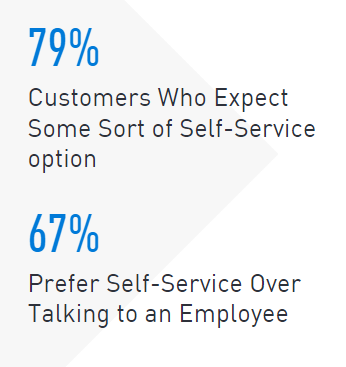
Despite initial reservations about interacting with automated systems, studies indicate that customers prefer seamless self-service options over cumbersome processes. By implementing a user-friendly IVR system with a clear menu structure, customers can efficiently access information and resolve issues independently, reducing time spent on the interaction.
4. You aim to enhance agent efficiency and engagement within your organization
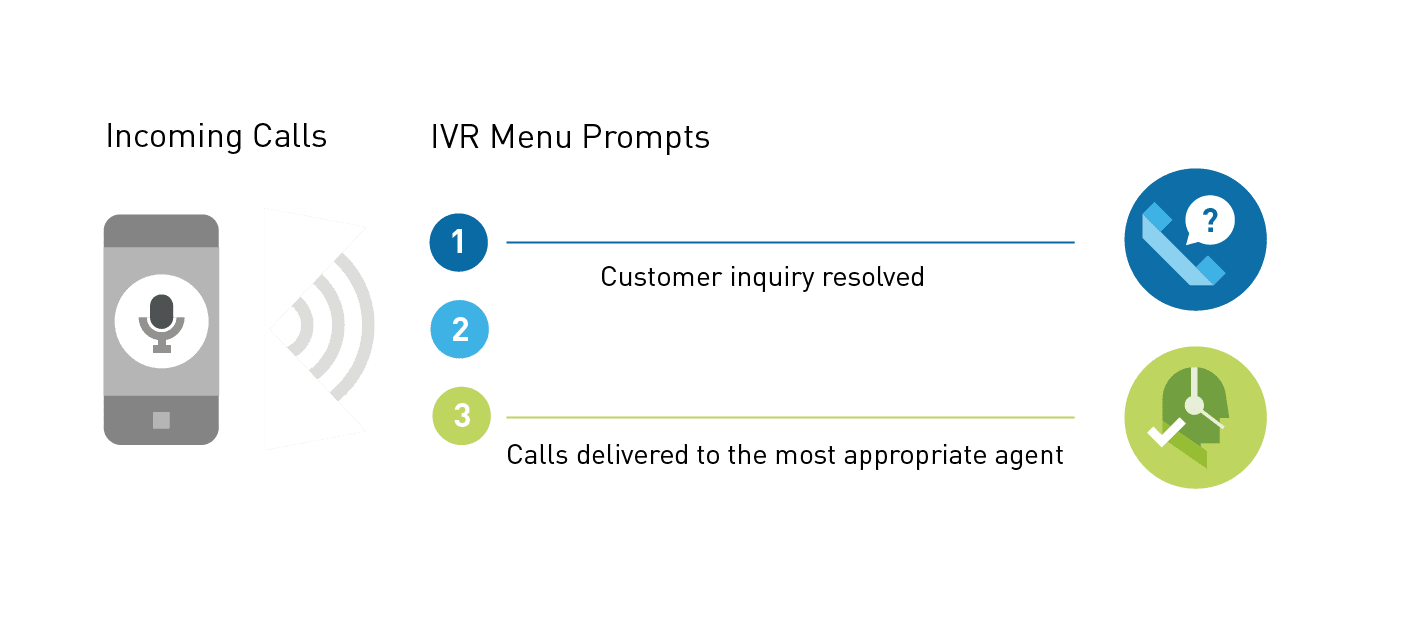
By leveraging an IVR service to automate routine tasks like call forwarding and prioritization, you empower your agents to concentrate on addressing more intricate customer concerns. Through this automation, your IVR system can gather pertinent caller information and relay it to agents prior to call initiation.
For instance, callers can provide key details about their identity and issues before engaging with a human agent. This allows the agent to prepare adequately, potentially leading to a higher rate of first-contact issue resolution.
Enhanced efficiency also correlates with increased employee engagement. Focusing on higher-level tasks provides agents with a greater sense of achievement and facilitates opportunities for upskilling and cross-training. Consequently, your contact center benefits from stronger, more versatile teams, leading to improved retention rates and reduced hiring costs.
5. You want to give priority to your top-tier customers
An IVR service collaborates with automatic call distribution to expedite customer-agent connections. Moreover, you can configure the system to prioritize your VIP clients by assigning specific rules, ensuring they receive expedited service.
Integrating your customer relationship management software with your contact center enables agents to promptly retrieve customer details, allowing for personalized greetings and premium service. This tailored approach not only fosters customer loyalty but also creates opportunities for upselling and maximizing customer lifetime value.
6. You need to minimize errors
As much as you and your team dislike transfer errors, your customers likely find them even more aggravating. Such frustrations may drive callers to seek alternatives with your competitors. Utilizing an IVR service significantly decreases the likelihood of callers being routed incorrectly or enduring prolonged hold times, thereby enhancing customer satisfaction and retention.
7. You want to enhance your professional image
Implementing an IVR service enhances your company’s professional image by enabling swift responsiveness and round-the-clock call handling. Unlike the impersonal automated systems of the past, you have the option to personally record messages or enlist a professional voice actor for a polished touch. Additionally, advancements in text-to-speech technology have made interactions more natural and pleasant.
Moreover, IVR services now leverage natural language processing, allowing for more conversational interactions with callers. Customers no longer need to restrict themselves to predefined words or phrases; instead, they can engage with the system naturally, simplifying query handling.
Towner Intermedia’s IVR Service Simplifies Onboarding
Are you ready to leverage a top-tier communications platform with exceptional IVR service capabilities? Explore why Towner’s Intermedia Contact Center offers all the essentials you require.
Thinking of upgrading your communications system for your government, education, or nonprofit agency? You’ve got two solid choices to meet your bidding needs:
Request for Proposal (RFP)
Sourcewell Contract Purchasing
What’s the Deal with Bid Requirements?
Bid requirements are essential for publicly funded agencies. They ensure fairness by giving companies an equal shot at winning agency business through a standardized bidding process. Additionally, bid requirements help agencies track and document their spending of allocated funds. While the traditional method has been an RFP, the Sourcewell cooperative purchasing contract might be a better fit depending on your needs.
The Classic RFP The Request for Proposal (RFP) process aims to foster fair competition among companies vying for available work. According to Investopedia:
An RFP tailored to a specific program may task companies with assessing bids for their feasibility, the bidder’s financial health, and their capability to execute proposed plans. While the RFP may offer detailed project or program information, it often leaves room for bidders to outline their approach to completing the project or running the program.
Although this process was crafted with noble intentions, it can pose procurement challenges for government, education, and nonprofit agencies. Brian Pullen of Playground, Inc., shared insights on the RFP’s efficacy, stating:
The RFP was originally devised to address various issues, with fairness, structure, clarity, and accessibility being key concerns. It aimed to level the playing field for all companies interested in pitching their proposals. Moreover, it establishes a standardized framework for crafting and submitting proposals. By enhancing upfront communication of essential requirements, the RFP aims to bring clarity to pitching agencies. Lastly, through a standardized document, agencies can widely distribute information, enabling numerous entities to obtain and pitch, thus fostering a broader range of options.
What are the Hurdles with RFPs for Government, Education, and Nonprofit Agencies?
Initially, RFPs may hinder the quality of responses received, albeit not necessarily the quantity. Given the time investment required to respond, agencies may encounter the following:
Premier agencies opt out of responding altogether.
Businesses are selective, responding only if they anticipate significant gains or high odds of success.
Respondents may allocate minimal effort to their proposals.
Moreover, the RFP process proves exceedingly time-consuming for agencies initiating bids. Typically, this entails:
Identifying potential providers.
Drafting equipment and service specifications.
Crafting and publicizing the RFP.
Reviewing received proposals.
Assessing proposals.
Selecting the lowest bid.
Allowing for a protest period.
Overseeing equipment delivery and installation.
Monitoring and upholding the contract’s terms.
At a minimum, the RFP process spans three to six months, but typically extends to six to nine months from RFP initiation to installation completion. Despite this lengthy process, there’s no assurance of acquiring products or services precisely tailored to your needs. Factors like prioritizing cost-effective hardware and contract structuring, often tangential to core requirements, can skew final decisions.
Sourcewell:
Tired of grappling with RFP challenges? Sourcewell contracts offer a welcome relief for government, education, and nonprofit agencies. By conducting its own rigorous RFP process and awarding national contracts to vendors, Sourcewell alleviates the RFP burden. With Sourcewell contracts, agencies can seamlessly procure communication technology, bypassing months of hassle and uncertainty.
If you’re eyeing a Towner communication system, you’re in luck—Sourcewell has granted Towner a coveted communications solutions vendor contract.
Using Sourcewell cooperative contracts streamlines the purchasing process and slashes timelines for government, education, and nonprofit agencies. Instead of navigating a cumbersome nine-step process, agencies need only complete four:
Become a member of Sourcewell (if not already).
Connect with Towner or a trusted Towner partner to assess your phone system requirements.
Specify your interest in Sourcewell pricing for procurement.
Coordinate with your Towner Partner (Sourcewell selling agent) for seamless installation and implementation.
With fewer steps and streamlined processes, you’ll save time, and most of the heavy lifting is expertly handled by Towner or your Towner Partner (or already facilitated by Sourcewell).
Avoiding the RFP Hassle with Sourcewell Sourcewell takes the reins to spare you, the education or government phone system buyer, from the intricacies of the traditional RFP process. Here’s an insider look at the 12-step process Sourcewell navigates to make this a reality, saving you both time and money:
Identifying members’ needs
Researching solutions available in the marketplace
Requesting permission from the Sourcewell Board of Directors
Drafting a solicitation, public advertisement, and notice
Conducting a pre-proposal conference followed by receipt of responses
Evaluating proposers’ responses
Reviewing evaluation results
Providing recommendations to the Sourcewell Board
Awarding vendor(s)
Posting approved contract documents
Developing and implementing a joint marketing plan with awarded vendor(s)
Reviewing and maintaining the contract throughout its term
For a detailed breakdown of this process, check out Sourcewell’s deep dive.
Addressing Sourcewell Reservations Despite its benefits, some may have reservations about the Sourcewell process. Here are the top concerns we’ve encountered, along with the facts:
Difficulty or Expense in Becoming a Sourcewell Member: Fact: Membership is free, with no obligations or liabilities for eligible agencies nationwide, including government, education, or nonprofit agencies.
Working with an Unknown Third Party: Fact: Sourcewell is a government agency, offering the best of both worlds—local dealer access combined with national buying power through cooperative purchasing.
Satisfying Bid Requirements: Fact: The Sourcewell contract meets bid requirements, providing all necessary documentation you’ll need.
Forward-thinking businesses continuously seek avenues to enhance their customer communications, which extends to upgrading contact center capabilities with innovative tools and technologies.
Illustrating this, a recent global survey conducted by Metrigy revealed that more than 80% of companies have initiated, scheduled, or are in the process of executing a transformation in customer experience. These initiatives encompass the adoption of both new and established technologies aimed at elevating agent performance and overall customer experience, thereby generating tangible business benefits.
Are you aware that Voice over Internet Protocol (VoIP) holds the potential to facilitate these objectives? In this piece, we’ll delve into how implementing a VoIP contact center solution can effectively serve your business needs.
Key Points:
VoIP-powered contact centers operate as virtual systems, enabling the management of customer communications via the internet.
Utilizing a VoIP contact center empowers you to supervise both inbound customer support and outbound sales or outreach teams effectively.
VoIP contact centers offer a suite of features designed to enhance customer experiences, bolster security measures, ensure heightened reliability, and facilitate unlimited scalability.
Understanding the Inner Workings of a VoIP Contact Center
When your business demands handling a high volume of outbound and inbound calls, a VoIP contact center is the solution. But is it the same as a traditional call center?
Not quite. Traditional call centers, rooted in physical infrastructure and in-house teams, struggle to meet modern customer experience standards. They’re limited by their reliance on a single location.
In contrast, VoIP contact centers leverage web-based operations, enabling agents and supervisors to work remotely using contact center as a service (CCaaS) software. This flexibility extends to an unlimited number of agents. With digital services, you can effortlessly set up and manage virtual lines to meet your company’s evolving needs.
The Shift to VoIP Contact Centers: Reasons for Organizational Adoption and Why You Should Consider Making the Change
A VoIP contact center consistently outshines its traditional call center counterpart. Explore further benefits today!
Elevated Customer Experience:
VoIP technology facilitates seamless integration of phone software with various media channels for omnichannel customer service. Your team gains the ability to engage customers through their preferred channels and smoothly transition between mediums as per customer preference.
For example, a customer initiating a support request via web chat with an automated bot on your website can have their query escalated to a human agent through web chat, email, or instant messaging if the issue surpasses the AI’s capabilities. In cases demanding deeper assistance, a phone or video call might be necessary. Rather than the customer dealing with disparate teams across channels and repeatedly explaining the problem, assistance unfolds as a cohesive conversation spanning channels and agents.
This feature empowers agents to resolve issues swiftly and effectively, enhancing satisfaction for both customers and employees.
Enhanced Security and Increased Reliability:
Opting for the right VoIP contact center immediately fortifies your operation’s security and reliability. By transitioning away from reliance solely on on-premise equipment, you mitigate the risks of outages and technical glitches that can paralyze a traditional call center indefinitely, leaving you at the mercy of repair timelines.
With a VoIP contact center, your hardware is housed in secure off-site data centers equipped with robust security measures and backup solutions. Even if one data center experiences an issue, your service seamlessly switches to another, ensuring uninterrupted operation. This level of redundancy translates to less than a minute of potential downtime each month.
Moreover, a cloud-based setup means your vendor maintains constant vigilance over your security. Trained personnel secure physical locations, while digital experts employ sophisticated software to safeguard your data around the clock. With this continuous protection, you can enjoy worry-free security, 24/7.
Infinite Scalability and Versatility:
As your business expands, your contact center must evolve accordingly. With a VoIP-based system, you have the flexibility to add lines, modify permissions, and activate new features as required.
Moreover, the subscription model eliminates the need to purchase a new software version to access the latest features. Cloud-based services provide instant access to cutting-edge tools, empowering you to meet evolving customer demands efficiently.
Capabilities Enhancing the Optimal VoIP Contact Center Journey:
A VoIP contact center offers a plethora of exceptional features designed to elevate productivity and enrich customer experience.
Interactive Voice Response (IVR) and Automated Call Distribution (ACD):
Efficiently establish an automated phone menu using IVR to swiftly guide callers to the relevant person or department. Subsequently, ACD intelligently distributes calls to suitable agents through intelligent routing. Customize rules to direct calls based on agent availability, skillset, and business hours.
Simple Call Recording, Monitoring, and Transfers:
Effortlessly capture and archive customer interactions for training and quality assurance purposes within your system. Supervisors can conveniently listen to agents’ calls from any location, providing coaching discreetly through the whisper function, which remains unheard by customers.
Transferring calls is now simplified; agents no longer need to navigate complex sequences of digits and extensions. Utilizing the app, agents can easily identify available team members, streamlining the process of transferring and conferencing calls.
Integration With Your CRM:
When integrated with a top-tier VoIP contact center, your customer relationship management software operates seamlessly, accelerating data collection and retrieval. This synergy facilitates faster support resolutions and enhances efficiency in closing sales calls.
Sophisticated Dashboards and Reporting Systems:
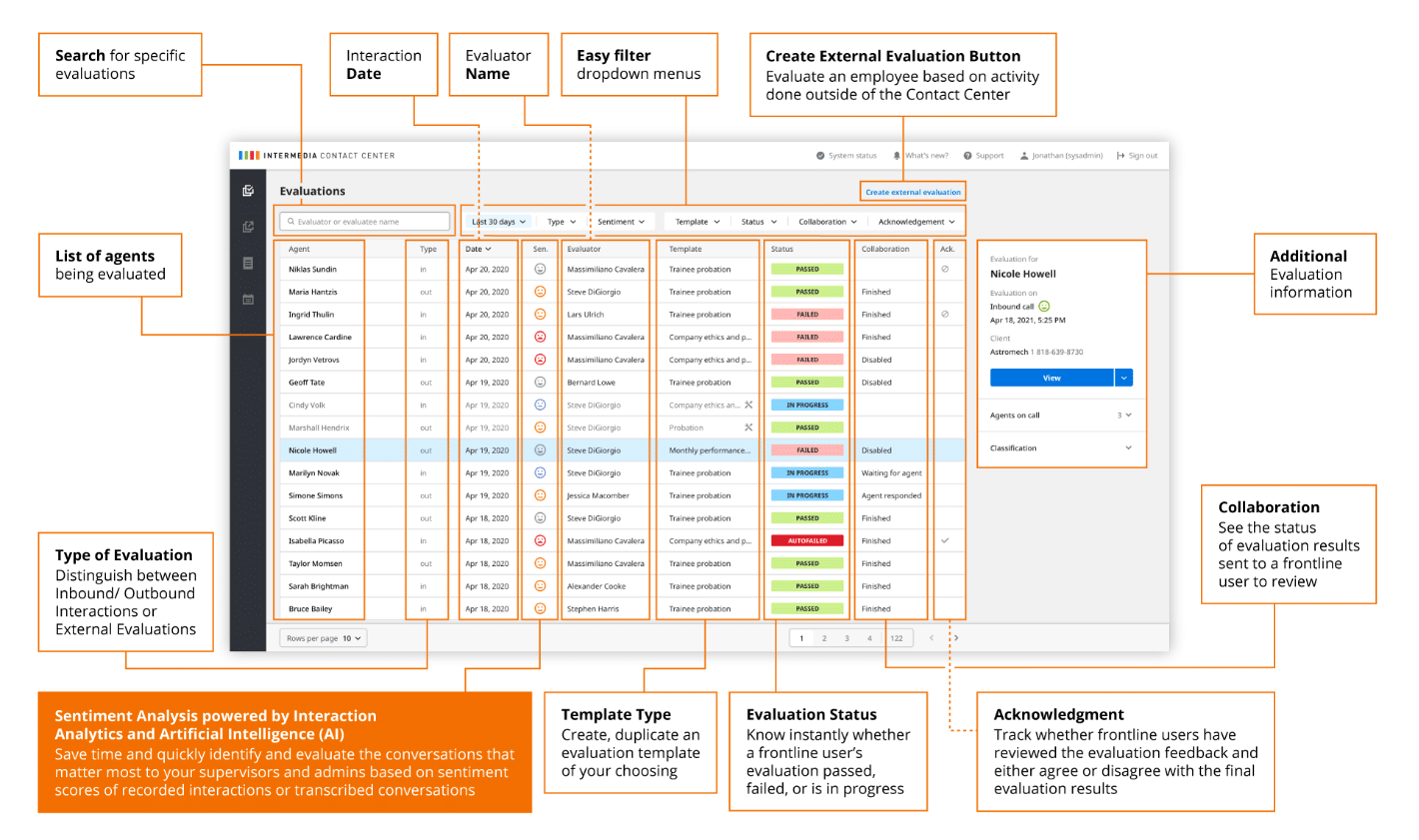
AI-powered analytics ensure you stay informed about your team’s performance at all times. For instance, you can uncover customer sentiments during calls and delve into crucial metrics like call duration, hold times, and first-contact resolution rates. Intuitive dashboards assist managers in dissecting this data to identify optimal training strategies. Clearly, your VoIP contact center diligently supports you, enabling you to deliver exceptional customer experiences and strengthen your brand.
Discover why thousands of businesses choose Towner’s VoIP Contact Center:
Now that you recognize the importance of a VoIP contact center, setting yours up is a breeze. With Towner’s assistance, the process is effortless. Simply connect with one of our team members to select your plan and features.
In today’s digital landscape, conference calling has become an essential tool for businesses navigating the modern work environment. Whether teams are predominantly office-based or dispersed across various locations, conference calling bridges the gap, enabling seamless connections with clients, stakeholders, and field members.
The surge in the video conferencing market is indicative of its growing significance, with projections suggesting exponential growth in the coming years.
While free conferencing software may seem appealing, it often lacks the robust security measures and advanced features necessary to meet the demands of remote conferencing in a business environment.
Top 10 Features of Professional Conference Calling Software
Seamless Cloud Integration:
Harness the power of cloud-based communications for cutting-edge conference calling features. Voice over Internet Protocol (VoIP) transcends the limitations of traditional landlines, offering a wealth of functionalities. Enjoy swift and cost-effective access to high-powered features, all facilitated through digital services.
High-Quality Calls with Minimal Latency:
At Intermedia, we recognize that not all clouds are created equal. Merely offering a cloud-based solution isn’t sufficient. Ensure your provider boasts a robust network guaranteeing 99.999% uptime, with the capability to swiftly troubleshoot and resolve any potential issues.
Robust Encryption and Enhanced Security:
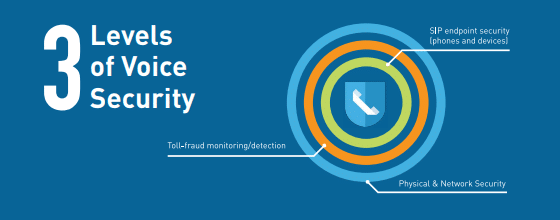
Rest assured that your sensitive discussions remain confidential with advanced encryption measures. Leading conference calling solutions employ world-class SOC 2-audited security, fortified with three layers of protection. This ensures that crucial decisions need not be postponed until everyone can convene in person; instead, you can rely on secure conference calls.
For instance, fortified privacy protocols facilitate discreet conversations concerning legal affairs and human resources issues. Moreover, industries requiring stringent regulatory compliance for digital exchanges can trust in top-tier conferencing software to meet these exacting standards.
Furthermore, strict access controls guarantee that only authorized participants gain entry to meetings. Your administrative portal empowers you to swiftly remove disruptive participants or attendees, ensuring seamless proceedings.
Crystal-Clear Video Quality:
Your communication solution should transcend mere audio conferencing. Video capability enables comprehensive demonstrations and authentic face-to-face interactions.
However, nobody desires grainy or stuttering visuals. Ensure that your cloud-based video conferencing software delivers full HD quality, guaranteeing an immersive and seamless experience.
Expanded Participant Capacity:
Align entire company divisions effortlessly with expansive meetings accommodating up to 200 participants. Additionally, harness the power of webinars to establish thought leadership within your industry, whether for internal training or engaging clients and prospects. Superior conference calling software facilitates hosting larger-scale events with the capability to accommodate up to 1,000 attendees.
Intuitive Dashboard and Interface:
Having access to exceptional features is only valuable if you can easily manage them. Gone are the days of requiring technical assistance for conference call adjustments. Whether you need to add, modify, or remove users, features, or security settings, it’s all conveniently manageable through an intuitive interface.
Exceptional Customer Support:
While your dashboard may be intuitive, you may still require assistance to maximize the potential of your conferencing software. Additionally, guidance with troubleshooting is essential. Look to a provider offering round-the-clock, award-winning support to ensure you receive the assistance you need, precisely when you need it.
Insightful Analytics and Reporting:
Interested in understanding how your team utilizes conferencing calls and accessing valuable statistics and insights about their meetings? AI-assisted analytics and reporting provide a comprehensive view of how team members utilize the software, offering invaluable insights for optimization and improvement.
Enhanced Collaboration Tools, Screen Sharing, Interactions, and Whiteboards:
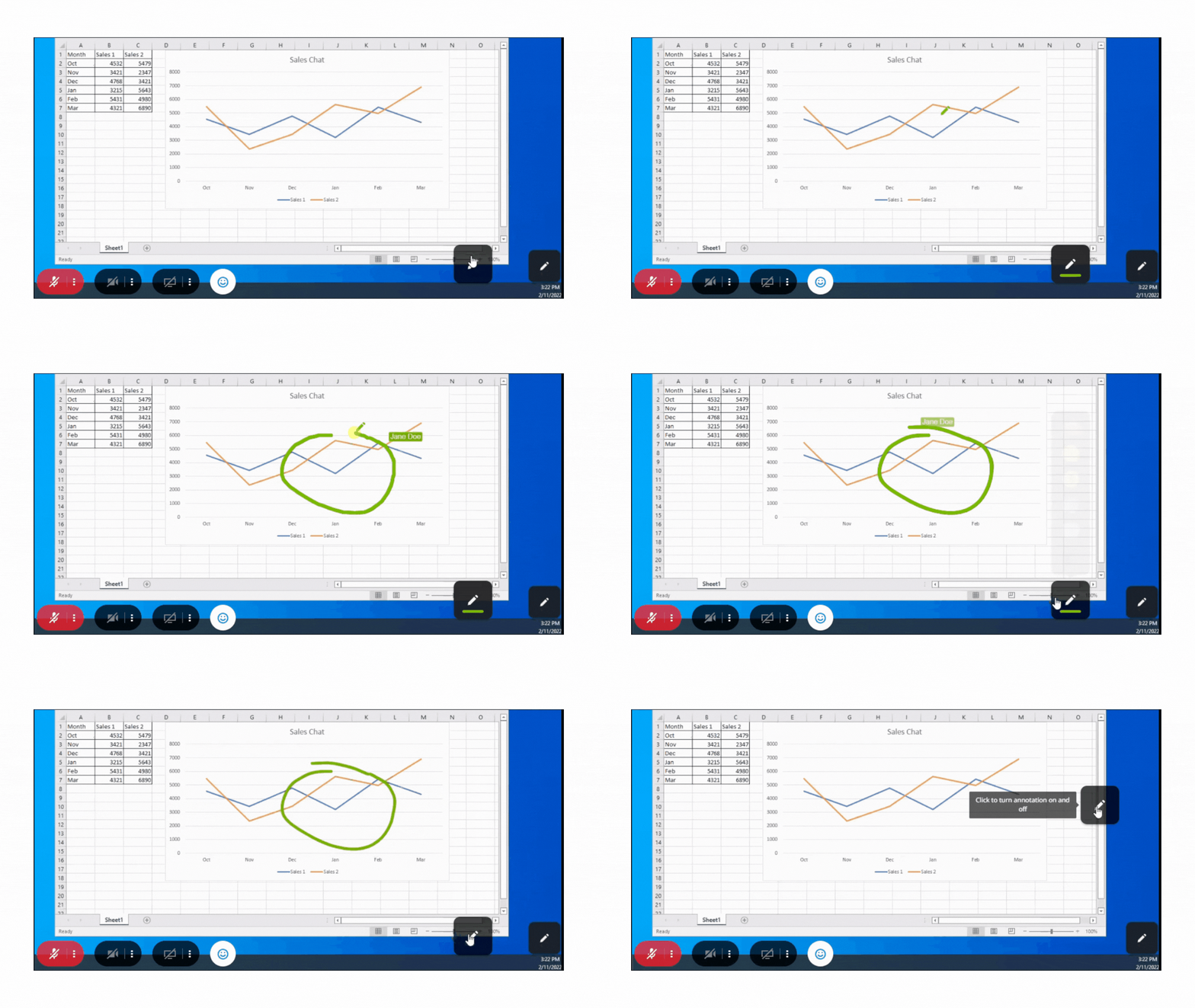
Visual aids breathe life into abstract concepts and enhance viewer engagement. Seek screen-sharing capabilities that enable collaborative editing and drawing, elevating remote collaboration to new heights. Facilitate seamless document and resource sharing through group-wide or private chats, ensuring uninterrupted meeting flow.
Seamless Integration with Business Applications:
Chances are, you rely on specific software for scheduling, customer service, managing customer data, and analytics. These applications can seamlessly integrate with your conferencing solution, enhancing productivity across your workflow.
For instance, your customer relationship management software can seamlessly synchronize with your conference calling solution, facilitating swift access to customer data or seamless input of details into your CRM during sales calls with key decision-makers. This streamlined efficiency expedites deal closures.
Moreover, you can swiftly distribute invitations and links to invitees’ calendars, ensuring no one is left uninformed. Additionally, you can schedule recurring meetings with automated notifications and streamline the distribution of meeting minutes and action items to attendees.
Beware of Free Conference Calling Software: What You Need to Consider
While the allure of saving money might tempt you to explore free conference calling software, it’s crucial to recognize that “free” often comes with hidden costs.
Firstly, free solutions typically generate revenue through selling upgrades or other services. Moreover, some free applications may resort to monitoring your conversations or selling your data to third parties.
Most importantly, free services often lack the essential security and protection required for conducting business online. Additionally, they may not provide the necessary bandwidth, participant capacity, or unlimited calling crucial for efficient commerce.
When it comes to projecting professionalism and impressing stakeholders, employees, and clients, opt for a trusted conference calling solution like Towner’s Intermedia.
Contact Towner to Discuss Professional Conference Calling Services:
Are you seeking the best conference calling software for small and mid-sized businesses? Reach out to Towner to explore how Towner and AnyMeeting software deliver comprehensive conferencing solutions for impactful meeting experiences.