VoIP Phone Systems: A Practical Guide for Business Owners

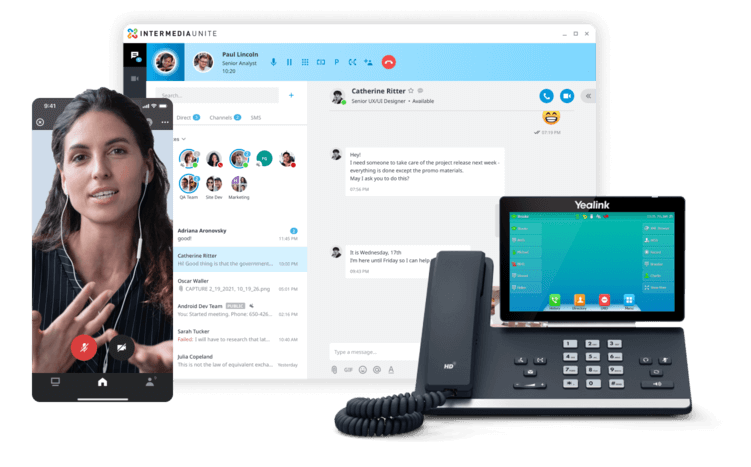
VoIP phone systems allow organizations to make and receive business calls over an internet protocol network. Modern platforms can also combine voicemail, messaging, video meetings, mobile applications, call routing and business integrations in one communications environment.
This guide explains how VoIP works, which features matter, what affects reliability and what businesses should evaluate before selecting a system or provider.
If your organization is actively comparing local providers, explore Towner’s business phone systems and VoIP solutions in Kansas City.

What is VoIP and How Does It Work?
VoIP—Voice Over Internet Protocol—transforms your voice into digital data, then routes it over the internet instead of through old-fashioned copper wires.
Here’s how it works:
1: Your voice is converted into digital packets.
2: those packets travel over your business’s internet connection.
3: the receiving system reassembles the data into voice on the other end.
VoIP integrates seamlessly with the apps and tools your team already uses—think email, chat, and video conferencing—so your communication is faster, easier, and more reliable than ever.
Want to learn how VoIP Solutions in Kansas City can modernize your business? Click here.
Why Businesses Choose VoIP Phone Systems
Organizations often consider VoIP when an existing phone system becomes difficult to support, limits mobility or cannot integrate with newer business applications.
Common reasons for adopting VoIP include:
- Mobility: Employees can use their business number from supported desk phones, computers and mobile devices.
- Scalability: Users, numbers and features can generally be added without expanding a traditional phone system at every location.
- Centralized administration: Authorized administrators can manage users, routing and features through one interface.
- Integrated communications: Calling may be combined with messaging, video meetings, presence and file collaboration.
- Business integrations: VoIP platforms can connect with Microsoft Teams, customer management systems and other applications.
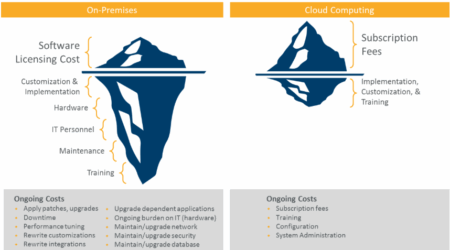
- Flexible cost structure: Subscription-based services can reduce certain infrastructure and maintenance costs, although actual savings depend on the existing environment and selected platform.

Business VoIP Features to Compare
Not every organization needs every available feature. Compare platforms according to the call flows, employee roles, customer interactions and integrations the business actually requires.
Important capabilities may include:
- Auto attendants and call queues: Route callers according to department, schedule or availability.
- Desktop and mobile applications: Allow employees to use their business identity away from a desk phone.
- Voicemail-to-email: Deliver voicemail notifications or recordings to an employee’s inbox.
- Business texting: Support customer communication through an approved business number and compliant messaging process.
- Video meetings and team messaging: Combine calling with other collaboration tools.
- Call recording and reporting: Support training, quality management and operational analysis where legally and organizationally appropriate.
- Microsoft Teams and CRM integrations: Connect calling with applications employees already use.
- Emergency calling and location management: Help route emergency calls and maintain accurate location information.
- Continuity features: Redirect calls or provide alternative access during an internet, power or carrier interruption.
How to Evaluate a Business VoIP Provider
A provider should be able to explain how the proposed system fits your organization—not simply present a list of licenses and features.
Ask prospective providers about:
- Technical assessment: Will they evaluate your network, locations, calling requirements and existing equipment?
- Platform options: Can they explain the practical differences between cloud, on-premises and hybrid systems?
- Implementation ownership: Who handles configuration, number porting, testing, deployment and employee training?
- Support responsibilities: Who answers technical questions after launch, and when is on-site assistance available?
- Reliability planning: What happens during an internet, power, carrier or platform interruption?
- Security and compliance: How are accounts, calls, recordings, messages and administrative access protected?
- Integrations: Can the platform support Microsoft Teams, customer management tools and other required applications?
- Contract terms: What are the term length, renewal provisions, fees, support charges and termination requirements?
The strongest proposal is the one that clearly connects the technology, implementation plan and support model to the organization’s actual operating requirements.
VoIP Deployment Example: Multi-Site Construction Company
A construction company with employees working across its main office and multiple job sites needed a phone system that could support mobile work without disconnecting employees from their business numbers.
Towner implemented a VoIP solution with Microsoft Teams integration and ongoing support. The new environment gave office and field employees access to the same communications tools while reducing dependence on the company’s previous telephone setup.
The company reported:
- A 35% reduction in phone-service costs
- Better communication between office and field employees
- Improved collaboration through Microsoft Teams
- Access to 24/7 local technical support
Frequently Asked Questions About VoIP Phone Systems
Need help with Customer Portal and Training Resources to get the most from your system? Visit our support page.
Ready to Compare Business Phone System Options?
Use the requirements in this guide to document your users, locations, call flows, integrations, reliability needs and current contract terms before requesting proposals.
If your organization is evaluating a new system or provider, explore Towner’s Kansas City business phone services and schedule a consultation with our communications team.