Have you ever felt the frustration of having one of your outbound calls tagged as a spam or scam call? Such labeling can result in the loss of valuable customer connections, wasted time, and revenue setbacks. If you’re reading this post, chances are you’ve faced this issue and are likely experiencing significant frustration.
But before you grab your pitchforks, it’s important to recognize that call tagging plays a crucial role in safeguarding callers. It actively prevents bad actors and irritating robocallers from exploiting customers’ trust.
You might also wonder how carriers differentiate between spam and scam calls and how to prevent these unwanted labels from being applied to your calls. To tackle this, let’s begin by clarifying the difference between a scam call and a spam call, as they are distinct concepts.
SCAM VS. SPAM
So, what distinguishes scam calls from spam calls?
Scam calls feature fraudulent activities, with the caller attempting to trick individuals into disclosing personal information, typically for financial gain.
In contrast, spam calls do not necessarily involve fraudulent schemes. Many spam calls originate from legitimate businesses that employ unfair or ineffective calling practices, causing annoyance to recipients. Examples of spammers include political or survey calls, as well as charitable organizations repeatedly seeking donations.
While both spam and scam calls share a deceptive nature, they differ in their intentions. Spam calls often come from legitimate businesses but can still be unwelcome to recipients. The labeling of these calls allows customers to decide whether to answer or ignore them.
HOW CALLS GET TAGGED
Every telecom provider utilizes distinct methods to assess incoming calls, determining whether they are likely wanted, potentially fraudulent (scams), or legitimate yet undesirable (spam).
Within the T-Mobile network, calls coming from unverified entities that might pose a fraudulent risk are labeled as “Scam Likely.” T-Mobile leverages advanced AI-driven analytics, powered by First Orion, to differentiate between genuine calls and scams.
This technology enables First Orion to distinguish calls maliciously spoofed by bad actors from legitimate ones. Even large organizations, such as national banks that make thousands of daily calls, can be vulnerable to spoofing attempts. However, our AI technology ensures accurate identification and tagging of spoofed calls as “Scam Likely,” leaving legitimate calls untouched.
It’s important to note that spam tagging methods employed by other carriers differ from those of First Orion and the T-Mobile network. Many alternative carriers lack similar technological capabilities, often relying on customer feedback to identify spam. Furthermore, they may struggle to differentiate between genuine calls and spoofed calls originating from businesses, potentially leading to more valid calls going unanswered.
If you’re eager to eliminate scam and spam call tags, read on for valuable best practices.
PREVENT TAGGING
Businesses often assume they have no control over being tagged as spam or scam callers. However, here’s some encouraging news – there are several best practices you can implement to reduce the likelihood of receiving an inaccurate label.
As a starting point, consider registering your business number with the Free Caller Registry. While this doesn’t offer an absolute guarantee against spam or scam tags, it assists carriers in categorizing your business correctly and recognizing it as legitimate.
Once your business number is registered, it’s essential to evaluate your calling strategy against the following checklist of best practices to ensure fairness and appropriateness for your customers:
Avoid relying on a single central number for all calls.
Minimize excessive calls to the same recipient.
Ensure that your calls are expected by users.
Respect users’ preferences regarding contact.
Consistently provide an accurate and user-dialable telephone number with each call.
Maintain a consistent Calling Name that aligns with the context.
Ensure that the content and context of calls match the number’s intended purpose throughout its assignment.
Document standard calling patterns.
Refrain from using pre-recorded messages for lead prospecting calls.
Avoid frequently calling unassigned numbers.
While removing a spam or scam tag isn’t a simple task, following these calling practices can enhance your business’s calling outcomes, reduce the likelihood of call blocking, and prevent future unwanted labeling as spam or scam.
Additionally, there’s another option you can explore to distinguish your calls to your customers.
BRANDED COMMUNICATION
With the INFORM® Branded Text Display, you can effectively showcase your business using a customizable 32-character display name.
INFORM is a valuable addition to your calling toolkit. However, it’s important to note that each carrier retains the final authority to label calls based on their individual spam and scam call prevention processes. The only foolproof method to prevent call spoofing is by utilizing INFORM Paired on the T-Mobile network.
INFORM also offers the following advantages:
Protection of your brand from scammers.
Custom branding that remains visible in the phone call log.
Access to superior call data and top-notch analytics to enhance your outbound calling strategy.
INFORM reaches a broad audience, encompassing 2/3 of the U.S. mobile market, equating to over 280 million devices. This provides an added layer of assurance when reaching out to your clients through outbound calls.
Curious to witness INFORM in action? You can experience a free demo today on our website. Discover how INFORM can revolutionize your calls and bolster your defenses against spam and scam callers.
Are you looking for ways to optimize your phone service costs? Managing essential expenses efficiently can be a daunting task. Towner’s Elevate Cloud Savings Calculator is here to simplify the process and help you save big on your cloud expenditures.
Calculate Your Cloud Savings with Ease
Towner’s Elevate Cloud Savings Calculator is a powerful tool designed to assist businesses and organizations in gaining insights into their cloud spending. Whether you’re using Amazon Web Services (AWS), Microsoft Azure, Google Cloud Platform (GCP), or any other cloud provider, this calculator will provide you with valuable information to make informed decisions.
Key Features:
1. Real-Time Insights: Our calculator provides real-time data analysis. You can track expenses, identify areas of savings, and make adjustments.
2. Multi-Cloud Compatibility: Analyze spending across cloud platforms, ideal for any provider or complex infrastructure.
3. Customized Recommendations: Uses patterns and costs to recommend cloud resource optimization.
5. Budgeting Assistance: Efficiently manage your cloud budget to prevent overspending
6. Cost Visualization: Visualize your cloud expenses with clear, easy-to-understand charts and graphs, making it simple to communicate your cost-saving strategies to your team or stakeholders.
Expertise: Towner and Intermedia are trusted names in cloud technology, both known for their expertise in helping businesses reduce telecommunication costs.
User-Friendly: The calculator is user-friendly and requires no technical expertise to operate, making it accessible to all team members.
Cost-Effective: Using this calculator is cost-effective compared to hiring expensive cloud consultants to assess and optimize your cloud spending.
Results-Driven: Our calculator is results-driven, helping you see immediate cost savings and plan for the future.
Constant Updates: The calculator is regularly updated to reflect changes in cloud pricing and industry best practices, ensuring you stay ahead of the curve.
Don’t let telecom expenses eat into your budget. Take control of your spending and start saving today with with Towner’s Elevate Cloud Solutions.
In today’s fast-paced business landscape, staying ahead of the competition requires not only efficiency but also innovation. Imagine a communication tool that not only connects your team seamlessly but also empowers them with smart, AI-driven capabilities. Look no further – Intermedia’s Spark AI feature is here to transform the way you collaborate and communicate.
The Power of AI Unleashed
Introducing Spark AI, a groundbreaking feature within the Intermedia communication suite that leverages the power of artificial intelligence to elevate your business interactions. Gone are the days of manual tasks and fragmented communication; Spark AI takes communication to a whole new level by intelligently anticipating your needs and streamlining your workflows.
Key Benefits
1. Smart Scheduling and Reminders
Spark AI becomes your personal assistant, making scheduling a breeze. It analyzes your calendar, identifies optimal meeting times, and suggests slots that work for all participants. No more back-and-forth emails trying to coordinate schedules. Additionally, it sends timely reminders to ensure you never miss an important meeting again.
2. Effortless Document Management
Say goodbye to the hassle of searching for documents across various platforms. Spark AI understands context and retrieves files based on your conversation topics. Whether it’s the latest presentation or a crucial report, you’ll have what you need at your fingertips, without the headache of manual searching.
3. Real-time Transcription and Summaries
Meetings are more productive when everyone is on the same page. Spark AI’s real-time transcription feature captures meeting discussions, creating accurate and detailed transcripts. But it doesn’t stop there – it also generates concise summaries, highlighting action items and key takeaways so you can focus on execution instead of note-taking.
4. Instant Language Translation
In today’s globalized world, communication knows no bounds. Spark AI eliminates language barriers by providing instant translation during chats and video calls. Collaborate seamlessly with colleagues, clients, and partners from around the world without the need for external translation tools.
5. Enhanced Security and Compliance
Intermedia understands the importance of data security and compliance. Spark AI features robust security protocols to ensure that your sensitive conversations and information are safeguarded. Rest easy knowing that your communications are protected at all times.
Embrace the Future of Communication
Spark AI is not just a feature; it’s a game-changer. It empowers your team to communicate more efficiently, make better-informed decisions, and drive productivity to new heights. Say hello to streamlined collaboration and bid farewell to communication barriers.
Ready to experience the future of business communication? Unlock the potential of Spark AI today with Intermedia’s comprehensive communication suite. Elevate your team’s capabilities, enhance your workflows, and embrace the era of intelligent communication.
Don’t get left behind – embrace the AI revolution with Intermedia’s Spark AI feature. Your journey to smarter, more effective communication starts now.
Companies frequently utilize IVR systems to manage initial customer interactions, aiming to deliver prompt and precise service that aligns with customers’ preferences for efficiency and accuracy.
Nevertheless, despite desiring its convenience, numerous callers often find automated systems to be exasperating. A study reveals that close to 50% of callers encounter difficulties while navigating IVR (Interactive Voice Response) systems.
Notable Takeaways:
IVR, an automated technology, empowers callers to manage transactions and inquiries effectively.
Leveraging IVR effectively yields various benefits such as enhanced employee efficiency and elevated customer satisfaction.
Establishing IVR is a straightforward process with the assistance of a hosted contact center provider.
Craft an IVR system that delights your customers by steering clear of convoluted menus, prolonged hold times, and impersonal messages.
Thanks to advancements in artificial intelligence, IVR is rapidly evolving, enabling callers to engage in more natural interactions.
What is IVR
“Interactive Voice Response” (IVR) is an acronym that refers to a technology known as an automated telephone system. It enables callers to interact with the system by selecting menu options through either voice response or touch-tone inputs. Advanced IVR systems have the capability to handle straightforward requests that go beyond the limitations of predefined menu options.
How it works
IVR works together with other software features in a cloud-based contact center to improve customer support. Typically, it combines with an automatic call distribution (ACD) system to handle and direct calls effectively.
Here’s how it works: When callers first connect, they hear an automated greeting that asks for information about the reason for their call. Callers can respond by speaking or by entering information on the keypad. IVR understands their response and guides them to the appropriate section of the menu until they complete their task.
If the inquiry requires assistance from a human agent, IVR passes on the necessary details to the ACD. The ACD can then connect the caller with the right agent who possesses the skills to address their request.
It has huge benefits
IVR proves beneficial for companies dealing with high call volumes by reducing the reliance on human agents. This approach helps businesses save on the costs associated with hiring additional staff. Additionally, agents experience greater job satisfaction as their workloads are reduced, and they deal with fewer mundane issues.
Furthermore, an automated IVR system minimizes errors in customer service requests. Callers are efficiently directed to the appropriate agents and receive prompt confirmation of the successful resolution of their inquiries.
Customers also value the effectiveness of a well-functioning IVR system. It enables callers to swiftly handle tasks without the need to wait for a human agent. For instance, customers can easily check their account or shipment status.
Moreover, IVR is particularly advantageous for customers who prioritize security and confidentiality. The system securely accepts payment details and verifies transaction success. This added layer of security allows clients to avoid sharing their credit card or checking account numbers with another individual.
How to setup your IVR
Modern IVR systems offered by leading communication providers, like Intermedia, no longer demand extensive coding expertise. You can easily program a multilingual menu in just a few simple steps.
The optimal configuration involves utilizing a hosted contact center subscription that includes IVR features. Using your administrative dashboard, you can input prompts and menu options according to your preferences.
Additionally, you have the flexibility to establish specific behaviors based on schedules, such as holidays or non-business hours. With the assistance of a reliable communications provider, you can have your system up and running in as little as five minutes!
Overcoming common challenges and avoiding mistakes.
Here’s how you can tackle these issues:
Clear and Concise Prompts: Craft clear and concise prompts that guide callers efficiently. Avoid lengthy or confusing messages that might frustrate or confuse callers.
Intuitive Menu Design: Design your menu options in a logical and intuitive manner. Keep the menu structure simple and easy to navigate, allowing callers to reach their desired destination quickly.
Minimize Complex Menus: Avoid creating complex and lengthy menus. Streamline the options and keep the menu hierarchy shallow to prevent callers from getting lost or overwhelmed.
Effective Call Routing: Implement an intelligent call routing system that directs callers to the appropriate department or agent based on their needs. Ensure your routing rules are accurate and up to date.
Regular Testing and Monitoring: Regularly test and monitor your IVR system to identify any glitches or bottlenecks. Make necessary adjustments to improve the caller experience and optimize system performance.
Human Assistance Option: Offer a human assistance option, such as the ability to speak with a live agent, for more complex or sensitive inquiries. Strike a balance between automation and human interaction to provide the best possible customer experience.
Continuous Improvement: Gather feedback from callers and analyze data to identify areas for improvement. Continuously refine and optimize your IVR system based on customer feedback and evolving needs.
By following these guidelines and continuously refining your IVR system, you can overcome common challenges and mistakes, providing a seamless and satisfying experience for your callers.
What industries should be utilizing IVR
IVR offers benefits to businesses across various industries. If your business deals with significant call volume, it’s worth exploring the advantages of IVR in the following sectors:
Healthcare: Medical professionals can save time and enhance patient care through IVR. Clients can securely receive confidential results, schedule treatments, and complete questionnaires.
Finance: Account-holders can efficiently manage important tasks and access account details with IVR. For instance, individuals can swiftly make changes to their investment portfolios.
Education: Parents and students can stay updated with IVR by obtaining reports from schools. Families can conveniently check grades and attendance records.
Moreover, any business operating in an industry where exceptional customer service is crucial should consider leveraging IVR to efficiently support their clients.
Artificial Intelligence (AI) is playing a significant role in enhancing IVR systems
Here’s how AI is improving IVR:
Natural Language Processing (NLP): AI-powered IVR systems employ NLP to understand and interpret human speech more accurately. This enables callers to have more natural and conversational interactions with the system, reducing the need for rigid menu-driven navigation.
Advanced Speech Recognition: AI enhances speech recognition capabilities, allowing IVR systems to accurately transcribe and understand spoken words. This enables callers to provide responses verbally, eliminating the need for keypad inputs in many cases.
Intelligent Call Routing: AI algorithms analyze caller data and context to intelligently route calls to the most appropriate department or agent. This ensures that callers are quickly connected to the right resource, improving efficiency and customer satisfaction.
Personalized Customer Experience: AI-powered IVR systems can access customer data and history, enabling personalized interactions. Callers can receive tailored recommendations, relevant information, and proactive assistance based on their specific needs and preferences.
Self-Service Automation: AI enables IVR systems to handle more complex requests beyond simple menu options. With AI capabilities, IVR systems can provide automated self-service solutions for tasks like balance inquiries, order tracking, or troubleshooting, reducing the need for human intervention.
Continuous Learning and Improvement: AI algorithms can learn from interactions and customer feedback, continuously improving the IVR system’s performance. This allows for ongoing optimization and refinement of the system to provide a better user experience over time.
In summary, AI is revolutionizing IVR by enabling natural language understanding, intelligent call routing, personalized experiences, self-service automation, and continuous learning. These advancements result in more efficient, intuitive, and effective IVR interactions, enhancing the overall customer experience.
Find out more about how Towner and Intermedia can make your Contact Center’s IVR Easy
You can feel confident that your private data is safe with Towner’s comprehensive security guide . Our Triple Shield Security takes a multipronged approach to protecting your business data with technologies that address three potential points of vulnerability – protecting user access, securing applications, and defending the cloud infrastructure. Our system utilizes state-of-the-art technologies designed to constantly monitor for, and defend against, malicious intruders.
Our comprehensive security platform provides comprehensive security features that are constantly evolving in order to respond to, and help mitigate, potential threats. The platform capabilities and the technologies it employs are regularly examined and reviewed by our security team to help ensure an extremely secure communications and collaboration experience that can be trusted to protect you and your businesses.
INFRASTRUCTURE & NETWORK SECURITY
We invest considerable human and capital resources to help ensure high levels of security and protection that give you peace of mind. We understand that if you’re to trust us with your communications and data, you need to understand how we’ll protect it. Vigilance is essential to keeping your business safe.
Highly Secure Datacenters Our cloud is hosted in geographically dispersed, highly secure and monitored datacenters by certified tier-three providers. All of the datacenters used to deliver the Elevate service are either ISO 27001-certified or are subject to regular SOC security audits. Each of the world-class datacenters that are used in the delivery of the Elevate service also adhere to adheres to strict standards in physical security. Each datacenter is closely monitored and guarded 24/7/365. Secure access is strictly enforced using the latest technology, including electronic man-trap devices between lobby and datacenter, motion sensors, and controlled ID key-cards.
Infrastructure Protection System and network security is important to us and our customers. In order to maintain a secure infrastructure, Elevate is supported by several layers of security controls in operation. These controls include processes for managing user access to critical systems and devices, formal policies for authentication and password controls, and configuration standards for firewalls. Secure VPN and two-factor authentication (2FA) are widely utilized across the Elevate infrastructure to prevent unauthorized access.
We also implemented several monitoring controls to identify potential security threats and notify relevant personnel of the severity of the threat. Firewalls are in place and configured to prevent unauthorized communications. Network-based monitoring detection systems are configured to detect attacks or suspicious behavior, and vulnerability scans are performed to identify potential weakness in the security and confidentiality of systems and data.
We also run advanced, next-generation antivirus technology across our systems to help detect and deter malicious computer usage that often cannot be caught by a conventional methods. The technology monitors for unusual patterns and behaviors, alerting security engineers of suspicious activity, 24x7x365. This endpoint technology can also help prevent attacks against vulnerable services; data-driven attacks on applications; host-based attacks such as privilege escalation; unauthorized logins and access to sensitive files; and malware (e.g., viruses, Trojan horses, and worms).
We utilize a combination of commercial and proprietary security tooling to assist with threat and vulnerability management; security information event management; identity, access, and password audits; secrets and key management; managed detection and response; secure development lifecycle; managed security operations; and bug bounty programs. We also perform regular penetration testing and/or red team assessments on our applications and systems infrastructure using respected independent cybersecurity consultants on at least an annual basis.
Other security highlights:
Commercial-grade edge routers are configured to resist IP-based network attacks
We subscribe to Distributed Denial of Service (DDoS) protection through a leading provider of network security
Our production network is physically and logically separated with highly restricted access and multiple authentication levels
Operational functions include monitoring, system hardening, and vulnerability scans
Employee Security Our employees, regardless of role, undergo rigorous background checks. Employee access to systems, applications and networks is strictly controlled using two-factor authentication and role-based access control. Access to servers is restricted to a limited number of authorized engineers and monitored regularly.
Dedicated Security Staff and Monitoring We employ a dedicated, full-time security staff who are certified in information security. This team is involved with all aspects of security, including log and event monitoring, penetration testing, incident response, managing endpoint protection, vulnerability management, perimeter defense, service and architecture testing, and source code reviews.
DATA PROTECTION & PRIVACY
We are committed to protecting the privacy of your data and making sure you have full visibility regarding where and how it’s used. Your cloud contains extremely valuable and confidential content, including intellectual property, customer data, financial information, and sensitive personal data. You need to have confidence in how it’s stored and managed.
Locations of Data Handling/Storage We maintain datacenter locations in the Eastern and Western United States, Canada, the United Kingdom, Germany, Australia, and Japan. With respect to user content that is processed through the Elevate service, we generally aim to handle and store such data in the customer’s geographic region, when possible. As of the date of this report, the core components of the Towner service are able to be delivered through the following datacenter locations: • Voice Services: Any of our global datacenter locations • ShareSync: United States, Canada, United Kingdom, and Japan • Online Meeting/Chat: United States
In instances where a particular service is not able to be serviced through a datacenter in a customer’s geographic region, the user content will generally be handled and stored in the datacenter closest to the customer’s location. Business and financial information related to Towner accounts, such as billing, order history and account contacts, is processed and stored in the United States.
Data Encryption Data encryption protects sensitive customer and call data from unauthorized access. In addition, numerous national, local, and industry regulations regarding customer and patient privacy mandate encryption of data. We employ encryption, both in transit (using TLS encryption) and at-rest (using AES 256-bit keys), as an essential component of our “secure-by-design” product architecture to help keep your data private and secure. Data encrypted while at rest includes voicemails, call recordings, meeting recordings/chat/notes, chat and SMS history, chat attachments, and ShareSync files.
PHONES/DEVICES/APP SECURITY
Encryption technology is important to keep conversations and data secure from prying eyes. However, encryption only tells part of the story. We have several technologies designed to keep intruders from accessing your internal systems and apps.
Secure Handset Protection To verify that phones and devices are secure from cyber threats and attacks like eavesdropping, we require strong passwords on all SIP endpoints. Each device is securely provisioned using “HTTPS” with mutual authentication to prevent intrusion.
Authentication for Elevate Apps Elevate Desktop and Mobile Apps allow users to use their business phone system while working remotely or on-the-go. These apps can require a username and password and can also be enabled with 2-factor authentication for access.
Google Chromium Browser Security Platform The Elevate Desktop App is built using Google Chromium browser technology. It makes use of the very latest security enhancements available and is updated regularly to keep current with the latest security patches. Chromium’s architecture focuses on preventing attacks from persistent malware, transient keyloggers, and file theft.
MONITORING & DETECTION
Automated 24/7 Toll Fraud & Threat Detection We monitor call patterns to international (and high-cost) locations on a constant basis and consistently look to improve our fraud monitoring systems. If any customer exceeds the call thresholds for any international areas, we will disable international calling and notify the purchaser, informing them that international calling has been disabled based on possible fraudulent activity. To protect the customer, we will not re-enable international calling until the account holder has given us authorization. Additionally, we employ active monitoring to detect and notify customers of suspicious login activity and unrecognized devices on their network.
Spam Caller Protection* Every account is enabled with Spam Caller Protection – helping to keep you and your employees free from calls originated by autodialers and known fraudsters. It allows administrators to decide how to route these calls. Depending on your organization’s preferences, you can tag these calls in the Caller ID screen, send them to voicemail, or block them. This protection extends to every device, including the Desktop and Mobile Apps
SECURITY & COMPLIANCE
SOC 2 SOC 2 is a technical audit specifically designed for service providers who store customer data in the cloud. We have a SOC 2 report from an independent auditor that has validated that, in their opinion, our controls and processes are effective in minimizing risk and exposure to this data.
PCI-DSS The Payment Card Industry Data Security Standard (PCI DSS) is a set of security standards designed to ensure that ALL companies that accept, process, store, or transmit credit card information maintain a secure environment.
The payment processing system that supports Elevate has passed these strict testing procedures and is compliant with PCI DSS. This helps ensure that your payment information will not be accessed by unauthorized parties or shared with unscrupulous vendors.
GDPR and Other Privacy Regulations We have extensive experience managing a highly secure infrastructure and complying with complex regulations. We are committed to comply with the EU’s General Data Protection Regulation (GDPR) and other privacy regulations across our services. We maintain a security environment that meets the requirements of the GDPR, and we offer Data Processing Agreements (DPAs) to our partners and customers to help assure them that our processing and handling of their data will meet applicable regulatory standards, including all required security measures.
Healthcare Industry Security Compliance Countries around the world impose strict legal and regulatory requirements on the handling of medical and other health-related information by healthcare providers. Our robust set of security features enables customers in the healthcare industry to configure Elevate to help them comply with those stringent requirements. For instance, Elevate offers a range of security settings, and a Business Associate Agreement (BAA) is available upon request, to support businesses in their efforts to comply with the administrative, physical, and technical standards required by the U.S. Health Insurance Portability and Accountability Act of 1996 (HIPAA).
Telecommunications-Related Security Requirements Consumers are understandably concerned about the security of the sensitive, personal data they provide to their service providers. Many countries’ telecommunications regulations include encryption and other security-related requirements applicable to data processed and stored in connection with the services, and we are committed to complying with those requirements wherever we offer our services. As just one example, the United States Federal Communications Commission (FCC) requires carriers like us to establish and maintain systems designed to ensure that we protect our subscribers’ Customer Proprietary Network Information (CPNI), and we file an annual certification documenting our compliance with these rules
ELEVATE SECURITY FEATURES AND CONTROLS
Calling – The account administrator can request TLS transport for desktop telephones
Mobile Softphone – TLS transport can be enabled in application settings to enable encrypted signaling
Call Recording – The account administrator can control call recording on a per user basis. Call recording can be activated on demand by the user
Voicemail to Email – Voicemail to email is a convenient feature but for maximum security it can be disabled per user
Voicemail Transcription – Voicemail transcription can be enabled or disabled on a per user basis for maximum security
Visual Voicemail – Visual voicemail is available in the Desktop and Mobile apps and is protected by the same robust access controls including optional 2FA
Desktop Softphone – The Desktop Softphone uses TLS and SRTP to ensure communication is always encrypted
Chat – Chat messages are encrypted both at rest and in transit
ShareSync – Share data is encrypted both at rest and in transit
Online Meeting meetings, chat, notes – This data is encrypted at rest and in transit. WebRTC technology is used to encrypt meetings
Integrations – Integrations vary depending upon the 3rd party system, but typically use REST over HTTPs transport for encryption
Administrator Control Elevate features many flexible security features that allow the system administrator granular control over their security policies.
Administrator-defined passwords – Elevate supports both user and administrator-defined passwords for access to services
No compromised passwords – Elevate users benefit from password validation services; this prevents users from selecting passwords which are known as compromised
Forced password resets – Administrators can force all users to change their passwords, either for administrative reasons or company policy reasons
Custom password policies – Password policies can be defined to align with existing business practices or policies
Flexible password expiration – Password expiration can be defined to align with existing business practices or policies
Dynamic blocking feature – Administrator-defined policies monitor unsuccessful logon attempts and can dynamically restrict and release user accounts. This feature can be fully customized to align with existing business practices or policies
Two-Factor Authentication (DoubleSafe)
This additional security layer can be activated for Elevate, Online Meeting, Contact Center and ShareSync applications. Two-factor authentication (2FA) requires an additional authentication challenge to access Elevate services. This feature is fully configurable to suit your business needs. 2FA supports Push Notification via the DoubleSafe mobile application, SMS messaging and voice calls. 2FA can be enabled on a per-user or per-organization basis and supports challenges for every login, daily, weekly, monthly or only when logging into Elevate services from a new device. DoubleSafe is included with every Towner Elevate account.
From 2021 to 2026, the global market for VoIP (Voice over Internet Protocol) is expected to grow by nearly $20 billion. One of the main drivers of this increase is business usage, which has accelerated recently because of the COVID-19 pandemic. Many businesses let their employees work from home for the first time during the pandemic, so they had to switch to a phone solution that would let them run operations remotely while maintaining security.
Many adopted VoIP, the digital form of voice communications, and other cloud-based communications platforms to make their teams more flexible.
But for small businesses, VoIP offers far more than increased flexibility. It provides important benefits that can enhance the customer experience and drive growth. Let’s look at the main benefits of VoIP for small business so you can decide if you should modernize your company’s phone system.
1. Lower Business Phone Costs
Because VoIP sends voice data over the internet instead of relying on phone lines, your small business will see lower operational and calling costs. Businesses see about a 30 percent drop in phone bill costs when they switch to VoIP, and they can save as much as 75 percent on operating costs.
You don’t have to maintain separate networks for your data and voice, letting you consolidate your expenses.
Your business can avoid expensive landline setup fees because you don’t need to pay for a PBX (Private Branch Exchange) system, hubs, switches, telephone adaptors, and other hardware.
With a virtual number rather than one that’s connected to a physical landline telephone, you can save on both local and international calls.
With hosted VoIP, you can easily use a cloud-based communications platform that lets your employees communicate from anywhere via video conferencing or voice. With this capability, your business can save on office space.
2. High Call Quality
As long as your business has a strong internet connection and adequate bandwidth, your customers and employees will experience excellent call quality. Your business also has more control over call quality with VoIP because you can use a headset or microphone and adjust the settings to create the sound you want.
3. Advanced Call Features Without High Costs
One of the biggest benefits of VoIP for small business is functionality. VoIP and cloud-based communications technology have been evolving rapidly in recent years, so you can find a provider that offers a rich set of useful features when comparing platforms.
With a modern VoIP solution, features like call forwarding, Interactive Voice Response (IVR), call recording, analytics, auto attendant, call queuing, and integration with your other business applications are the norm rather than the exception. These tools can help you better serve your customers because you can improve call flows and gain insights into performance.
With a landline business system, you’d likely need to invest in a high-priced PBX system and pay add-ons for extra features.
4. Better Security with the Right Provider
Just as your business has access to more call features with VoIP, you also have more security tools in your toolbox. That’s why – despite the fact that both landline calling and internet-based calling have vulnerabilities – you can create a more secure system with a properly configured VoIP phone system.
With VoIP, your business can use the following tools to increase security:
End-to-end encryption to prevent eavesdropping
Endpoint security
Two-factor authentication for call apps
SPAM call blocking and tagging
To ensure top-notch security, you also want to choose a hosted phone system provider that lives up to extremely high standards regarding data center, network, and product protection.
5. Employees Can Work from Anywhere with VoIP
Another game-changing benefit of VoIP is work flexibility. Once you modernize your phone system with internet-based calling, your staff can work from anywhere. That means your organization can go fully remote or use a hybrid model, where some employees come into the office for at least part of the week.
This work-from-home option makes your business more flexible – if people can’t be in the office, whether it’s because they’re traveling, they prefer working from home, or there’s an emergency that won’t let them, operations can continue as usual when your phone system is hosted in the cloud.
But there’s more to it. Being a work-from-anywhere small business might also help you attract and retain talent – according to surveys conducted by Morning Consult and Owl Labs, 30 to 40 percent of American workers would consider leaving their job if their employer required them to work in the office full-time.
6. Digital Calls Are Just the Beginning
When your small business uses VoIP technology, you can get far more than digital voice communications. You can choose a system that includes all the important communication channels under one umbrella. A cloud-based unified communications system, or UCaaS (unified communications as a service), combines:
Voice
Video conferencing
Chat
File sharing
You can also integrate with your contact center solution, enabling your employees to provide an even better customer experience.
Empower Your Small Business with VoIP
If you’re considering switching to a modern phone system, explore the options offered by Towner.
We have the cloud communications solutions your organization needs to take advantage of all the benefits of VoIP and transition to a work-from-wherever organization, including Unified Communications, Contact Center software, and more. Even better, we make cloud migration and onboarding worry-free. Contact us to learn more.
As the workforce continues to become location-agnostic, and employees are working from home, the office and anywhere in between, delivering the right customer experience and maximizing employee productivity from any location should be critical objectives for any business. Businesses using Microsoft Teams typically assume they have this covered, but does it? Businesses using Teams for employee collaboration also need to ensure they have the essential business phone functionality to compete and win in today’s business environment. The trouble is not all business phone services are created equal. Outdated platforms—like on-premises systems— lack mobile phone support and other critical phone features like business texting. And basic cloud voice providers often don’t integrate with Teams often leading to inefficiencies and security risks as users switch between applications. To eliminate these business technology trade-offs and arm employees with the tools they need, you need a cloud-based communications platform that integrates with Teams.
MEET TOWNER UNITE, THE PERFECT COMPLEMENT TO MICROSOFT TEAMS
Towner Unite is an easy-to-use, cloud-based phone system that’s fully integrated with Microsoft Teams and provides over 90+ business essential phone features. Whether you’re in the office or remote—Unite provides the highest levels of reliability and features your business deserves to ensure employees stay connected to each other and to your customers—without compromise.
Intermedia Unite provides Teams users with essential phone functionality they need:
CALL ROUTING TO THE RIGHT PERSON Today’s customers are becoming less tolerant of lengthy hold times, frustrating transfers between people or being dropped into a voicemail box. Call routing eliminates this issue by directing inbound customer calls to the right person, at the right time based on availability, skills, or history with the caller—no matter where they are located.
BUSINESS TEXTING Each Unite business phone number includes the ability to receive phone calls and text messaging allowing your customers to communicate with your employees in the right way at the right time.
MOBILE FLEXIBILITY Eliminate the need for employees to give out their personal phone number. With Unite, employees answer and place phone calls from their business phone number, on any device.
CUSTOMER SERVICE PERFORMANCE INSIGHTS Employees have access to automated reports about customer service performance (average hold time, number of transfers, number of dropped calls) to continuously provide service improvements.
SELF-HELP WHEN CUSTOMERS NEED IT For customers looking for common information who don’t necessarily want to talk to someone, get them answers quickly and easily while freeing up employees for higher value engagements.
Perhaps you’ve found yourself needing to return an item recently. If the return was a bit complicated, odds are your experience using lack luster omnichannel communications was something like this:
Open a discussion with a chatbot. Provide a few details about what you need.
Trigger a live chat with a representative. Provide those details again.
The issue can’t be resolved in live chat. Get in a line for a phone call.
Speak with a call center agent. Provide the same details.
Get bumped to a manager. Explain your details again.
Finally resolve your issue. Receive an email with your details.
What does the future of customer service hold? Drive competitiveness with personalized, omnichannel client communications, blending automation and human touch for customer and representative satisfaction.
Tip #1: Meet Your Customers Where They Are With Omnichannel Communications
By this point, we’re familiar with the multichannel model of reaching consumers. Physical stores, websites, emails, phone calls, apps and social media are all channels through which we can engage. If you have more than one way to communicate with customers, your business is multichannel.
The problem with the multichannel practice is that often there is no real sense of connection between the different modes. Seamless channels prevent lost information and enhance customer experience.
The concept of omnichannel ties all the different aspects of multichannel communications together in a thoughtful way. An effective omnichannel presence maintains continuity through each contact method, ensures that your agents are knowledgeable at each stage of the process and feels like a personalized, holistic experience for the customer.
All-in-one customer relationship management (CRM) platforms create consistent customer experiences no matter what method they choose to use, because they keep interaction histories ready for representatives in one place.
Tip #2: Create Seamless Transitions From Channel To Channel
Say your customer opens a help ticket through their browser, but then has to leave their desk. They’ll want to be able to check in on the status of their issue from their mobile device. If the ticket needs to be elevated to a phone call, the agent should be able to easily access their history and offer updates.
Seamless communications are also efficient communications. Needing to repeat the same information over and over again can be exhausting and frustrating for customers. Being able to transition easily from one channel to the next saves time and effort on behalf of both the customer and agent, ensuring faster resolution and higher satisfaction.
Empower agents with access to customer history and efficient query routing, providing the right tools for successful customer interactions.istory and efficient query routing, providing the right tools for successful customer interactions.
Seamlessly integrate multi-modal continuity with advanced call center technology like click-to-dial, ensuring uninterrupted customer communication and smooth transitions between channels.
Tip #3: Bring In The Human Element
With more and more interactions moving into the digital space, it can be easy to forget that there are real people on the other side of the keyboard and involved in your company’s omnichannel communications. When it comes to a truly personalized experience, though, it’s important to make sure the human element comes through.
Now more than ever, the practice of empathy can go a long way even in professional interactions. Letting your customers know that you sympathize with their issues and are working to resolve them helps keep emotions calm through the process. It also helps to remind customers that the agents on the other end of the phone or keyboard are people, too.
Retaining and easily referencing interaction histories helps customers feel like their issues matter. Agents with access to this greater depth of knowledge can resolve problems more efficiently and gain the trust and respect of their clients.
A Holistic Way To Communicate
The key to distinguishing yourself as a customer service leader in the future will be directly tied to your ability to offer clients a personalized, seamless and empathetic omnichannel communication experience. Mitel offers solutions that enable your business to respond to customer needs with flexibility and expertise.
When we’re talking tech, latency is the time that elapses between a user request and the completion of that request. Even processes that seem instantaneous have some measurable delay. The goal is to have the shortest latency possible!
Why does it matter?
Nearly all applications and functions that we rely on today…especially today, require very low latency in order to perform as intended. Think quicker and improved user experience and customer satisfaction. Things like cloud hosting,virtual meeting solutions like zoom and teams, or mission-critical computation applications.
Why does it happen?
When a trigger happens like a user, app, or solution requests information from another system, the info request gets processed locally, then sent over the network to a server or system. There, it is processed again, and a response is formed, starting the reply transmission process for the return trip.
Along the way, and in each direction, are network components known as switches, routers, protocol changes, translators, and changes between the network cabling, fiber, and wireless transmission. At each step, tiny delays are introduced, which can add up to discernible wait times for the user.
Think of driving on a highway, what’s it like during rush hour, high travel times? As all network traffic continues to grow, inactivity is increased for all users as the line to complete transmissions backs up and micro-latencies add up. This creates high latency, a frustrating delay before the webpage loading begins. You wont likely notice a 5 second delay on the internet, but you will notice it on a voice call. This is why it’s incredibly important to set up a voice network which is separate from the network that all of your other IT solutions run off of.
The geographical distance that data must travel can also have a significant effect. This is why edge computing, the practice of locating data and applications closer to users, is a well-known strategy for reducing latency. In some cases (see below), reducing this distance is a smart, effective way to lower network latency.
A latency network? WHAT?
An LL network is one that has been designed and optimized to reduce lag as much as possible. However, a low latency network can’t improve latency caused by factors outside the network.
What is jitter?
Jitters when it deviates unpredictably from an average; in other words, when it is low at one moment, high at the next. For some applications, this unpredictability is more problematic than high latency.
What is ultra-low latency?
A ULL is measured in nanoseconds, while low latency is measured in milliseconds. Therefore, ultra-low latency delivers a response much faster, with fewer delays than low latency.
How is low latency achieved?
For new deployments, lag is improved through the use of a next-generation programmable network platform built on software-defined hardware, programmable network switches, smart network interface cards, and FPGA-based software applications.
To reduce latency in an existing network, follow the steps below:
Identify the network problems and impacts
Confirm that the problems and impacts are caused by high latency
Identify the IT infrastructure that is contributing to the high-latency problem
Evaluate which network switches and network interface cards can be replaced to create a low latency environment
Evaluate which network functions can be offloaded to a field-programmable gate array (FPGA)-programmable switch or smart network interface cards (SmartNICs) to reduce latency to milliseconds or nanosecondsl
In both the physical and virtual realms, meetings constitute just one component of accomplishing work. This blog was originally posted on lauriemccabe.com.
There’s no question that COVID-19 has forever changed the way small and medium businesses (SMBs) think about the “workplace”, shifting the concept from the physical world to a virtual one.
Recently, Mona Abou-Sayed, Mitel’s VP of Collaboration and Applications, and I discussed this in a LinkedIn Live session, Building Culture and Collaboration for the Next Normal, hosted by Brent Leary. We talked about the implications for businesses as they move from early, reactive responses to remote working, and consider the longer-lasting impacts on the workplace.
In this post, I recap some of the key take-aways and make additional perspectives.
Work From Home Is Here To Stay
Providing employees with the option to work from home isn’t new. The trend had already been rising prior to COVID-19: According to Flexjobs, WFM jobs had risen 44% over the last 5 years before COVID-19 struck.
In addition, SMB Group’s 2019 SMB 360: Connecting the Dots Between Business and Technology survey indicated that about three-quarters of SMBs had options for employees to work from home prior to COVID-19. However, in the majority of these companies, only a small percentage of workers—typically 10% or less—were working from home on a regular basis.
COVID-19 has turned these numbers upside down. Confronted with stay-at-home mandates, SMBs with existing WFM programs dramatically expanded them, and over half of SMBs that lacked work-from-home options prior to the pandemic started putting them in place.
Seemingly overnight, millions of people transitioned to working from home, realizing the potential productivity and effectiveness of remote work.
As the threat of the virus subsides and mandates lift, employers will require some employees to return to the office full time. But others will continue to work at home full time, and another group will divide their time between the office and home, resulting in a hybrid workplace. The workplace is also likely to be more fluid, accommodating changing business and employee considerations.
Videoconferencing Becomes The Poster Child For Work From Home
Videoconferencing took off just as quickly as WFM. Companies that lacked or never used the video element of web conferencing started to do so. People who used to turn their cameras off for online meetings started turning them on.
Of course, there were also issues—ranging from Zoom bombing security breaches to time wasted due to slow connections to technical difficulties.
But people adapted to the glitches and successfully managed video meetings amidst distractions like dogs, kids, spouses, messy offices, and bad hair days. Video quickly humanized business meetings that had in the past been stodgy affairs. Instead of reading emails behind a darkened screen, more people were actually paying attention during videoconferencing sessions.
Collaboration Requires More Than Videoconferencing
But videoconferencing is not the only online tool that has helped SMBs to sustain their businesses.
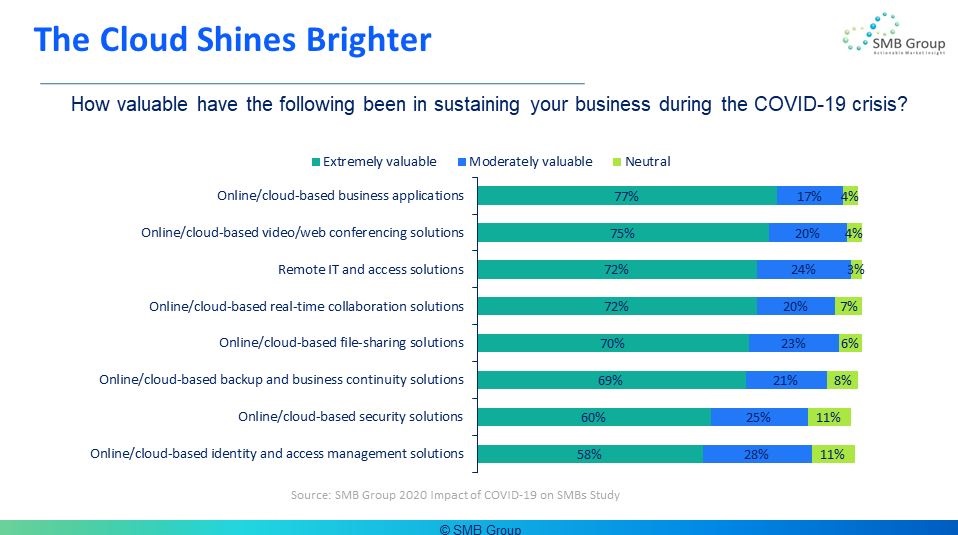
SMB Group’s Impact of COVID-19 Study on SMBs reveals that across the board, a majority of SMBs rate cloud-based applications as being extremely valuable in helping them to weather the COVID-19 crisis. Cloud-based business solutions topped the list, followed by videoconferencing. But for most SMBs all of these solutions—remote IT and access, real-time collaboration, file sharing, backup, security, and identity management— have proved their worth in supporting WFM and keeping businesses up and operational.
This isn’t surprising. From phone systems to business solutions, most companies use multiple solutions to collaborate and get their work done. And businesses need to secure these solutions to protect customer, financial, and other sensitive data that we share within our companies.
Supporting A Hybrid, Flexible Workplace For The Long Term
Many SMBs were forced to play defense when the pandemic hit. They turned to whatever they could quickly fill in the gaps for a new or greatly expanded remote workforce—often ending up with a hodge-podge of different, point solutions.
But as we transition from this initial, reactive phase, more SMBs are realizing that jumping from one application or system to another adds friction, frustration, and security risks into the collaboration process. As a result, many are starting to think about how they can develop a cohesive collaboration and communications strategy that can adapt to change today and tomorrow.
Integrating a mix of old phone systems, web and videoconferencing, SMS, file sharing and other tools after the fact often costs more—in terms of both time and money—than it does to move to a unified solution in which the applications are designed to work together in the first place.
Unified, cloud-based collaboration solutions pull all the things you need to do every day, such as phone calls, web and video meetings, messaging, notifications, and file sharing, into one place. They’re built from the ground up to work together. For instance, say you’re on a chat and realize that it would be easier to have the conversation via a video meeting. Ideally, you’d just want to be able to click a button and move the conversation to a video call.
Many offer integrations with key business applications, such as email, CRM, human resources, and other solutions to help streamline business workflows. For example, Mitel’s public cloud communications solution, MiCloud Connect, has native integrations with G Suite, Salesforce, and Microsoft Office. Their private cloud offering, MiCloud Flex, has additional integrations with Salesforce, SugarCRM, and Microsoft Dynamics. They’ve put together a slew of resources for SMBs to support the hybrid and remote worker thrive.
Unified collaboration solutions, designed to support millions of users, provide businesses with the necessary enterprise-grade security and reliability safeguards.
Perspective
While no one has a crystal ball, it’s highly likely that many of the changes we’ve seen unfold during the pandemic will continue to reshape our views of work and the workplace even after the pandemic subsides.
As your business transitions from reacting to COVID-19 to longer-term planning, now is the time to evaluate your current collaboration strategy. Taking a more holistic approach can help you bring people, processes together, improve how work gets done, and put your business on track for sustainability and growth as the way we work evolves.